1 Introduction
R code for this chapter: introduction_figures.R (data and figures) and _common.R (shared helpers). Save both in one folder and run source("introduction_figures.R"); every figure is then one function call, as shown under the Code buttons.
Slides for this chapter: introduction_slides.html (opens in a new tab; use the arrow keys to move between slides).
1.1 Why do the points move together?
An airline flies the same route, from airport A to airport B, every day. For each flight it records two numbers: the flight time and the fuel burned, both as deviations from the route’s typical flight.
fig_air_data <- function() {
ggplot(flights, aes(time, fuel)) +
geom_hline(yintercept = 0, colour = "grey85") +
geom_vline(xintercept = 0, colour = "grey85") +
geom_point(colour = "#6f7a8c", alpha = 0.55, size = 2) +
geom_path(data = { e <- ellipse_xy(sym_root(cov(app_X)), 1); tibble(time = e[1, ], fuel = e[2, ]) },
colour = "black", linewidth = 0.8) +
coord_equal(xlim = c(-4.2, 4.2), ylim = c(-4.2, 4.2)) +
labs(title = "200 flights on one route",
subtitle = sprintf("Correlation %.2f (ellipse: one standard deviation)", num$corr),
x = "flight time (min)", y = "fuel burned (100 kg)",
caption = "Both variables are deviations from a typical flight on the route.")
}
# draw the figure
fig_air_data()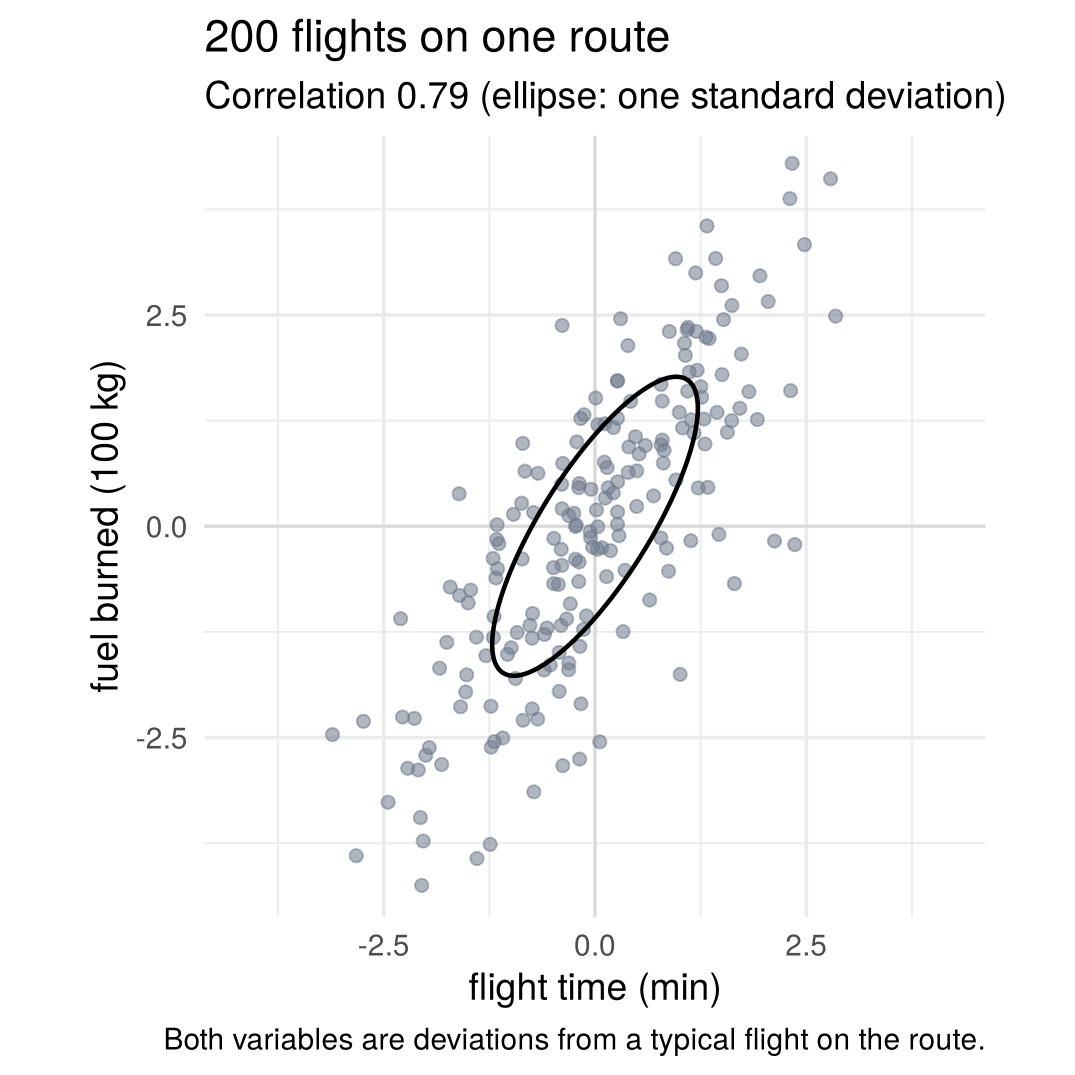
The cloud is tilted (correlation 0.79): longer flights tend to burn more fuel. Why do the two variables move together?
1.1.1 Why not just run a regression?
The first instinct from a regression course is to treat flight time as the explanatory variable and fuel as the outcome: regress fuel on flight time and read off the slope, “one extra minute costs so much fuel”. That treats flight time as exogenous, as if someone chose it and fuel followed.
Here that is not a good story. Every flight covers the same distance from A to B, so nobody chooses the flight time. Flight time and fuel are both outcomes, driven by the same underlying causes. And why a flight takes longer matters for how much more fuel it burns:
- If a flight takes longer because of a headwind, the plane simply spends more minutes at normal cruise, burning the manual’s 100 kg per minute.
- If it takes longer because it is heavier (more passengers and cargo), it climbs a little slower, but above all it burns more fuel every minute: a typical load shock adds only 12 seconds but 130 kg of fuel.
cloud_base <- function(alpha = 0.25, lims = c(-4.2, 4.2)) {
e <- ellipse_xy(app_root, 1)
list(axes0,
geom_point(data = pts, aes(x, y), colour = "#6f7a8c", alpha = alpha, size = 1.4),
geom_path(data = tibble(x = e[1, ], y = e[2, ]), aes(x, y), colour = "black", linewidth = 0.9),
coord_equal(xlim = lims, ylim = lims),
labs(x = "flight time (min)", y = "fuel (100 kg)"))
}
f2 <- function(v) sprintf("%.2f", v)
kg <- function(v) sprintf("%.0f", 100 * v)
fig_regression <- function() {
b <- num$beta
dirs <- tibble(lab = c(sprintf("headwind: +1 min,\n+%s kg", kg(fuel_per_min)),
sprintf("load: +%s min,\n+%s kg", f2(min_per_t * sd_load), kg(fuel_per_t * sd_load))),
xend = c(air_A[1, 1], air_A[1, 2]) * c(1 / air_A[1, 1], 1), yend = c(fuel_per_min, air_A[2, 2]),
col = c(col_a1, col_a2))
ggplot() + cloud_base(alpha = 0.3) +
geom_abline(slope = b, intercept = 0, colour = "grey30", linewidth = 1, linetype = 2) +
annotate("text", x = 2.6, y = b * 2.6 + 0.9, label = sprintf("regression slope:\n%s kg per min", kg(b)),
size = 4.2, hjust = 1, colour = "grey20", lineheight = 0.9) +
geom_segment(data = dirs, aes(x = 0, y = 0, xend = xend, yend = yend, colour = I(col)), linewidth = 1.5,
arrow = arrow(length = unit(0.2, "cm"), type = "closed")) +
geom_label(data = dirs, aes(x = xend + c(0.3, -0.25), y = yend + c(-0.75, 0.55), label = lab, colour = I(col),
hjust = c(0, 1)), size = 3.9, fontface = "bold", lineheight = 0.9,
label.size = 0, fill = alpha("white", 0.85)) +
labs(title = "Regressing fuel on flight time", subtitle = "one slope for two very different reasons")
}
# draw the figure
fig_regression()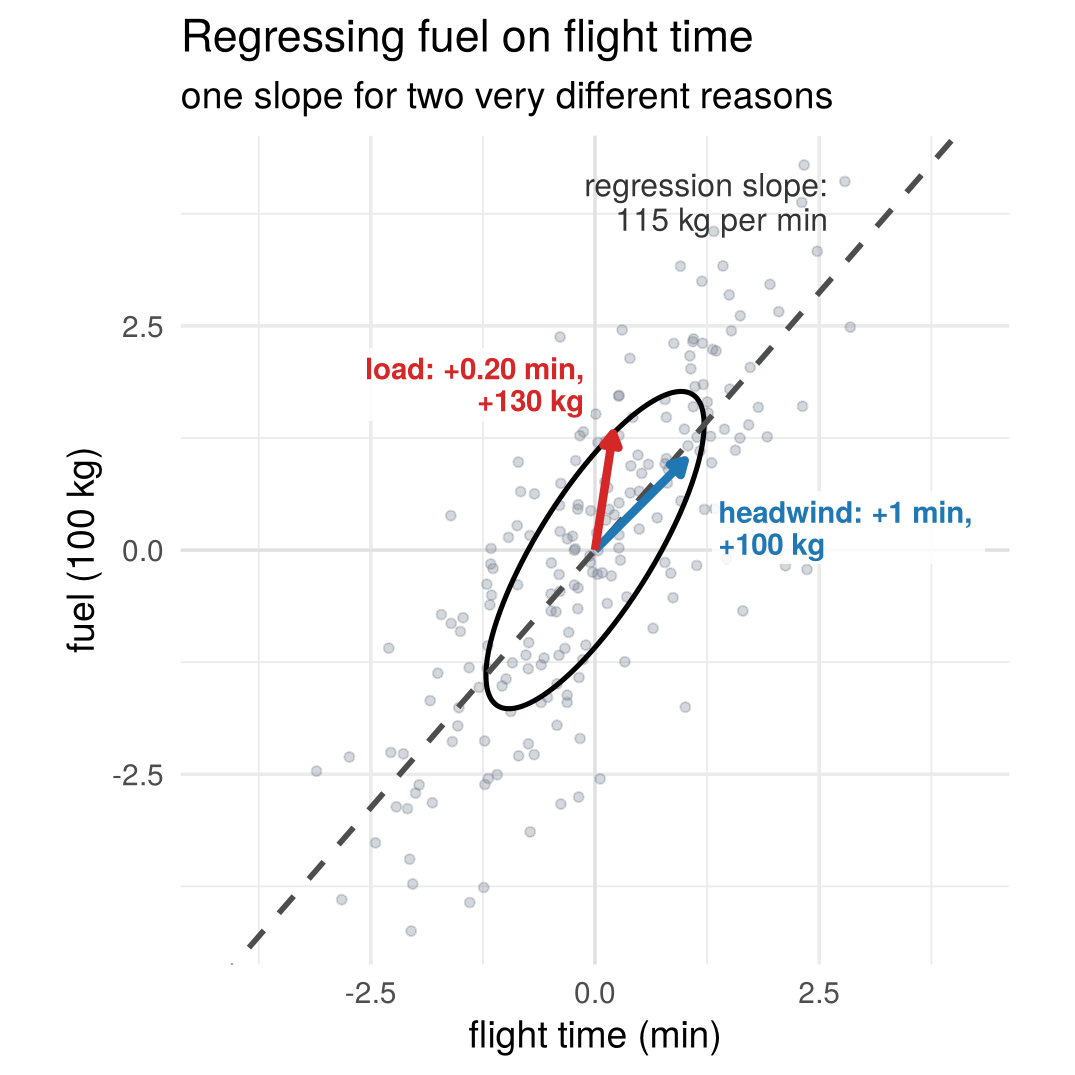
The regression slope, 115 kg per minute, is a mixture of these two very different reasons for an extra minute. It describes the cloud, but it is neither the cost of a headwind nor the cost of extra load.
Instead of asking how one observed variable affects the other, ask which unobserved forces move both of them, and how strongly each force moves each variable.
1.1.2 A world without relationships
Suppose each flight is hit by two independent shocks, each standard normal: a headwind shock \(\varepsilon_1\) (wind stronger than usual) and a load shock \(\varepsilon_2\) (plane heavier than usual). Winds do not depend on ticket sales, so on their own these shocks form a round cloud: knowing one says nothing about the other.
Press Play: the aircraft turns each flight’s two shocks into a flight time and a fuel burn, and the round cloud becomes the tilted cloud of the 200 flights above.
fig_world_forward <- function(k_grid = seq(0, 1, by = 0.04), lim = 4.2) {
lab <- function(k) sprintf("%.2f", k)
circ <- ellipse_xy(diag(2), 1, n = 200)
pts_f <- purrr::map_dfr(k_grid, function(k) {
X <- app_W %*% t(matrix_power_real(air_A, k))
tibble(id = seq_len(nrow(X)), x = X[, 1], y = X[, 2], k = lab(k))
})
ell_f <- purrr::map_dfr(k_grid, function(k) {
E <- matrix_power_real(air_A, k) %*% circ
tibble(x = E[1, ], y = E[2, ], k = lab(k))
})
ax <- function(title) list(range = c(-lim, lim), title = title, showgrid = TRUE, gridcolor = "#ebebeb",
zeroline = TRUE, zerolinecolor = "#d9d9d9", tickfont = list(size = 13),
titlefont = list(size = 15))
plot_ly() |>
add_trace(data = pts_f, x = ~x, y = ~y, frame = ~k, ids = ~id, type = "scatter", mode = "markers",
marker = list(size = 7, color = "#6f7a8c", opacity = 0.55),
hoverinfo = "skip", showlegend = FALSE, inherit = FALSE) |>
add_trace(data = ell_f, x = ~x, y = ~y, frame = ~k, type = "scatter", mode = "lines",
line = list(color = "black", width = 2.2),
hoverinfo = "skip", showlegend = FALSE, inherit = FALSE) |>
layout(xaxis = ax("headwind shock ε<sub>1</sub> → flight time (min)"),
yaxis = c(ax("load shock ε<sub>2</sub> → fuel (100 kg)"), list(scaleanchor = "x")),
plot_bgcolor = "white", paper_bgcolor = "white",
margin = list(l = 60, r = 20, t = 20, b = 60), showlegend = FALSE) |>
animation_opts(frame = 90, transition = 0, redraw = TRUE) |>
animation_slider(currentvalue = list(prefix = "k = ")) |>
animation_button(label = "Play")
}
# draw the figure
fig_world_forward()Correlated data can come from independent forces: a system combines them, and because each force feeds several variables, the round cloud becomes tilted.
Check your understanding
- Why is regressing fuel on flight time a poor description of the flights?
- The sample is too small
- Flight time is not chosen; it is itself an outcome of headwind and load
- Fuel is measured with error
- The relationship is nonlinear
- A flight takes longer because of extra load rather than headwind. Compared with a headwind delay of
the same length, it burns
- the same extra fuel
- less extra fuel
- more extra fuel
- no extra fuel
- Two variables drawn independently from standard normal distributions form
- a tilted ellipse
- a round cloud with no special direction
- a straight line
- two clusters
Answers
1 b. 2 c. 3 b.1.2 From shocks to data
1.2.1 Each shock moves both measurements
- A one-standard-deviation headwind shock keeps the plane in the air 1.20 minutes longer, and at the manual’s 100 kg per minute it burns 120 kg more fuel.
- A one-standard-deviation load shock adds about 2 tonnes: 0.20 minutes more (slower climb) and 130 kg more fuel.
With fuel in units of 100 kg, each variable is a weighted sum of the same two shocks:
\[ \begin{aligned} X_1 = \text{flight time} &= 1.20\,\varepsilon_1 + 0.20\,\varepsilon_2,\\ X_2 = \text{fuel} &= 1.20\,\varepsilon_1 + 1.30\,\varepsilon_2. \end{aligned} \]
Flight time and fuel are written with capital letters, \(X_1\) and \(X_2\), because they are random: they change from flight to flight, as do the shocks. The numbers recorded for one particular flight are written in lower case, \(x_1\) and \(x_2\). Chapter 3 makes this distinction precise.
The weights of each shock form an arrow: what one unit of that shock does to flight time and fuel.
arrows_of <- function(M, cols = c(col_a1, col_a2), lw = 1.3)
geom_segment(data = tibble(xend = M[1, ], yend = M[2, ], col = cols),
aes(x = 0, y = 0, xend = xend, yend = yend, colour = I(col)),
linewidth = lw, arrow = arrow(length = unit(0.22, "cm"), type = "closed"))
cloud_base <- function(alpha = 0.25, lims = c(-4.2, 4.2)) {
e <- ellipse_xy(app_root, 1)
list(axes0,
geom_point(data = pts, aes(x, y), colour = "#6f7a8c", alpha = alpha, size = 1.4),
geom_path(data = tibble(x = e[1, ], y = e[2, ]), aes(x, y), colour = "black", linewidth = 0.9),
coord_equal(xlim = lims, ylim = lims),
labs(x = "flight time (min)", y = "fuel (100 kg)"))
}
f2 <- function(v) sprintf("%.2f", v)
fig_A_columns <- function() {
lab <- tibble(x = air_A[1, ] + c(0.25, -0.15), y = air_A[2, ] + c(-0.55, 0.45),
txt = c(sprintf("headwind\n(%s, %s)", f2(air_A[1, 1]), f2(air_A[2, 1])),
sprintf("load\n(%s, %s)", f2(air_A[1, 2]), f2(air_A[2, 2]))),
col = c(col_a1, col_a2), hj = c(0, 1))
ggplot() + cloud_base() + arrows_of(air_A, lw = 1.6) +
geom_text(data = lab, aes(x, y, label = txt, colour = I(col), hjust = hj),
size = 4.6, fontface = "bold", lineheight = 0.9) +
labs(title = "Columns of A", subtitle = "what one unit of each shock does")
}
# draw the figure
fig_A_columns()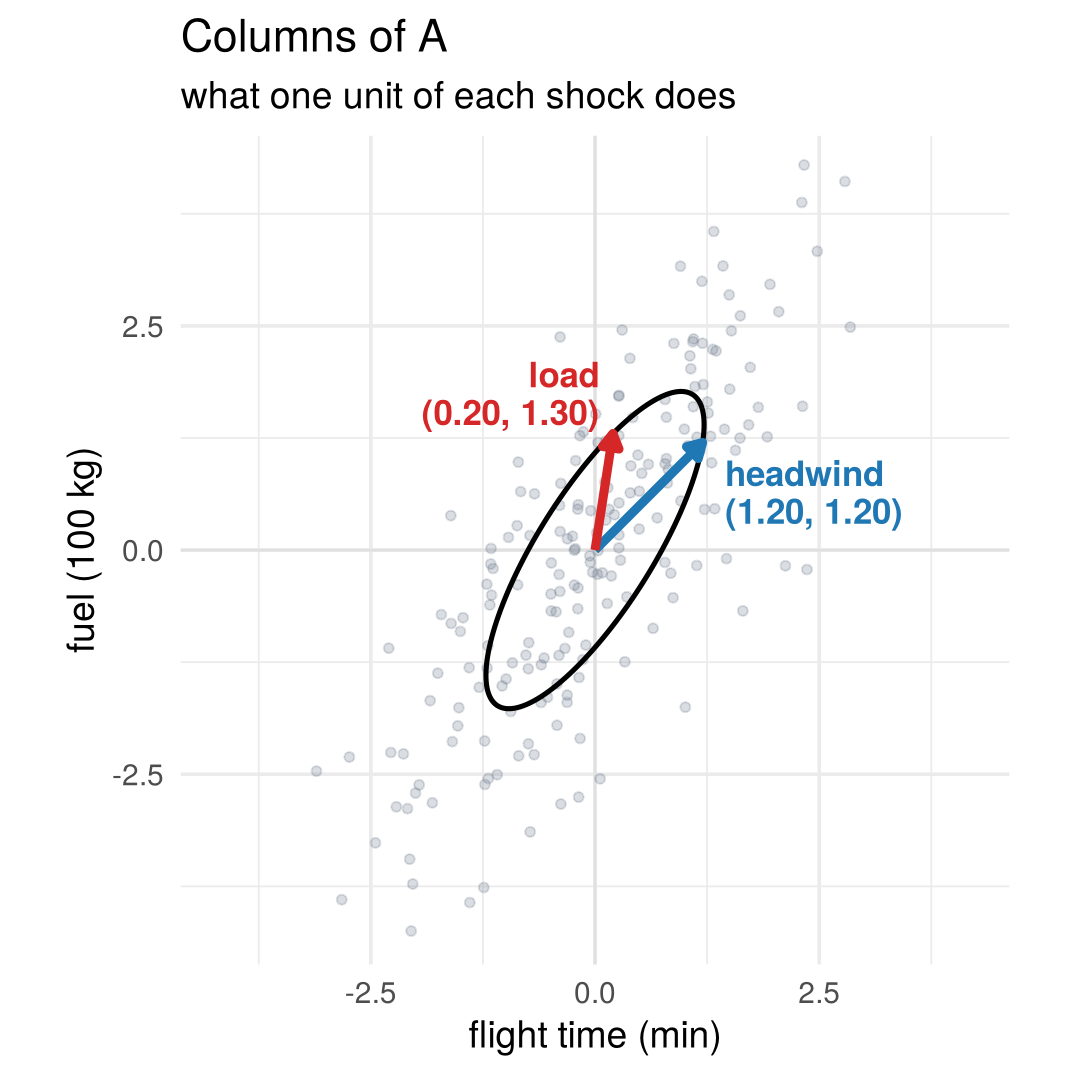
1.2.2 In matrix form
Collecting the weights in a table gives a matrix:
\[ \underset{X}{\begin{pmatrix} X_1\\ X_2\end{pmatrix}} = \underset{A}{\begin{pmatrix} 1.20 & 0.20\\ 1.20 & 1.30\end{pmatrix}} \underset{\varepsilon}{\begin{pmatrix} \varepsilon_1\\ \varepsilon_2\end{pmatrix}}, \qquad\text{or in short}\qquad \boxed{X=A\varepsilon.} \]
Row \(i\) of \(A\) says how variable \(X_i\) responds to each shock. Column \(j\) says how shock \(j\) moves all the variables at once (the arrows above). The same 200 flights, seen as shocks (left) and as data (right):
fig_shocks_to_data <- function() {
hl <- flights |> dplyr::filter(flight %in% highlight_flights) |> mutate(lab = paste("flight", flight))
p_left <- ggplot(flights, aes(headwind, load)) +
geom_point(colour = "grey75", size = 1.6) +
geom_point(data = hl, shape = 21, fill = "white", colour = "black", size = 3.6, stroke = 1.6) +
geom_text(data = hl, aes(label = lab), nudge_y = 0.38, size = 3.6, fontface = "bold") +
coord_equal(xlim = c(-3.6, 3.6), ylim = c(-3.6, 3.6)) +
labs(title = "Shocks", subtitle = "independent", x = "headwind shock", y = "load shock")
p_right <- ggplot(flights, aes(time, fuel)) +
geom_point(colour = "grey75", size = 1.6) +
geom_point(data = hl, shape = 21, fill = "white", colour = "black", size = 3.6, stroke = 1.6) +
geom_text(data = hl, aes(label = lab), nudge_y = 0.45, size = 3.6, fontface = "bold") +
coord_equal(xlim = c(-4.2, 4.2), ylim = c(-4.2, 4.2)) +
labs(title = "Flights", subtitle = "X = A ε", x = "flight time (min)", y = "fuel (100 kg)")
p_left + p_right
}
# draw the figure
fig_shocks_to_data()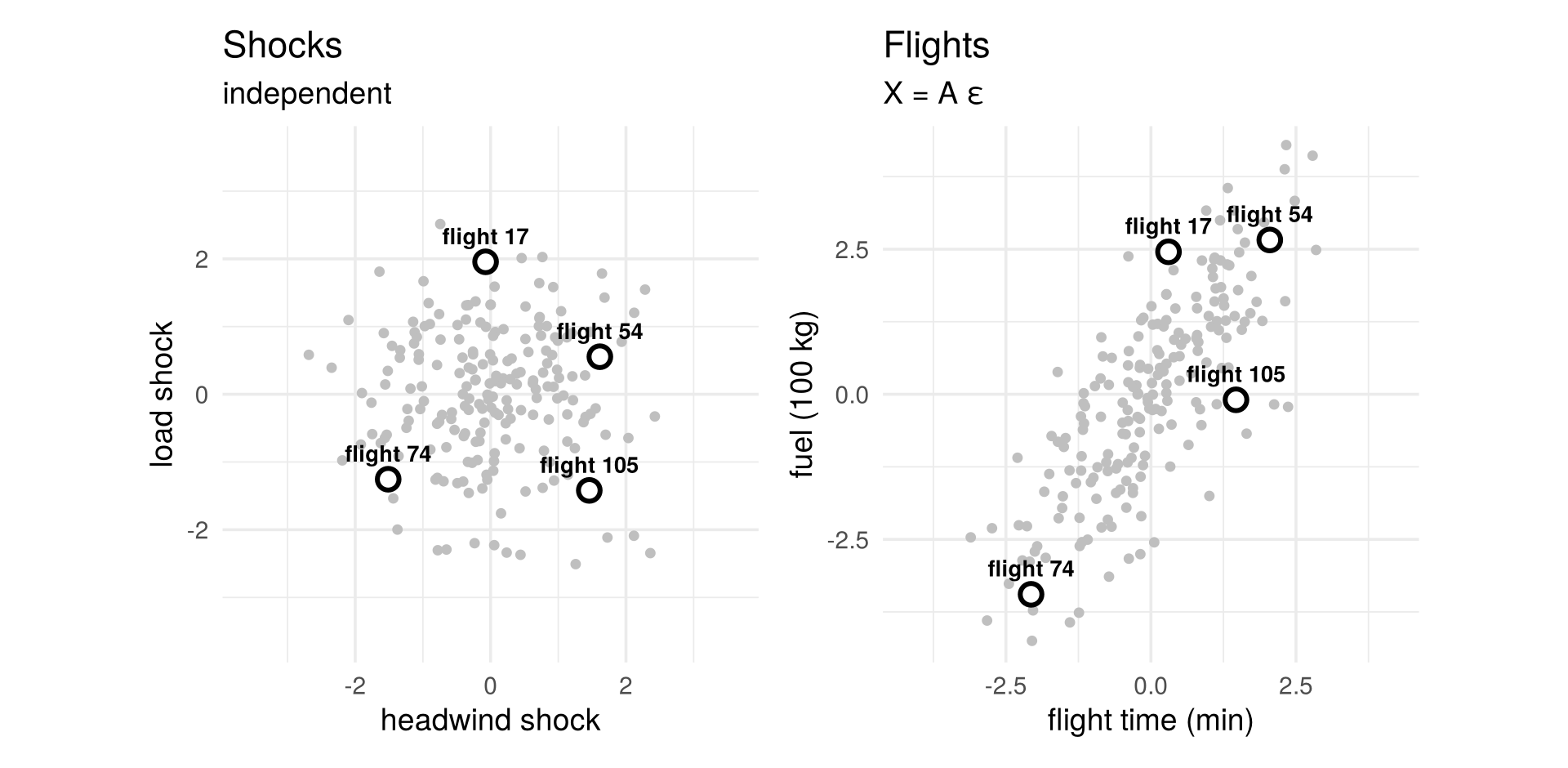
In R, a matrix is filled column by column, and %*% multiplies a matrix by a vector:
A <- matrix(c(1.20, 1.20, # first column: what one unit of headwind does
0.20, 1.30), # second column: what one unit of load does
nrow = 2)
A## [,1] [,2]
## [1,] 1.2 0.2
## [2,] 1.2 1.3eps <- c(1, -0.5) # one flight: headwind shock +1, load shock -0.5
A %*% eps # its flight time (min) and fuel (100 kg)## [,1]
## [1,] 1.10
## [2,] 0.551.2.3 A matrix moves space
Think of \(A\) not as a table of numbers but as a movement of the whole plane: every point moves, straight lines stay straight, grid lines stay parallel and evenly spaced, and the origin stays put. (This view comes from 3Blue1Brown’s Essence of Linear Algebra.)
The movement is fixed by where the two basis vectors \(e_1=(1,0)'\) and \(e_2=(0,1)'\) land, and they land on the columns of \(A\):
\[ Ae_1=\begin{pmatrix}1.20\\1.20\end{pmatrix}, \qquad Ae_2=\begin{pmatrix}0.20\\1.30\end{pmatrix}. \]
Every other point follows: \(X=\varepsilon_1\,Ae_1+\varepsilon_2\,Ae_2\). Press Play to watch the grid move; the four highlighted flights travel from their shocks to their flight time and fuel.
make_grid_animation <- function(A, Z, k_grid = seq(0, 1, by = 0.04), lim = 3.6, grid_max = 6,
highlight = integer(0), arrow_vecs = diag(2),
arrow_text = c("Ae<sub>1</sub>", "Ae<sub>2</sub>"),
xlab = "first coordinate", ylab = "second coordinate") {
lab <- function(k) sprintf("%.2f", k)
ticks <- seq(-grid_max, grid_max, by = 1)
grid_paths <- function(M) {
pieces <- c(
lapply(ticks, function(c0) M %*% rbind(c(c0, c0), c(-grid_max, grid_max))),
lapply(ticks, function(c0) M %*% rbind(c(-grid_max, grid_max), c(c0, c0))))
tibble(x = unlist(lapply(pieces, function(P) c(P[1, ], NA))),
y = unlist(lapply(pieces, function(P) c(P[2, ], NA))))
}
frames_grid <- purrr::map_dfr(k_grid, function(k) grid_paths(matrix_power_real(A, k)) |> mutate(k = lab(k)))
frames_pts <- purrr::map_dfr(k_grid, function(k) {
X <- Z %*% t(matrix_power_real(A, k))
tibble(id = seq_len(nrow(Z)), x = X[, 1], y = X[, 2], k = lab(k))
})
arrows <- lapply(1:2, function(j) purrr::map_dfr(k_grid, function(k)
arrow_geometry((matrix_power_real(A, k) %*% arrow_vecs)[, j], head_length = 0.22, head_width = 0.11,
shaft_width = 0.028)$arrow |> mutate(k = lab(k))))
labels <- purrr::map_dfr(k_grid, function(k) {
M <- matrix_power_real(A, k) %*% arrow_vecs
tibble(x = M[1, ] + c(0.3, -0.1), y = M[2, ] + c(-0.22, 0.3),
text = arrow_text, col = c(col_a1, col_a2), k = lab(k))
})
frames_hl <- purrr::map_dfr(k_grid, function(k) {
X <- Z[highlight, , drop = FALSE] %*% t(matrix_power_real(A, k))
tibble(id = highlight, x = X[, 1], y = X[, 2], text = paste("flight", highlight), k = lab(k))
})
static <- grid_paths(diag(2))
p <- plot_ly() |>
add_trace(data = static, x = ~x, y = ~y, type = "scatter", mode = "lines",
line = list(color = "rgba(150,150,150,0.25)", width = 1),
hoverinfo = "skip", showlegend = FALSE, inherit = FALSE) |>
add_trace(data = frames_grid, x = ~x, y = ~y, frame = ~k, type = "scatter", mode = "lines",
line = list(color = "rgba(31,119,180,0.35)", width = 1.3),
hoverinfo = "skip", showlegend = FALSE, inherit = FALSE) |>
add_trace(data = frames_pts, x = ~x, y = ~y, frame = ~k, ids = ~id,
type = "scatter", mode = "markers",
marker = list(size = 5, color = "#6f7a8c", opacity = 0.55),
hoverinfo = "skip", showlegend = FALSE, inherit = FALSE)
if (length(highlight)) {
p <- p |>
add_trace(data = frames_hl, x = ~x, y = ~y, frame = ~k, ids = ~id, text = ~text,
type = "scatter", mode = "markers+text", textposition = "top center",
marker = list(size = 11, color = "white", line = list(color = "black", width = 2.5)),
textfont = list(size = 13, color = "black"),
hoverinfo = "skip", showlegend = FALSE, inherit = FALSE)
}
for (j in 1:2) p <- add_arrow_trace(p, arrows[[j]], color = c(col_a1, col_a2)[j])
p |>
add_trace(data = labels, x = ~x, y = ~y, frame = ~k, text = ~text,
type = "scatter", mode = "text", textfont = list(size = 16, color = ~col),
hoverinfo = "skip", showlegend = FALSE, inherit = FALSE) |>
layout(
xaxis = list(range = c(-lim, lim), zeroline = TRUE, zerolinecolor = "#999",
showgrid = FALSE, title = xlab),
yaxis = list(range = c(-lim, lim), zeroline = TRUE, zerolinecolor = "#999",
showgrid = FALSE, scaleanchor = "x", title = ylab),
margin = list(l = 60, r = 20, t = 30, b = 60),
showlegend = FALSE) |>
animation_opts(frame = 90, transition = 0, redraw = TRUE) |>
animation_slider(currentvalue = list(prefix = "progress k = ")) |>
animation_button(label = "Play")
}
fig_grid_forward <- function()
make_grid_animation(air_A, app_W, lim = 4.2, highlight = highlight_flights,
xlab = "headwind → flight time", ylab = "load → fuel")
# draw the figure
fig_grid_forward()1.2.4 And back again: whitening
The inverse matrix \(A^{-1}\) undoes the movement, \(\varepsilon=A^{-1}X\). For every flight it answers the question we started with: how much headwind, and how much load? Press Play to watch the flights travel back; the headwind and load arrows fold back onto the axes.
make_grid_animation <- function(A, Z, k_grid = seq(0, 1, by = 0.04), lim = 3.6, grid_max = 6,
highlight = integer(0), arrow_vecs = diag(2),
arrow_text = c("Ae<sub>1</sub>", "Ae<sub>2</sub>"),
xlab = "first coordinate", ylab = "second coordinate") {
lab <- function(k) sprintf("%.2f", k)
ticks <- seq(-grid_max, grid_max, by = 1)
grid_paths <- function(M) {
pieces <- c(
lapply(ticks, function(c0) M %*% rbind(c(c0, c0), c(-grid_max, grid_max))),
lapply(ticks, function(c0) M %*% rbind(c(-grid_max, grid_max), c(c0, c0))))
tibble(x = unlist(lapply(pieces, function(P) c(P[1, ], NA))),
y = unlist(lapply(pieces, function(P) c(P[2, ], NA))))
}
frames_grid <- purrr::map_dfr(k_grid, function(k) grid_paths(matrix_power_real(A, k)) |> mutate(k = lab(k)))
frames_pts <- purrr::map_dfr(k_grid, function(k) {
X <- Z %*% t(matrix_power_real(A, k))
tibble(id = seq_len(nrow(Z)), x = X[, 1], y = X[, 2], k = lab(k))
})
arrows <- lapply(1:2, function(j) purrr::map_dfr(k_grid, function(k)
arrow_geometry((matrix_power_real(A, k) %*% arrow_vecs)[, j], head_length = 0.22, head_width = 0.11,
shaft_width = 0.028)$arrow |> mutate(k = lab(k))))
labels <- purrr::map_dfr(k_grid, function(k) {
M <- matrix_power_real(A, k) %*% arrow_vecs
tibble(x = M[1, ] + c(0.3, -0.1), y = M[2, ] + c(-0.22, 0.3),
text = arrow_text, col = c(col_a1, col_a2), k = lab(k))
})
frames_hl <- purrr::map_dfr(k_grid, function(k) {
X <- Z[highlight, , drop = FALSE] %*% t(matrix_power_real(A, k))
tibble(id = highlight, x = X[, 1], y = X[, 2], text = paste("flight", highlight), k = lab(k))
})
static <- grid_paths(diag(2))
p <- plot_ly() |>
add_trace(data = static, x = ~x, y = ~y, type = "scatter", mode = "lines",
line = list(color = "rgba(150,150,150,0.25)", width = 1),
hoverinfo = "skip", showlegend = FALSE, inherit = FALSE) |>
add_trace(data = frames_grid, x = ~x, y = ~y, frame = ~k, type = "scatter", mode = "lines",
line = list(color = "rgba(31,119,180,0.35)", width = 1.3),
hoverinfo = "skip", showlegend = FALSE, inherit = FALSE) |>
add_trace(data = frames_pts, x = ~x, y = ~y, frame = ~k, ids = ~id,
type = "scatter", mode = "markers",
marker = list(size = 5, color = "#6f7a8c", opacity = 0.55),
hoverinfo = "skip", showlegend = FALSE, inherit = FALSE)
if (length(highlight)) {
p <- p |>
add_trace(data = frames_hl, x = ~x, y = ~y, frame = ~k, ids = ~id, text = ~text,
type = "scatter", mode = "markers+text", textposition = "top center",
marker = list(size = 11, color = "white", line = list(color = "black", width = 2.5)),
textfont = list(size = 13, color = "black"),
hoverinfo = "skip", showlegend = FALSE, inherit = FALSE)
}
for (j in 1:2) p <- add_arrow_trace(p, arrows[[j]], color = c(col_a1, col_a2)[j])
p |>
add_trace(data = labels, x = ~x, y = ~y, frame = ~k, text = ~text,
type = "scatter", mode = "text", textfont = list(size = 16, color = ~col),
hoverinfo = "skip", showlegend = FALSE, inherit = FALSE) |>
layout(
xaxis = list(range = c(-lim, lim), zeroline = TRUE, zerolinecolor = "#999",
showgrid = FALSE, title = xlab),
yaxis = list(range = c(-lim, lim), zeroline = TRUE, zerolinecolor = "#999",
showgrid = FALSE, scaleanchor = "x", title = ylab),
margin = list(l = 60, r = 20, t = 30, b = 60),
showlegend = FALSE) |>
animation_opts(frame = 90, transition = 0, redraw = TRUE) |>
animation_slider(currentvalue = list(prefix = "progress k = ")) |>
animation_button(label = "Play")
}
fig_grid_inverse <- function()
make_grid_animation(solve(air_A), app_X, lim = 4.2, highlight = highlight_flights,
arrow_vecs = air_A, arrow_text = c("headwind", "load"),
xlab = "flight time → headwind", ylab = "fuel → load")
# draw the figure
fig_grid_inverse()Turning correlated variables back into uncorrelated shocks with unit variance is called
whitening: the round cloud is “white noise”, with no direction more important than another. In R,
solve() computes the inverse:
## [,1] [,2]
## [1,] 0.9848485 -0.1515152
## [2,] -0.9090909 0.9090909## [,1]
## [1,] 1.0
## [2,] -0.5Check your understanding
- In \(X=A\varepsilon\), the second column of \(A\) tells us
- how the second variable responds to each shock
- how the second shock moves all variables at once
- the variance of the second variable
- the correlation between the two variables
- For the flights, a one-standard-deviation headwind shock changes fuel by
- 130 kg
- 120 kg
- 20 kg
- nothing; headwind only affects time
- Whitening means
- removing outliers from the data
- standardising each variable separately
- transforming correlated variables into uncorrelated, unit-variance shocks
- dropping the smallest principal component
Answers
1 b. 2 b. 3 c.1.3 The same data, many stories
Suppose we only had the flight records, not \(A\). Can we still turn the cloud back into round, independent shocks? Yes, and in many different ways.
In the figure, the left panel shows the flights with two arrows, the columns of a candidate \(A\); the right panel shows the flights moved back by that candidate, \(\varepsilon=A^{-1}X\). The slider turns both arrows together by an angle \(\varphi\); the buttons jump to the choices of the next section.
The cloud of flights never moves, both arrow tips stay on the black ellipse, and the cloud on the right is always round. Every angle fits the data perfectly, so the data alone cannot tell us which arrows are the true headwind and load.
1.3.1 What the data can tell us: \(\Sigma\)
The data pin down only three numbers, collected in the covariance matrix:
\[ \Sigma=\begin{pmatrix}\sigma_1^2 & \sigma_{12}\\ \sigma_{12} & \sigma_2^2\end{pmatrix} =\begin{pmatrix}1.48 & 1.70\\ 1.70 & 3.13\end{pmatrix}. \]
\(\sigma_1^2\) and \(\sigma_2^2\) are the variances of flight time and fuel, \(\sigma_{12}\) their covariance, and \(\rho=\sigma_{12}/(\sigma_1\sigma_2)\) the correlation. The black ellipse is a picture of \(\Sigma\): its width is set by \(\sigma_1\), its height by \(\sigma_2\), and its tilt by \(\rho\).
f2 <- function(v) sprintf("%.2f", v)
cloud_base <- function(alpha = 0.25, lims = c(-4.2, 4.2)) {
e <- ellipse_xy(app_root, 1)
list(axes0,
geom_point(data = pts, aes(x, y), colour = "#6f7a8c", alpha = alpha, size = 1.4),
geom_path(data = tibble(x = e[1, ], y = e[2, ]), aes(x, y), colour = "black", linewidth = 0.9),
coord_equal(xlim = lims, ylim = lims),
labs(x = "flight time (min)", y = "fuel (100 kg)"))
}
fig_sigma <- function() {
s1 <- sqrt(app_Sigma[1, 1]); s2 <- sqrt(app_Sigma[2, 2])
ggplot() + cloud_base(alpha = 0.2) +
annotate("segment", x = c(-s1, s1), xend = c(-s1, s1), y = -4.2, yend = 4.2,
colour = col_a1, linetype = 2) +
annotate("segment", y = c(-s2, s2), yend = c(-s2, s2), x = -4.2, xend = 4.2,
colour = col_a2, linetype = 2) +
annotate("segment", x = -s1, xend = s1, y = -3.7, yend = -3.7, colour = col_a1, linewidth = 1,
arrow = arrow(ends = "both", length = unit(0.18, "cm"))) +
annotate("text", x = 0, y = -3.35, label = sprintf("2σ₁ (σ₁ = %s min)", f2(s1)),
colour = col_a1, size = 4.6, fontface = "bold") +
annotate("segment", y = -s2, yend = s2, x = -3.7, xend = -3.7, colour = col_a2, linewidth = 1,
arrow = arrow(ends = "both", length = unit(0.18, "cm"))) +
annotate("text", x = -3.35, y = 0, label = sprintf("2σ₂ (σ₂ = %s)", f2(s2)), angle = 90,
colour = col_a2, size = 4.6, fontface = "bold") +
labs(title = "Σ as an ellipse", subtitle = sprintf("width: σ₁, height: σ₂, tilt: ρ = %s", f2(num$corr)))
}
# draw the figure
fig_sigma()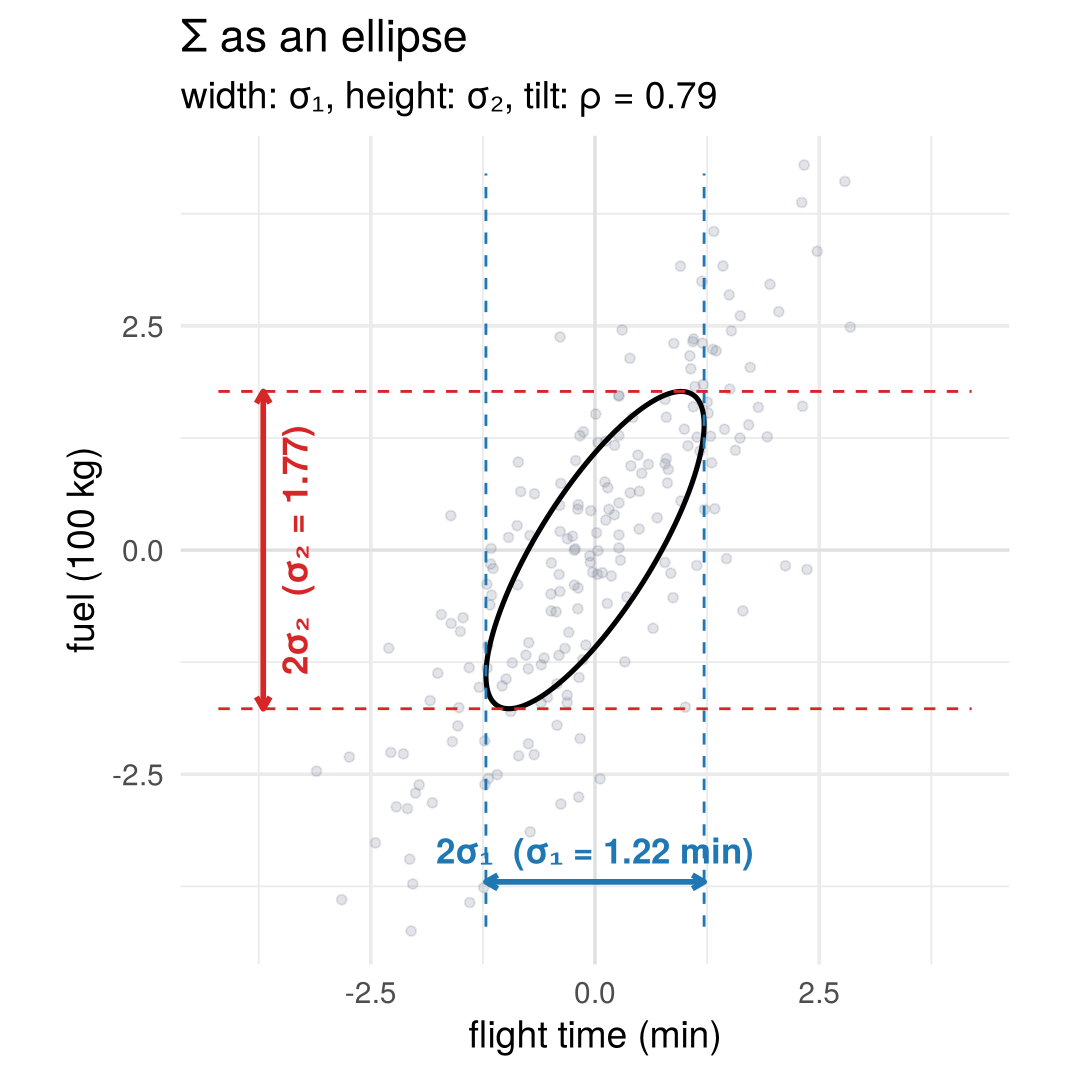
1.3.2 What a candidate \(A\) implies: \(\Sigma = AA'\)
Because the shocks are independent with variance one, their contributions to each variance simply add up. A candidate \(A\) therefore implies
\[ \begin{aligned} \sigma_1^2 &= a_{11}^2+a_{12}^2,\\ \sigma_2^2 &= a_{21}^2+a_{22}^2,\\ \sigma_{12} &= a_{11}a_{21}+a_{12}a_{22}, \end{aligned} \qquad\text{or in short}\qquad \boxed{\Sigma=AA'.} \]
Check it in R: the sample covariance of the 200 flights equals \(AA'\).
## [,1] [,2]
## [1,] 1.48 1.70
## [2,] 1.70 3.13## time fuel
## time 1.48 1.70
## fuel 1.70 3.13These are three equations for four unknowns. The reduced-form parameters are what the data can tell us (the three numbers in \(\Sigma\)); the structural parameters describe the story (the four entries of \(A\)). Every pair of arrows with both tips on the ellipse fits the data. The four panels show four such choices of \(A\) for the same cloud; the next section explains the restriction behind each one.
fig_useful_A <- function(which = names(A_choices), nrow = 2) {
column_labels <- list(
"Symmetric root" = c("closest to\ncoordinate 1", "closest to\ncoordinate 2"),
"Cholesky" = c("regression\nmovement", "new\ninnovation"),
"PCA" = c("major\nmovement", "minor\nmovement"),
"Simultaneous equations" = c("headwind", "load"))
choice_levels <- which
ch <- A_choices[which]
choice_vectors <- purrr::imap_dfr(ch, function(M, nm) {
purrr::map_dfr(1:2, function(j) {
v <- M[, j]; u <- v / sqrt(sum(v^2))
tibble(method = nm, direction = factor(j), label = column_labels[[nm]][j],
xend = v[1], yend = v[2],
label_x = max(sqrt(sum(v^2)) + 1.3, 2.9) * u[1],
label_y = max(sqrt(sum(v^2)) + 1.3, 2.9) * u[2])
})
}) |> mutate(method = factor(method, levels = choice_levels))
choice_points <- purrr::map_dfr(choice_levels, function(nm)
tibble(method = nm, x1 = app_X[, 1], x2 = app_X[, 2])) |>
mutate(method = factor(method, levels = choice_levels))
choice_ellipse <- purrr::map_dfr(choice_levels, function(nm) {
e <- ellipse_xy(app_root, 1); tibble(method = nm, x1 = e[1, ], x2 = e[2, ])
}) |> mutate(method = factor(method, levels = choice_levels))
ggplot(choice_points, aes(x1, x2)) +
geom_point(alpha = 0.18, colour = "#6f7a8c", size = 1) +
geom_path(data = choice_ellipse, linewidth = 0.8) +
geom_segment(data = choice_vectors,
aes(x = 0, y = 0, xend = xend, yend = yend, colour = direction),
arrow = grid::arrow(length = grid::unit(0.16, "cm")), linewidth = 1.3) +
geom_segment(data = choice_vectors, aes(x = xend, y = yend, xend = 0.8 * label_x, yend = 0.8 * label_y,
colour = direction), linewidth = 0.3, linetype = "22") +
geom_text(data = choice_vectors, aes(label_x, label_y, label = label, colour = direction),
size = 3.2, lineheight = 0.9, fontface = "bold") +
scale_colour_manual(values = c("1" = col_a1, "2" = col_a2), guide = "none") +
facet_wrap(~ method, nrow = nrow) +
coord_equal(xlim = c(-3.6, 3.6), ylim = c(-3.6, 3.6)) +
labs(x = "flight time (min)", y = "fuel (100 kg)")
}
# draw the figure
fig_useful_A()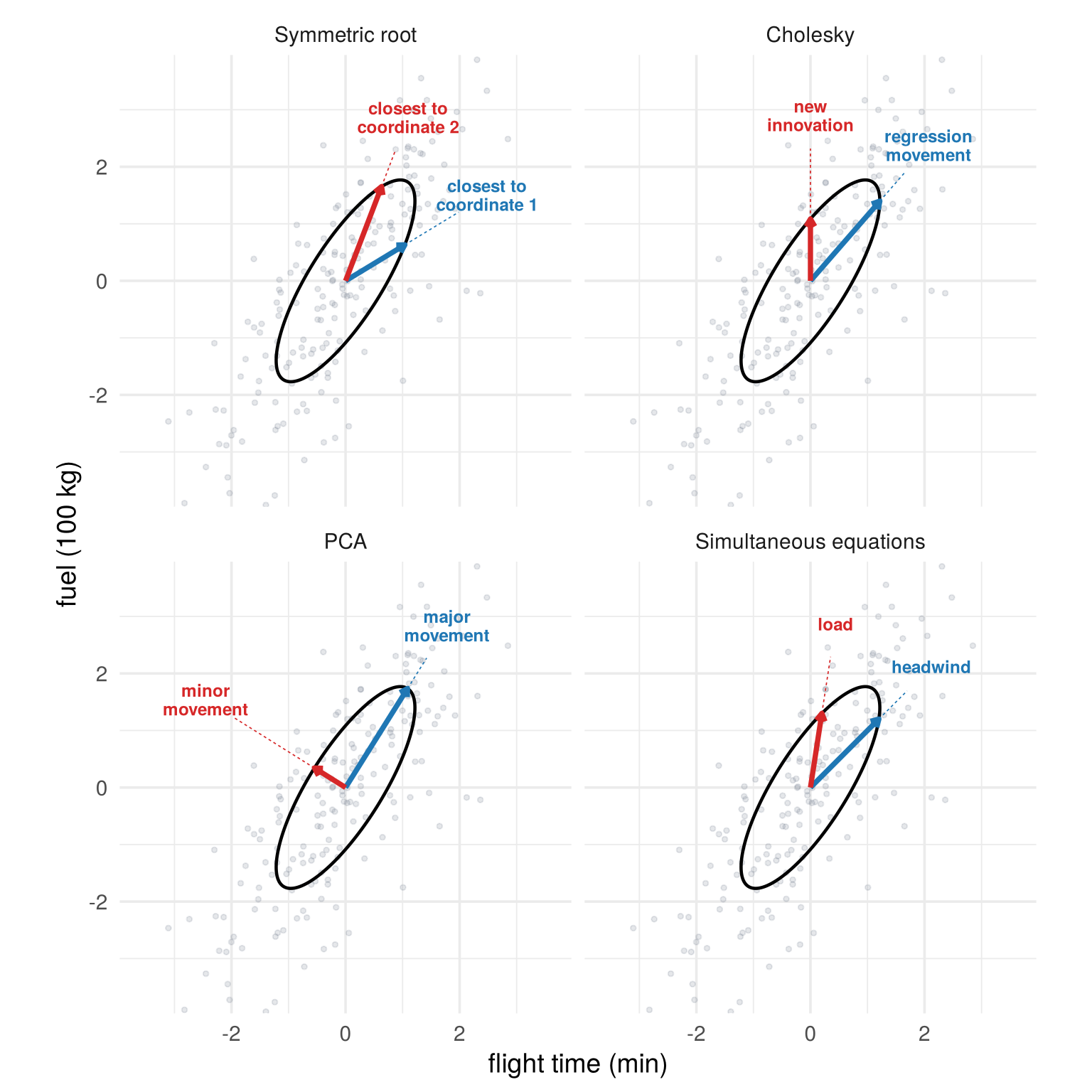
3 reduced-form parameters + 1 free rotation = 4 entries of \(A\). To pin down \(A\) we need one extra restriction.
(For readers who know matrix algebra: for any rotation \(Q\), \(QQ'=I\), so \((AQ)(AQ)'=AA'=\Sigma\).) This is the regression problem from the start in general form: the data alone do not say which forces are behind the cloud.
Check your understanding
- When the slider in the rotation figure turns the arrows, the observed cloud of flights
- rotates with the arrows
- stretches along the first arrow
- does not move at all
- becomes round
- With two observed variables, how many distinct numbers does the covariance matrix contain?
- 2
- 3
- 4
- 6
- Why can’t the data alone determine \(A\) in \(X=A\varepsilon\)?
- Because the sample is too small
- Because every rotation of \(A\) implies the same covariance matrix
- Because the shocks are not normally distributed
- Because \(A\) has no inverse
Answers
1 c. 2 b. 3 b.1.4 Choosing a useful \(A\)
The nonuniqueness is not a nuisance; it is the starting point of most methods in the course. The four choices of \(A\) in the last figure each come from a different extra restriction.
The question is not whether an \(A\) exists, but which \(A\) is useful.
Two of the four choices are one line of R each:
## [,1] [,2]
## [1,] 1.216553 0.000000
## [2,] 1.397391 1.085033e <- eigen(Sigma)
e$vectors %*% diag(sqrt(e$values)) # PCA: first column as long as possible (up to sign)## [,1] [,2]
## [1,] 1.087026 -0.5462366
## [2,] 1.735795 0.3420758Each choice is easiest to understand in an example where its restriction is natural.
1.4.1 Symmetric root: \(A = A'\)
arrows_of <- function(M, cols = c(col_a1, col_a2), lw = 1.3)
geom_segment(data = tibble(xend = M[1, ], yend = M[2, ], col = cols),
aes(x = 0, y = 0, xend = xend, yend = yend, colour = I(col)),
linewidth = lw, arrow = arrow(length = unit(0.22, "cm"), type = "closed"))
fig_choice_example <- function(name) {
pca_A <- function(S) {
eg <- eigen(S, symmetric = TRUE); V <- eg$vectors
if (det(V) < 0) V[, 2] <- -V[, 2]
if (V[1, 1] < 0) V <- -V
V %*% diag(sqrt(eg$values))
}
spec <- switch(name,
"Symmetric root" = list(X = app_X, A = app_root, labs = c("student 1's\nown shock", "student 2's\nown shock"),
xlab = "grade of student 1", ylab = "grade of student 2 (roommate)"),
"Cholesky" = list(X = app_X, A = t(chol(app_Sigma)), labs = c("education shock\n(regression line)", "earnings residual"),
xlab = "years of education", ylab = "earnings"),
"PCA" = { Xc <- as.matrix(dimred$df[, c("x1", "x2")])
list(X = Xc, A = pca_A(cov(Xc)), labs = c("market\n(hot weeks, holidays)", "brand\nswitching"),
xlab = "Coca-Cola sales", ylab = "Pepsi sales") },
"Simultaneous equations" = list(X = app_X, A = air_A, labs = c("headwind", "load"),
xlab = "flight time (min)", ylab = "fuel (100 kg)"))
S <- cov(spec$X); e <- ellipse_xy(sym_root(S), 1)
M <- spec$A
lab_pos <- if (name == "Cholesky") rbind(c(2.75, 0.55), c(-1.7, 1.6)) else t(M) * (1 + 1.05 / sqrt(colSums(M^2)))
lab <- tibble(x = lab_pos[, 1], y = lab_pos[, 2], txt = spec$labs, col = c(col_a1, col_a2))
ggplot() + axes0 +
geom_point(data = tibble(x = spec$X[, 1], y = spec$X[, 2]), aes(x, y), colour = "#6f7a8c", alpha = 0.25, size = 1.4) +
geom_path(data = tibble(x = e[1, ], y = e[2, ]), aes(x, y), colour = "black", linewidth = 0.9) +
arrows_of(M, lw = 1.6) +
geom_label(data = lab, aes(x, y, label = txt, colour = I(col)), size = 4.3, fontface = "bold",
lineheight = 0.9, label.size = 0, fill = alpha("white", 0.8)) +
coord_equal(xlim = c(-4.2, 4.2), ylim = c(-4.2, 4.2)) +
labs(title = name, x = spec$xlab, y = spec$ylab) +
theme(axis.text = element_blank(), plot.title = element_text(face = "bold"))
}
# draw the figure
fig_choice_example("Symmetric root")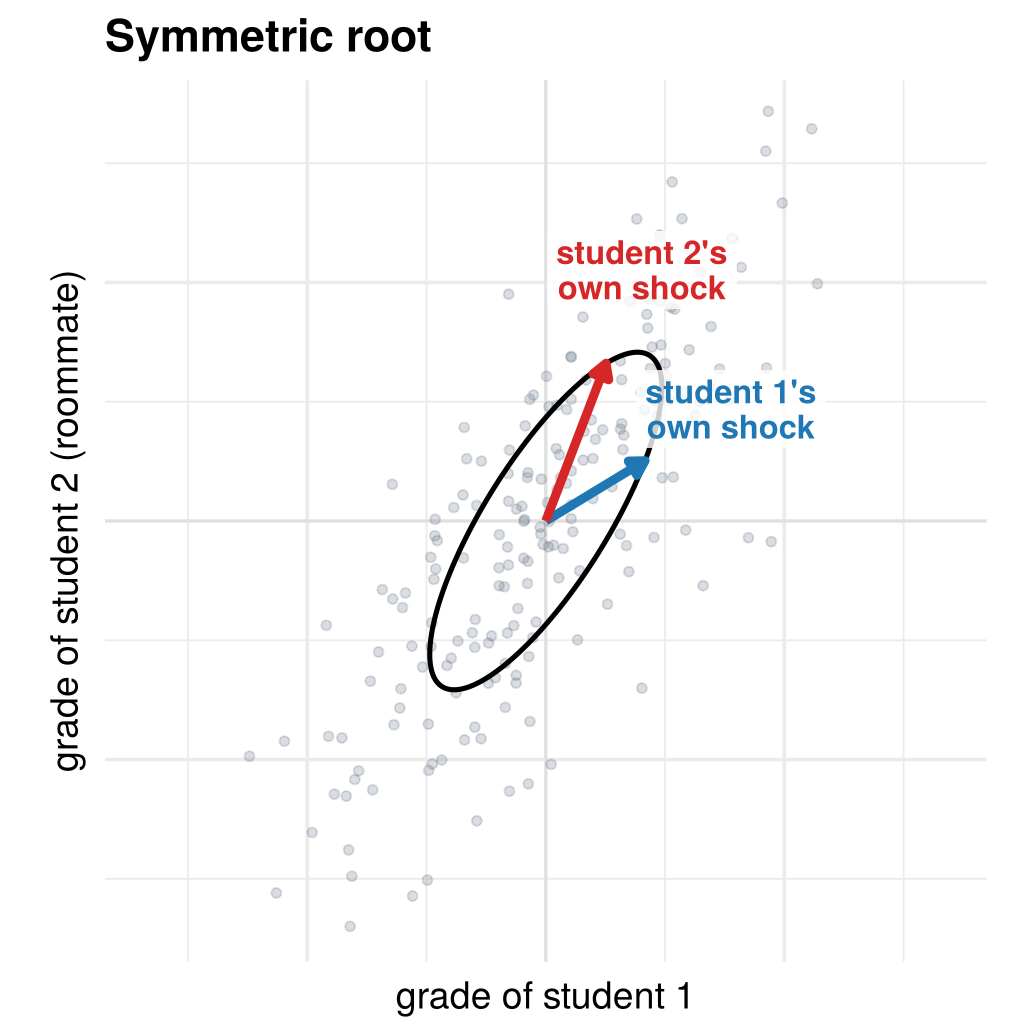
The uncorrelated coordinates that stay closest to the original variables. Roommates’ grades: first-year students are often paired with a roommate at random. Each student’s grade has its own shock, and roommates influence each other. Because the pairing is random, neither roommate comes “first”, so the influence is split evenly: student 1’s shock moves student 2’s grade as much as the other way round, \(a_{12}=a_{21}\).
1.4.2 Cholesky: \(a_{12} = 0\)
arrows_of <- function(M, cols = c(col_a1, col_a2), lw = 1.3)
geom_segment(data = tibble(xend = M[1, ], yend = M[2, ], col = cols),
aes(x = 0, y = 0, xend = xend, yend = yend, colour = I(col)),
linewidth = lw, arrow = arrow(length = unit(0.22, "cm"), type = "closed"))
fig_choice_example <- function(name) {
pca_A <- function(S) {
eg <- eigen(S, symmetric = TRUE); V <- eg$vectors
if (det(V) < 0) V[, 2] <- -V[, 2]
if (V[1, 1] < 0) V <- -V
V %*% diag(sqrt(eg$values))
}
spec <- switch(name,
"Symmetric root" = list(X = app_X, A = app_root, labs = c("student 1's\nown shock", "student 2's\nown shock"),
xlab = "grade of student 1", ylab = "grade of student 2 (roommate)"),
"Cholesky" = list(X = app_X, A = t(chol(app_Sigma)), labs = c("education shock\n(regression line)", "earnings residual"),
xlab = "years of education", ylab = "earnings"),
"PCA" = { Xc <- as.matrix(dimred$df[, c("x1", "x2")])
list(X = Xc, A = pca_A(cov(Xc)), labs = c("market\n(hot weeks, holidays)", "brand\nswitching"),
xlab = "Coca-Cola sales", ylab = "Pepsi sales") },
"Simultaneous equations" = list(X = app_X, A = air_A, labs = c("headwind", "load"),
xlab = "flight time (min)", ylab = "fuel (100 kg)"))
S <- cov(spec$X); e <- ellipse_xy(sym_root(S), 1)
M <- spec$A
lab_pos <- if (name == "Cholesky") rbind(c(2.75, 0.55), c(-1.7, 1.6)) else t(M) * (1 + 1.05 / sqrt(colSums(M^2)))
lab <- tibble(x = lab_pos[, 1], y = lab_pos[, 2], txt = spec$labs, col = c(col_a1, col_a2))
ggplot() + axes0 +
geom_point(data = tibble(x = spec$X[, 1], y = spec$X[, 2]), aes(x, y), colour = "#6f7a8c", alpha = 0.25, size = 1.4) +
geom_path(data = tibble(x = e[1, ], y = e[2, ]), aes(x, y), colour = "black", linewidth = 0.9) +
arrows_of(M, lw = 1.6) +
geom_label(data = lab, aes(x, y, label = txt, colour = I(col)), size = 4.3, fontface = "bold",
lineheight = 0.9, label.size = 0, fill = alpha("white", 0.8)) +
coord_equal(xlim = c(-4.2, 4.2), ylim = c(-4.2, 4.2)) +
labs(title = name, x = spec$xlab, y = spec$ylab) +
theme(axis.text = element_blank(), plot.title = element_text(face = "bold"))
}
# draw the figure
fig_choice_example("Cholesky")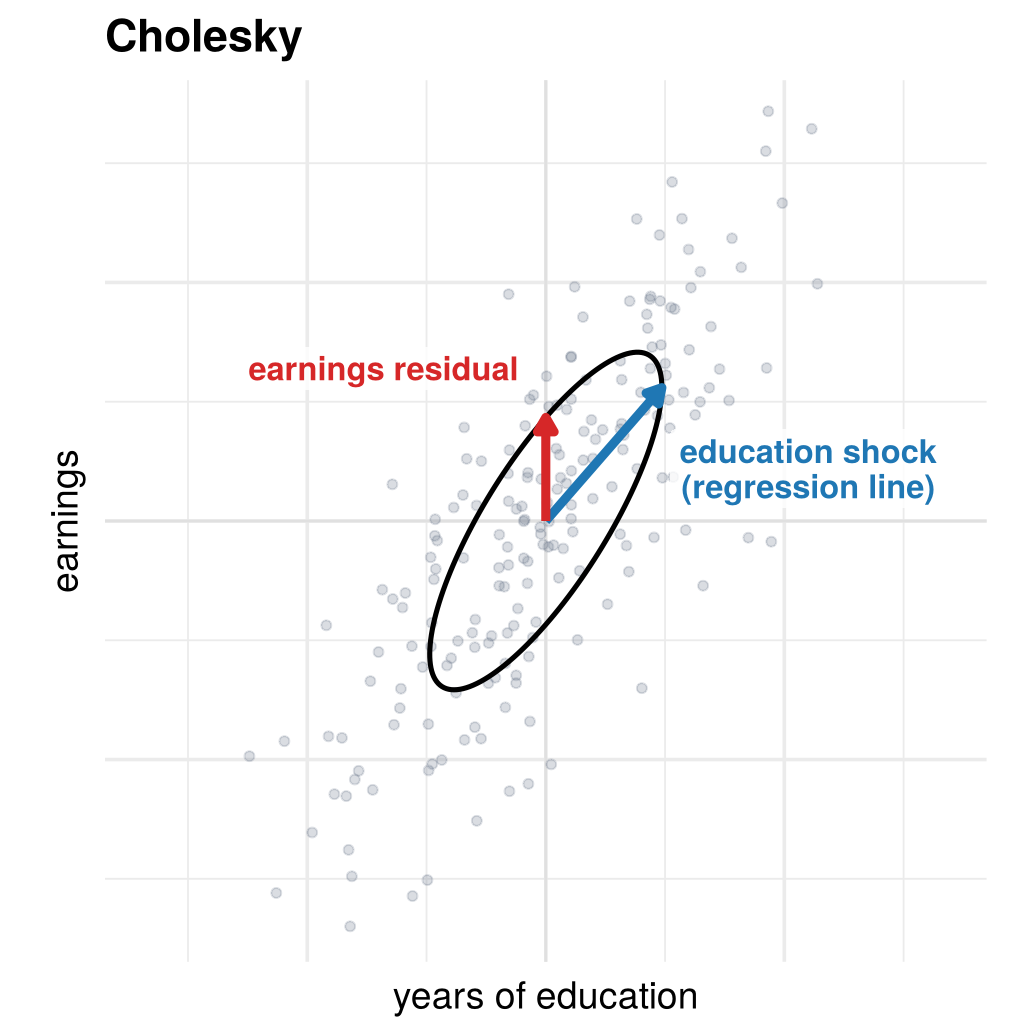
Put the variables in an order: \(X_1\) responds only to the first shock, \(X_2\) to the first shock and one of its own. The order is the assumption.
Regression is the classic case. With \(X_1\) education and \(X_2\) earnings,
\[ \begin{aligned} X_2 &= \beta X_1 + \sigma_2\varepsilon_2\\ X_1 &= \sigma_1\varepsilon_1 \end{aligned} \qquad\Longrightarrow\qquad \begin{pmatrix}X_1\\X_2\end{pmatrix}= \begin{pmatrix}\sigma_1 & 0\\ \beta\sigma_1 & \sigma_2\end{pmatrix} \begin{pmatrix}\varepsilon_1\\\varepsilon_2\end{pmatrix}. \]
The matrix is lower triangular: the first column is the regression line (slope \(\beta=\sigma_{12}/\sigma_1^2\)), the second the residual, and the zero says the residual in earnings does not feed back into education. This is exactly the assumption that failed for the flights: regressing fuel on flight time picks the Cholesky angle and gives 115 kg per minute, a mixture of headwind and load.
Timing: if a variable determined earlier can affect one determined later but not the other way round, put the earlier one first (recursive VARs in macroeconomics).
1.4.3 PCA: first column as long as possible
arrows_of <- function(M, cols = c(col_a1, col_a2), lw = 1.3)
geom_segment(data = tibble(xend = M[1, ], yend = M[2, ], col = cols),
aes(x = 0, y = 0, xend = xend, yend = yend, colour = I(col)),
linewidth = lw, arrow = arrow(length = unit(0.22, "cm"), type = "closed"))
fig_choice_example <- function(name) {
pca_A <- function(S) {
eg <- eigen(S, symmetric = TRUE); V <- eg$vectors
if (det(V) < 0) V[, 2] <- -V[, 2]
if (V[1, 1] < 0) V <- -V
V %*% diag(sqrt(eg$values))
}
spec <- switch(name,
"Symmetric root" = list(X = app_X, A = app_root, labs = c("student 1's\nown shock", "student 2's\nown shock"),
xlab = "grade of student 1", ylab = "grade of student 2 (roommate)"),
"Cholesky" = list(X = app_X, A = t(chol(app_Sigma)), labs = c("education shock\n(regression line)", "earnings residual"),
xlab = "years of education", ylab = "earnings"),
"PCA" = { Xc <- as.matrix(dimred$df[, c("x1", "x2")])
list(X = Xc, A = pca_A(cov(Xc)), labs = c("market\n(hot weeks, holidays)", "brand\nswitching"),
xlab = "Coca-Cola sales", ylab = "Pepsi sales") },
"Simultaneous equations" = list(X = app_X, A = air_A, labs = c("headwind", "load"),
xlab = "flight time (min)", ylab = "fuel (100 kg)"))
S <- cov(spec$X); e <- ellipse_xy(sym_root(S), 1)
M <- spec$A
lab_pos <- if (name == "Cholesky") rbind(c(2.75, 0.55), c(-1.7, 1.6)) else t(M) * (1 + 1.05 / sqrt(colSums(M^2)))
lab <- tibble(x = lab_pos[, 1], y = lab_pos[, 2], txt = spec$labs, col = c(col_a1, col_a2))
ggplot() + axes0 +
geom_point(data = tibble(x = spec$X[, 1], y = spec$X[, 2]), aes(x, y), colour = "#6f7a8c", alpha = 0.25, size = 1.4) +
geom_path(data = tibble(x = e[1, ], y = e[2, ]), aes(x, y), colour = "black", linewidth = 0.9) +
arrows_of(M, lw = 1.6) +
geom_label(data = lab, aes(x, y, label = txt, colour = I(col)), size = 4.3, fontface = "bold",
lineheight = 0.9, label.size = 0, fill = alpha("white", 0.8)) +
coord_equal(xlim = c(-4.2, 4.2), ylim = c(-4.2, 4.2)) +
labs(title = name, x = spec$xlab, y = spec$ylab) +
theme(axis.text = element_blank(), plot.title = element_text(face = "bold"))
}
# draw the figure
fig_choice_example("PCA")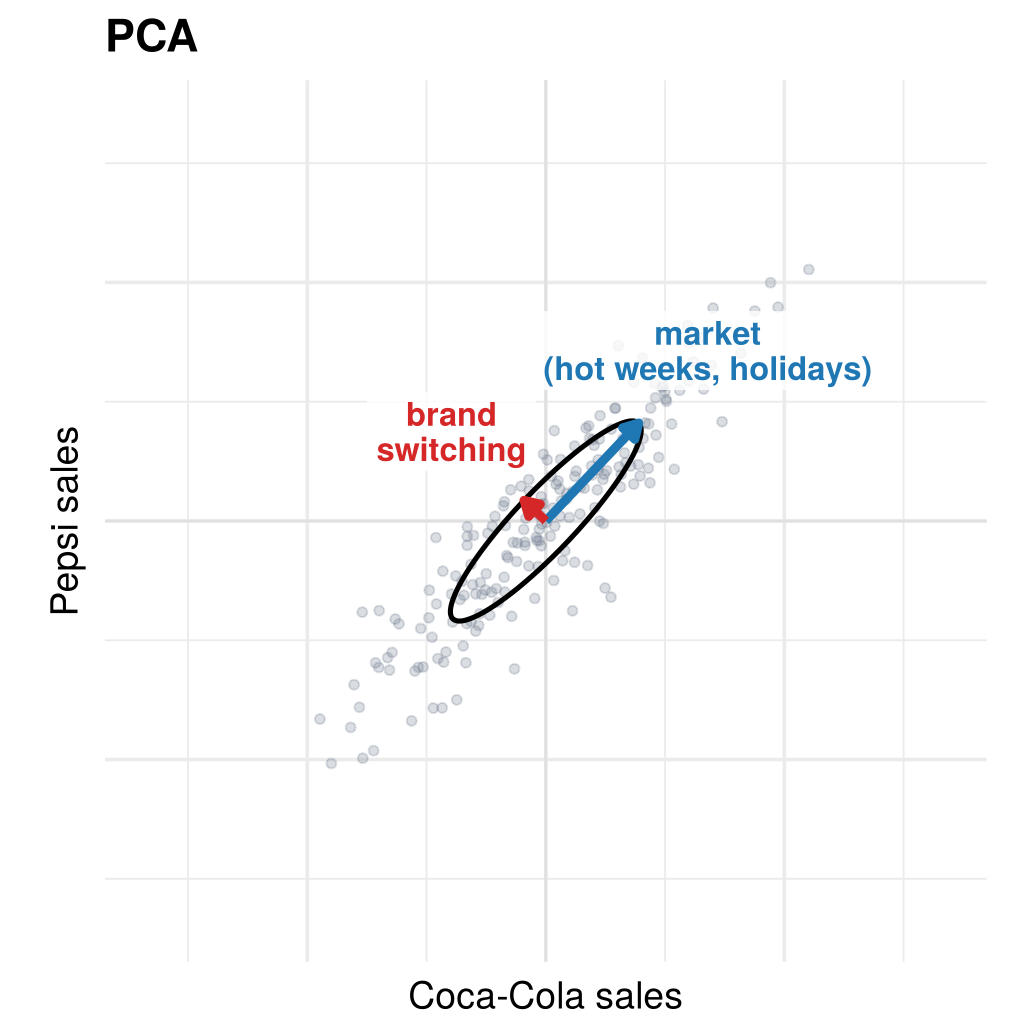
The squared length of a column of \(A\) is its shock’s contribution to the total variance. PCA turns the rotation until the first column is longest; the second takes what is left and is perpendicular. Coca-Cola and Pepsi: weekly sales mostly move together (hot weeks, holidays, big sports events), the overall soft-drink market. The small second component is brand switching.
1.4.4 Simultaneous equations: a known coefficient
arrows_of <- function(M, cols = c(col_a1, col_a2), lw = 1.3)
geom_segment(data = tibble(xend = M[1, ], yend = M[2, ], col = cols),
aes(x = 0, y = 0, xend = xend, yend = yend, colour = I(col)),
linewidth = lw, arrow = arrow(length = unit(0.22, "cm"), type = "closed"))
fig_choice_example <- function(name) {
pca_A <- function(S) {
eg <- eigen(S, symmetric = TRUE); V <- eg$vectors
if (det(V) < 0) V[, 2] <- -V[, 2]
if (V[1, 1] < 0) V <- -V
V %*% diag(sqrt(eg$values))
}
spec <- switch(name,
"Symmetric root" = list(X = app_X, A = app_root, labs = c("student 1's\nown shock", "student 2's\nown shock"),
xlab = "grade of student 1", ylab = "grade of student 2 (roommate)"),
"Cholesky" = list(X = app_X, A = t(chol(app_Sigma)), labs = c("education shock\n(regression line)", "earnings residual"),
xlab = "years of education", ylab = "earnings"),
"PCA" = { Xc <- as.matrix(dimred$df[, c("x1", "x2")])
list(X = Xc, A = pca_A(cov(Xc)), labs = c("market\n(hot weeks, holidays)", "brand\nswitching"),
xlab = "Coca-Cola sales", ylab = "Pepsi sales") },
"Simultaneous equations" = list(X = app_X, A = air_A, labs = c("headwind", "load"),
xlab = "flight time (min)", ylab = "fuel (100 kg)"))
S <- cov(spec$X); e <- ellipse_xy(sym_root(S), 1)
M <- spec$A
lab_pos <- if (name == "Cholesky") rbind(c(2.75, 0.55), c(-1.7, 1.6)) else t(M) * (1 + 1.05 / sqrt(colSums(M^2)))
lab <- tibble(x = lab_pos[, 1], y = lab_pos[, 2], txt = spec$labs, col = c(col_a1, col_a2))
ggplot() + axes0 +
geom_point(data = tibble(x = spec$X[, 1], y = spec$X[, 2]), aes(x, y), colour = "#6f7a8c", alpha = 0.25, size = 1.4) +
geom_path(data = tibble(x = e[1, ], y = e[2, ]), aes(x, y), colour = "black", linewidth = 0.9) +
arrows_of(M, lw = 1.6) +
geom_label(data = lab, aes(x, y, label = txt, colour = I(col)), size = 4.3, fontface = "bold",
lineheight = 0.9, label.size = 0, fill = alpha("white", 0.8)) +
coord_equal(xlim = c(-4.2, 4.2), ylim = c(-4.2, 4.2)) +
labs(title = name, x = spec$xlab, y = spec$ylab) +
theme(axis.text = element_blank(), plot.title = element_text(face = "bold"))
}
# draw the figure
fig_choice_example("Simultaneous equations")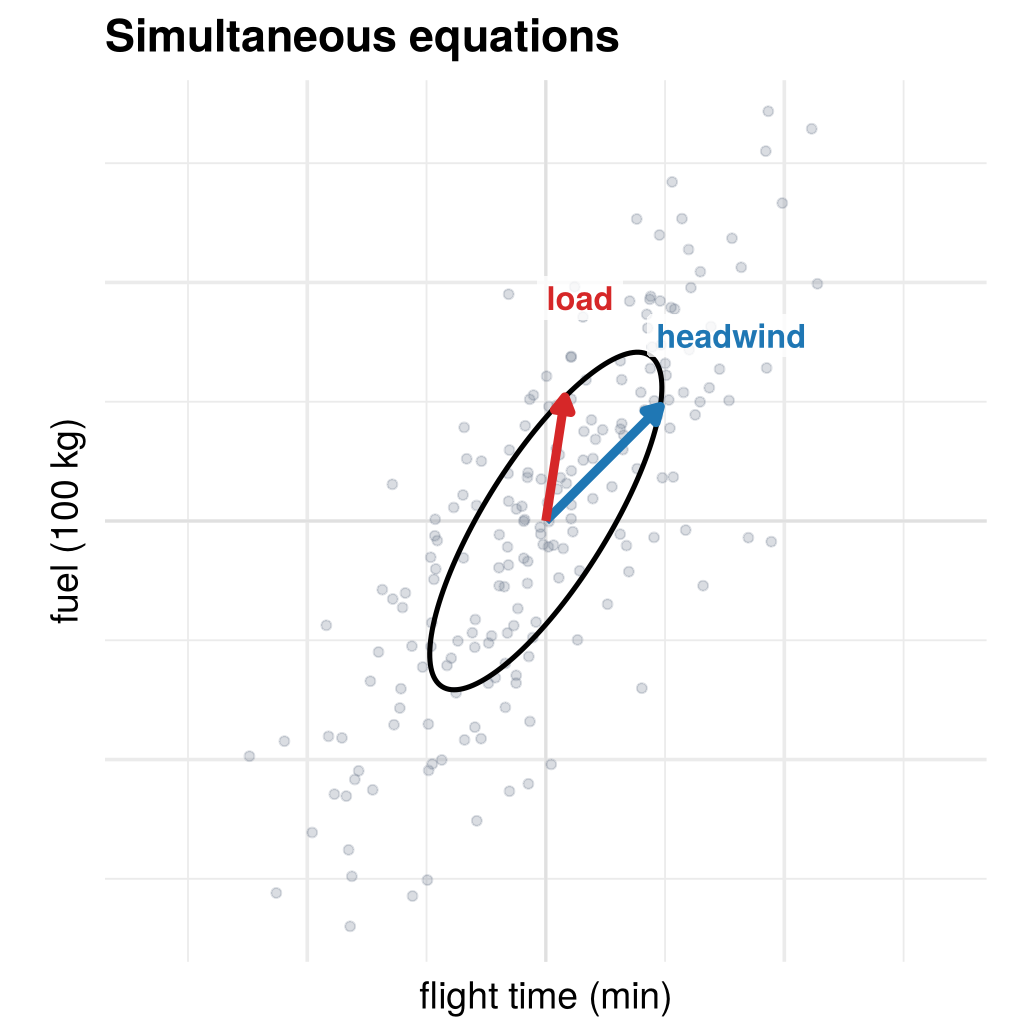
Engineering or economic reasoning, not statistics, supplies the restriction. For the flights, the aircraft manual says an extra minute at cruise burns 100 kg of fuel, so the headwind column must point in that direction. The covariance then reveals the rest: a typical load shock adds 130 kg of fuel but only 12 seconds. This answers the question the regression could not: every fuel overrun can be attributed to weather or to load.
Choose latent coordinates that make some feature of the data simple or meaningful.
Check your understanding
- Which restriction does the Cholesky choice impose?
- \(A\) is symmetric
- The first variable does not respond to the second shock (\(a_{12}=0\))
- The first column of \(A\) is as long as possible
- One coefficient is known from engineering
- Regressing fuel on flight time is the same as choosing which \(A\)?
- The symmetric root
- Cholesky, with flight time first
- PCA
- The simultaneous-equations choice
- PCA chooses the rotation at which
- the first column of \(A\) is longest
- the arrows are closest to the axes
- \(A\) is lower triangular
- the shocks have a physical meaning
- Which choice recovers the headwind and load shocks of the flights?
- Symmetric root
- Cholesky
- PCA
- Simultaneous equations, using the manual’s fuel flow
Answers
1 b. 2 b. 3 a. 4 d.1.5 Structural form, reduced form, sample
The 200 flights are a sample. The route and its aircraft are the population: the process that produces all the flights that could be flown. Every analysis in the course moves between three layers:
- Structural form \(\varepsilon\), \(A\): the independent forces and how each variable responds. It says why the variables move together (one-sd contour: a circle).
- Reduced form \(X=A\varepsilon\), with covariance \(\Sigma=AA'\). It says only how they move together (one-sd contour: an ellipse).
- Sample \(\mathbf X\): the 200 flights we recorded, each one a draw \(x^{(t)}\) of \(X\).
Nature goes one way around the cycle, data analysis the other. Colours: orange is the sample, teal the inferred reduced form, magenta the estimated structural form, black the population.
fig_layers_cycle <- function() {
bx <- c(1, 3.5, 6)
box_txt <- tibble(
x = rep(bx, each = 4), y = rep(c(0.33, 0.11, -0.08, -0.31), 3),
size = rep(c(3.9, 3.4, 3.4, 4.1), 3),
lab = c('bold("STRUCTURAL FORM")', '"model parameters and"', '"distribution of shocks"',
'italic(A)*", "*epsilon %~% N(0, I)',
'bold("REDUCED FORM")', '"moments and distribution of"', '"the observed random vector"',
'Sigma*", "*italic(X) %~% N(0, Sigma)',
'bold("SAMPLE")', '"200 flights (200 rows) with"', '"time and fuel (2 columns)"',
'bold(X)'))
ggplot() +
annotate("rect", xmin = bx - 0.88, xmax = bx + 0.88, ymin = -0.52, ymax = 0.52,
fill = "white", colour = "grey40", linewidth = 0.5) +
geom_text(data = box_txt, aes(x, y, label = lab, size = I(size)), parse = TRUE) +
annotate("segment", x = c(1.95, 4.45), xend = c(2.55, 5.05), y = 0.25, yend = 0.25,
colour = c("black", col_s), linewidth = 1.1, arrow = arrow(length = unit(0.25, "cm"), type = "closed")) +
annotate("text", x = c(2.25, 4.75), y = 0.55, label = c("generate", "sample"),
colour = c("black", col_s), size = 4.6, fontface = "bold") +
annotate("segment", x = c(2.55, 5.05), xend = c(1.95, 4.45), y = -0.25, yend = -0.25,
colour = c("black", col_e), linewidth = 1.1, arrow = arrow(length = unit(0.25, "cm"), type = "closed")) +
annotate("text", x = c(2.25, 4.75), y = -0.55, label = c("identify", "infer"),
colour = c("black", col_e), size = 4.6, fontface = "bold") +
annotate("path", x = c(6, 6, 1), y = c(-0.54, -1.05, -1.05), colour = col_h, linewidth = 1.1) +
annotate("segment", x = 1, xend = 1, y = -1.05, yend = -0.56, colour = col_h, linewidth = 1.1,
arrow = arrow(length = unit(0.25, "cm"), type = "closed")) +
annotate("label", x = 3.5, y = -1.05, label = "estimate = infer + identify", colour = col_h,
size = 4.4, fontface = "bold", label.size = 0) +
annotate("segment", x = 0.12, xend = 4.38, y = 0.95, yend = 0.95, colour = "grey45") +
annotate("segment", x = c(0.12, 4.38), xend = c(0.12, 4.38), y = 0.95, yend = 0.86, colour = "grey45") +
annotate("text", x = 2.25, y = 1.08, label = "population (unknown)", colour = "grey30", size = 4) +
annotate("segment", x = 5.12, xend = 6.88, y = 0.95, yend = 0.95, colour = "grey45") +
annotate("segment", x = c(5.12, 6.88), xend = c(5.12, 6.88), y = 0.95, yend = 0.86, colour = "grey45") +
annotate("text", x = 6, y = 1.08, label = "what we observe", colour = "grey30", size = 4) +
coord_cartesian(xlim = c(0, 7), ylim = c(-1.2, 1.2), expand = FALSE) +
theme_void()
}
# draw the figure
fig_layers_cycle()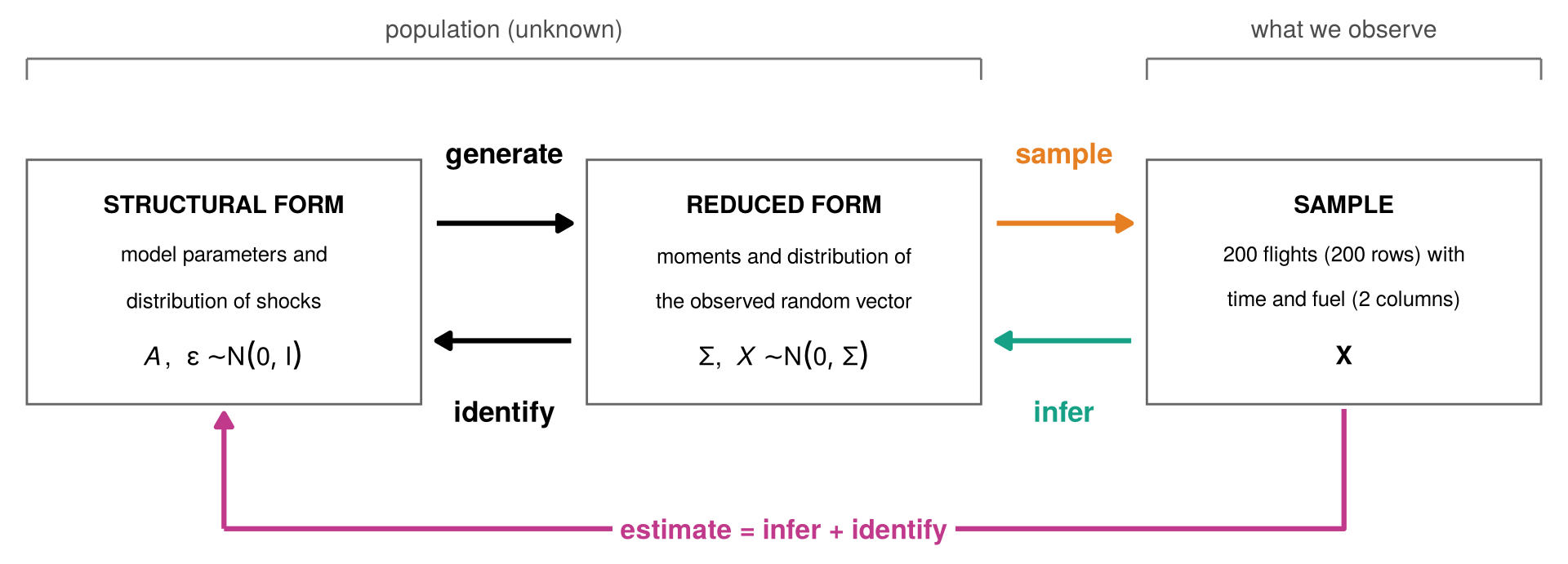
How nature produces the data. The shocks generate the random vector \(X\), and we sample 200 flights from it.
connector <- function(verb, note, col, parse_note = FALSE) {
ggplot() +
annotate("segment", x = 0.05, xend = 0.95, y = 0.5, yend = 0.5, colour = col, linewidth = 1.2,
arrow = arrow(length = unit(0.25, "cm"), type = "closed")) +
annotate("text", x = 0.5, y = 0.62, label = verb, colour = col, size = 5, fontface = "bold") +
annotate("text", x = 0.5, y = 0.36, label = note, colour = col, size = 3.9, parse = parse_note,
lineheight = 0.9) +
coord_cartesian(xlim = c(0, 1), ylim = c(0, 1), expand = FALSE) +
theme_void()
}
labels_of <- function(M, labs, cols = c(col_a1, col_a2), k = 0.42) {
P <- t(M) * (1 + k / sqrt(colSums(M^2)))
annotate("text", x = P[, 1], y = P[, 2], label = labs, parse = TRUE, colour = cols, size = 4.6)
}
arrows_of <- function(M, cols = c(col_a1, col_a2), lw = 1.3)
geom_segment(data = tibble(xend = M[1, ], yend = M[2, ], col = cols),
aes(x = 0, y = 0, xend = xend, yend = yend, colour = I(col)),
linewidth = lw, arrow = arrow(length = unit(0.22, "cm"), type = "closed"))
ell <- function(M, r = 1) { e <- ellipse_xy(M, r); tibble(x = e[1, ], y = e[2, ]) }
fig_layers_nature <- function() {
s_struct <- ggplot() + axes0 +
geom_path(data = ell(diag(2)), aes(x, y), colour = "black", linewidth = 1) +
arrows_of(diag(2)) + labels_of(diag(2), c("e[1]", "e[2]")) +
coord_equal(xlim = lim, ylim = lim) +
labs(title = title_sf, subtitle = "shocks: uncorrelated,\nunit variance (a circle)",
x = expression(epsilon[1]~"(headwind)"), y = expression(epsilon[2]~"(load)"))
s_pop <- ggplot() + axes0 +
geom_path(data = ell(A_pop), aes(x, y), colour = "black", linewidth = 1) +
arrows_of(A_pop) + labels_of(A_pop, c("A*e[1]", "A*e[2]")) +
coord_equal(xlim = lim, ylim = lim) +
labs(title = title_rf, subtitle = "the circle moved by A:\nan ellipse, Σ = AA'",
x = "flight time (min)", y = "fuel (100 kg)")
s_samp <- ggplot() + axes0 +
geom_path(data = ell(A_pop), aes(x, y), colour = "black", linewidth = 0.5) +
geom_point(data = pts, aes(x, y), colour = col_s, alpha = pt_alpha, size = pt_size) +
coord_equal(xlim = lim, ylim = lim) +
labs(title = title_sa, subtitle = "data: 200 draws\nfrom the random vector",
x = "flight time (min)", y = "fuel (100 kg)")
s_struct + connector("generate", "italic(X)==italic(A)*epsilon", "black", parse_note = TRUE) +
s_pop + connector("sample", "draw 200\nflights", col_s) + s_samp +
plot_layout(widths = c(1, 0.36, 1, 0.36, 1))
}
# draw the figure
fig_layers_nature()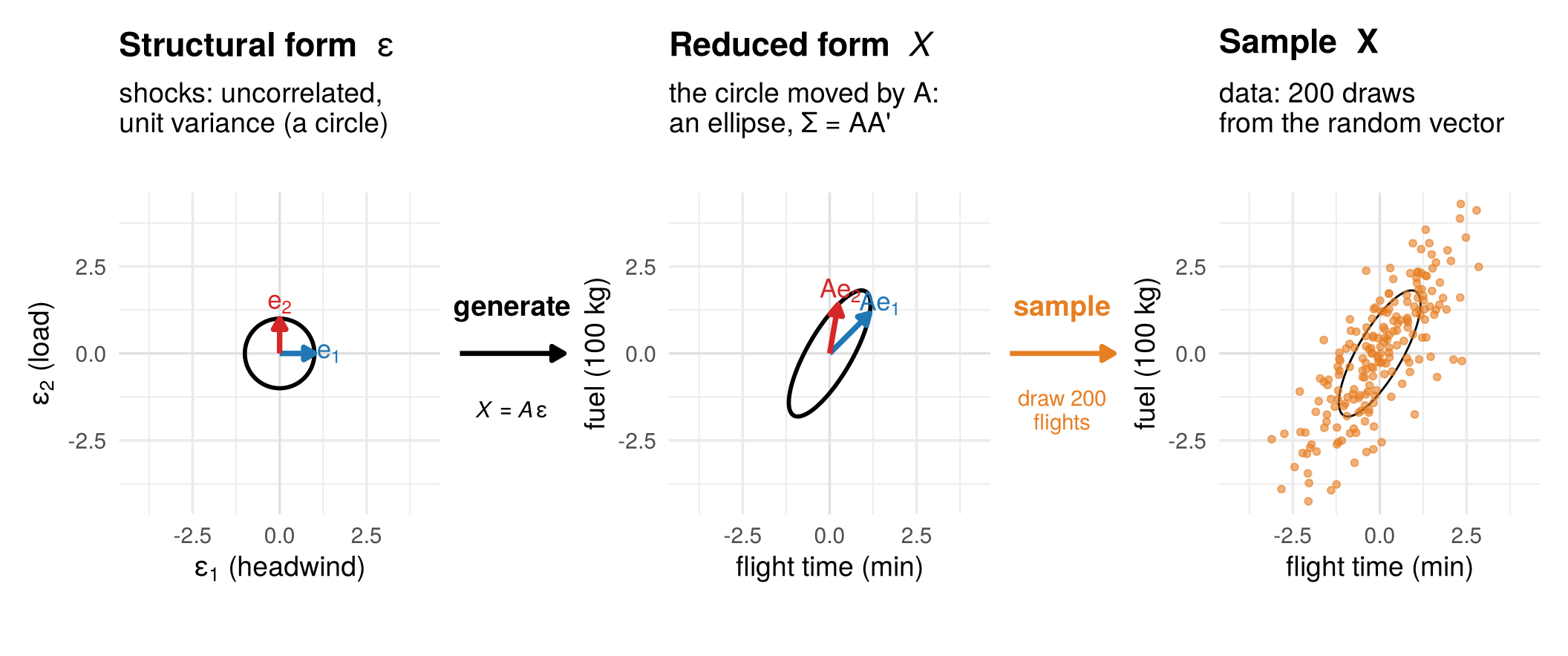
How we analyse the data. We only ever see the orange points.
connector <- function(verb, note, col, parse_note = FALSE) {
ggplot() +
annotate("segment", x = 0.05, xend = 0.95, y = 0.5, yend = 0.5, colour = col, linewidth = 1.2,
arrow = arrow(length = unit(0.25, "cm"), type = "closed")) +
annotate("text", x = 0.5, y = 0.62, label = verb, colour = col, size = 5, fontface = "bold") +
annotate("text", x = 0.5, y = 0.36, label = note, colour = col, size = 3.9, parse = parse_note,
lineheight = 0.9) +
coord_cartesian(xlim = c(0, 1), ylim = c(0, 1), expand = FALSE) +
theme_void()
}
ell <- function(M, r = 1) { e <- ellipse_xy(M, r); tibble(x = e[1, ], y = e[2, ]) }
fig_layers_analysis <- function() {
E <- app_X %*% t(solve(A_hat))
eps_hat <- tibble(x = E[, 1], y = E[, 2])
a_samp <- ggplot() + axes0 +
geom_point(data = pts, aes(x, y), colour = col_s, alpha = pt_alpha, size = pt_size) +
coord_equal(xlim = lim, ylim = lim) +
labs(title = title_sa, subtitle = "data: all we have",
x = "flight time (min)", y = "fuel (100 kg)")
a_pop <- ggplot() + axes0 +
geom_point(data = pts, aes(x, y), colour = col_s, alpha = pt_alpha, size = pt_size) +
geom_path(data = ell(A_pop), aes(x, y), colour = "black", linewidth = 0.5) +
geom_path(data = ell(A_hat), aes(x, y), colour = col_e, linewidth = 1.2, linetype = "22") +
coord_equal(xlim = lim, ylim = lim) +
labs(title = title_rf, subtitle = "inferred: S (teal)\nthin black: true Σ (unknown)",
x = "flight time (min)", y = "fuel (100 kg)")
a_struct <- ggplot() + axes0 +
geom_point(data = eps_hat, aes(x, y), colour = col_h, alpha = pt_alpha, size = pt_size) +
geom_path(data = ell(diag(2)), aes(x, y), colour = "black", linewidth = 1) +
coord_equal(xlim = lim, ylim = lim) +
labs(title = title_sf, subtitle = "estimated shocks,\nwhitened via the manual",
x = expression(hat(epsilon)[1]), y = expression(hat(epsilon)[2]))
a_samp + connector("infer", "uses\nthe data", col_e) + a_pop +
connector("identify", "restriction,\nno data", "black") + a_struct +
plot_layout(widths = c(1, 0.36, 1, 0.36, 1))
}
# draw the figure
fig_layers_analysis()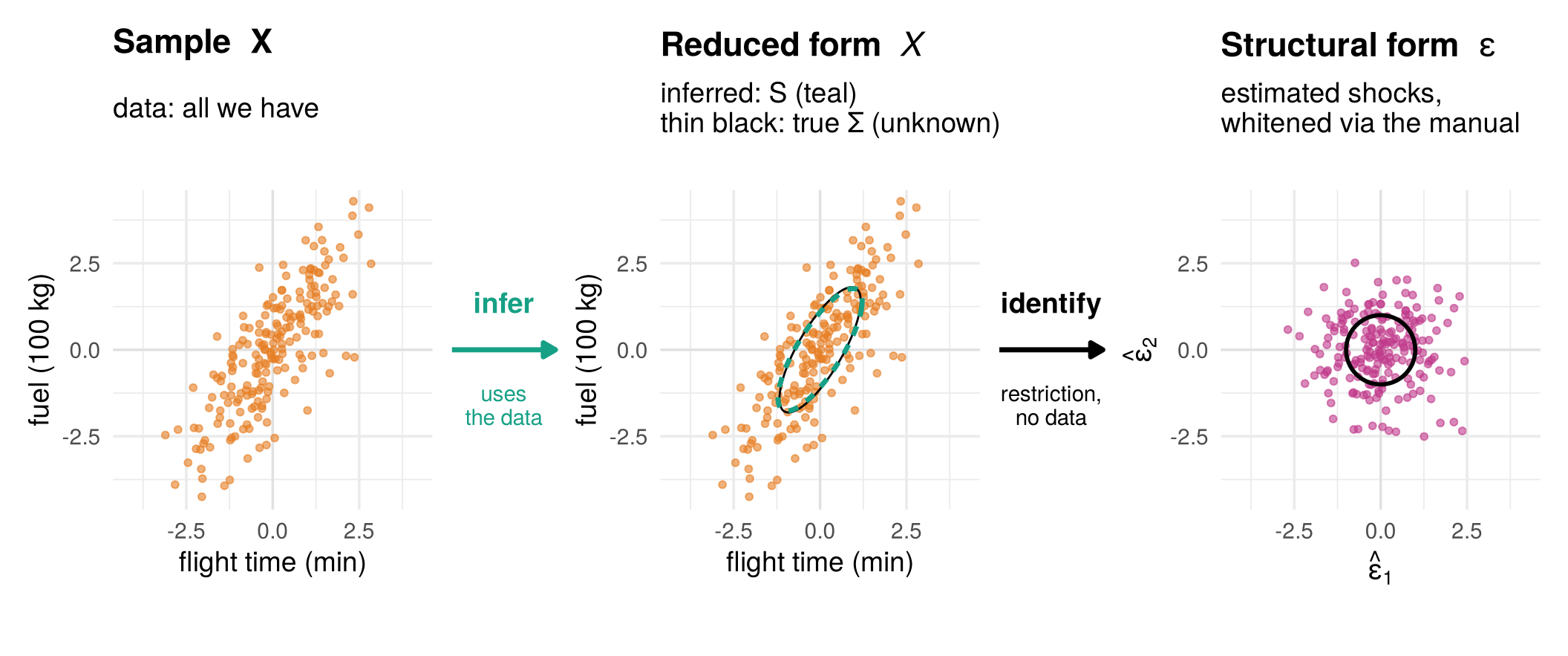
- Infer (sample to reduced form): we want \(\Sigma\), but we only have 200 flights, so we compute the sample covariance \(S\) as our estimate of it (teal ellipse). With more flights, \(S\) gets closer to \(\Sigma\).
- Identify (reduced form to structural form): even knowing \(\Sigma\) exactly, every rotation of \(A\) fits, so a restriction (here the manual) picks one \(A\). This step uses no data.
- Estimate (sample to structural form): both steps at once. Apply the restriction to \(S\) to get \(\hat A\) and the estimated shocks \(\hat\varepsilon^{(t)}=\hat A^{-1}x^{(t)}\).
Check your understanding
- Which step uses no data at all?
- Infer
- Identify
- Estimate
- Sample
- The sample covariance \(S\) is
- our estimate of the reduced form \(\Sigma\)
- the structural form
- the true population covariance
- a shock
- Collecting more flights helps most with
- choosing the restriction
- learning \(\Sigma\) more precisely
- making the shocks independent
- none of the above
Answers
1 b. 2 a. 3 b.1.6 Fewer coordinates: dimension reduction
A structural model also tells us how much each shock matters: the length of a column of \(A\) measures how much variation its shock creates. If one column is long and the other short, dropping the short shock loses little, and each observation is described by one number instead of two.
Weekly sales of Coca-Cola and Pepsi illustrate this. One big movement (the soft-drink market) and one small one (brand switching): the cloud lies close to a line, and the position along it describes almost everything.
fig_dimred <- function() {
df_t <- dimred$df; v1 <- dimred$v1
p_proj <- ggplot(df_t) +
geom_abline(slope = v1[2] / v1[1], intercept = 0, colour = col_a1, linewidth = 0.8) +
geom_segment(aes(x1, x2, xend = p1, yend = p2), colour = "grey70", linewidth = 0.3) +
geom_point(aes(x1, x2), colour = "#6f7a8c", alpha = 0.6, size = 1.6) +
coord_equal(xlim = c(-3.5, 3.5), ylim = c(-3.5, 3.5)) +
labs(title = "Coke and Pepsi: almost one direction",
subtitle = sprintf("Market direction: %.0f%% of the variance", 100 * dimred$share1),
x = "Coca-Cola sales (deviation)", y = "Pepsi sales (deviation)")
p_line <- ggplot(df_t, aes(s1, 0)) +
geom_hline(yintercept = 0, colour = col_a1, linewidth = 0.8) +
geom_point(colour = "#6f7a8c", alpha = 0.6, size = 1.6,
position = position_jitter(height = 0.04, width = 0, seed = 1)) +
scale_y_continuous(limits = c(-0.5, 0.5), breaks = NULL) +
labs(title = "One number per week",
subtitle = "Position along the line: the soft-drink market\n(first principal component)",
x = "size of the soft-drink market that week", y = NULL)
p_proj + p_line + plot_layout(widths = c(1, 1.1))
}
# draw the figure
fig_dimred()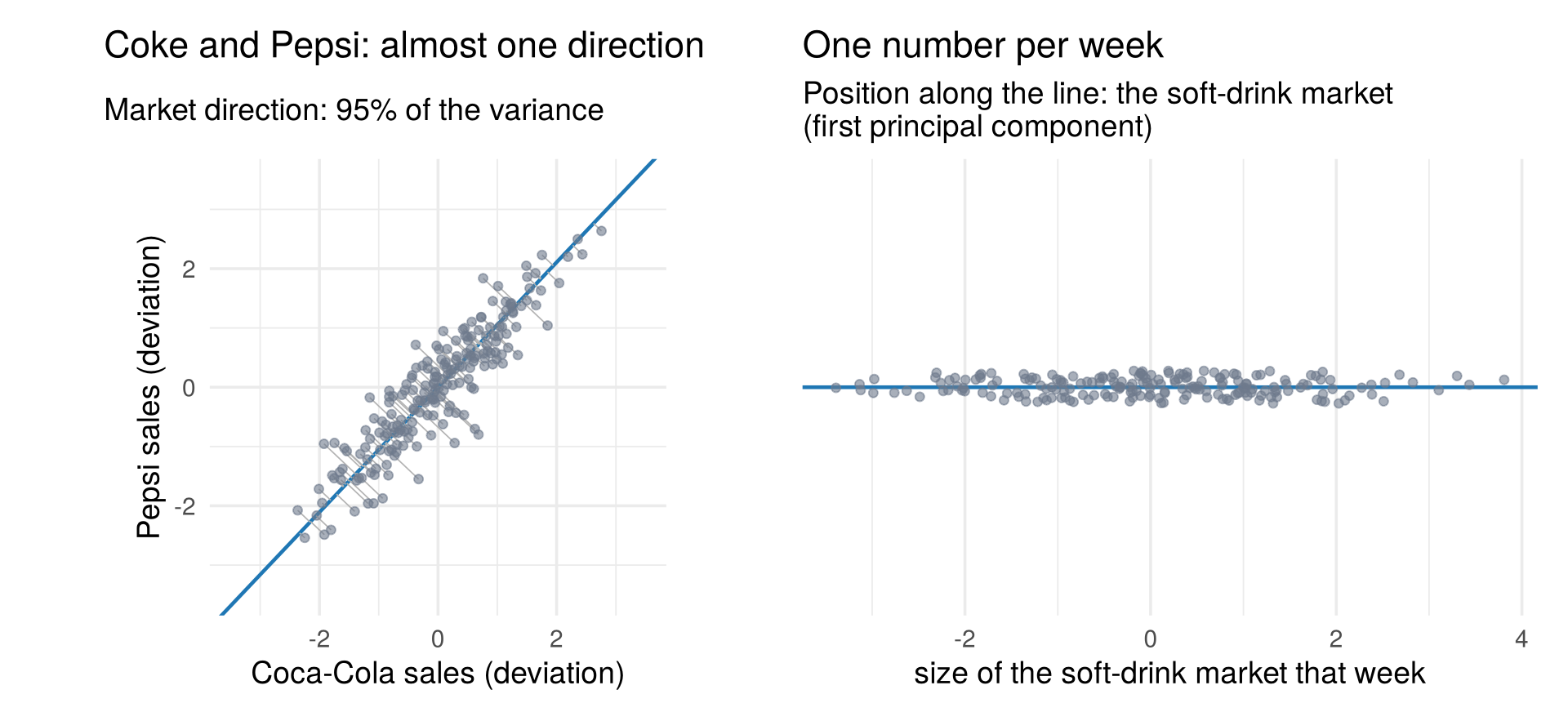
With many variables the payoff is larger: yield curves, consumer surveys and stock returns all have many variables but few underlying movements, so a few numbers per observation describe almost everything. The same model that explains the data can also compress them.
Check your understanding
- In the Coke and Pepsi example, the first direction carries about
95% of the variance. Describing each week by one number means
- dropping the brand-switching direction
- dropping the market direction
- averaging the two brands’ sales and their correlation
- clustering weeks into hot and cold
Answers
1 a.1.7 Other latent structures
\(X=A\varepsilon\) has exactly as many shocks as variables, and the shocks are continuous. Both can change.
1.7.1 More shocks than variables: factor analysis
Two critics rate the same restaurants. Their ratings are correlated because both taste the same food: the restaurant’s quality is a common factor \(f\). Each critic also has her own quirks and bad days, a unique shock that affects only her rating:
\[ \begin{aligned} X_1&=\sigma_1\varepsilon_1+\lambda_1 f\\ X_2&=\sigma_2\varepsilon_2+\lambda_2 f \end{aligned} \qquad\Longleftrightarrow\qquad \begin{pmatrix}X_1\\X_2\end{pmatrix} = \begin{pmatrix}\sigma_1 & 0 & \lambda_1\\ 0 & \sigma_2 & \lambda_2\end{pmatrix} \begin{pmatrix}\varepsilon_1\\\varepsilon_2\\ f\end{pmatrix}. \]
fig_factor_choices <- function(nrow = 2, pick = 1:4, critics = FALSE,
panels = c("No noise in X₁", "No noise in X₂", "Equal communalities", "Equal noise")) {
restr_pick <- c("ψ₁ = 0 (X₁ is the factor)", "ψ₂ = 0 (X₂ is the factor)",
"equal communalities h₁ = h₂", "equal noise ψ₁ = ψ₂")[pick]
panel_names <- panels[pick]
fa_models <- lapply(restr_pick, function(nm) fa_from_split(app_Sigma, app_restr[[nm]]))
fa_vectors <- purrr::map2_dfr(fa_models, panel_names, function(m, nm) {
tibble(method = nm, which = c("λ", "σ1", "σ2"),
xend = c(m$lambda[1], sqrt(m$psi[1]), 0),
yend = c(m$lambda[2], 0, sqrt(m$psi[2])))
}) |>
mutate(method = factor(method, levels = panel_names),
label_x = xend + ifelse(which == "λ", 0.3, ifelse(which == "σ1", 0.15, -0.35)),
label_y = yend + ifelse(which == "λ", 0.25, ifelse(which == "σ1", -0.3, 0.1)))
fa_lines <- purrr::map2_dfr(fa_models, panel_names, function(m, nm)
tibble(method = nm, x = c(-4, 4) * m$lambda[1], y = c(-4, 4) * m$lambda[2])) |>
mutate(method = factor(method, levels = panel_names))
fa_pts <- purrr::map_dfr(panel_names, function(nm)
tibble(method = nm, x1 = app_X[, 1], x2 = app_X[, 2])) |>
mutate(method = factor(method, levels = panel_names))
fa_ell <- purrr::map_dfr(panel_names, function(nm) {
e <- ellipse_xy(app_root, 1); tibble(method = nm, x1 = e[1, ], x2 = e[2, ])
}) |> mutate(method = factor(method, levels = panel_names))
ggplot(fa_pts, aes(x1, x2)) +
geom_line(data = fa_lines, aes(x, y), colour = col_f, linetype = 2, alpha = 0.5) +
geom_point(alpha = 0.18, colour = "#6f7a8c", size = 1) +
geom_path(data = fa_ell, linewidth = 0.8) +
geom_segment(data = fa_vectors |> dplyr::filter(xend^2 + yend^2 > 1e-6),
aes(x = 0, y = 0, xend = xend, yend = yend, colour = which),
arrow = grid::arrow(length = grid::unit(0.16, "cm")), linewidth = 1.3) +
geom_text(data = fa_vectors |> dplyr::filter(xend^2 + yend^2 > 0.01),
aes(label_x, label_y, label = which, colour = which), size = 4.2, fontface = "bold") +
scale_colour_manual(values = c("λ" = col_f, "σ1" = col_a1, "σ2" = col_a2), guide = "none") +
facet_wrap(~ method, nrow = nrow) +
coord_equal(xlim = c(-3, 3), ylim = c(-3, 3)) +
(if (critics) labs(x = "critic 1's rating", y = "critic 2's rating")
else labs(x = expression(x[1]~"(flight time)"), y = expression(x[2]~"(fuel)"))) +
(if (critics) theme(axis.text = element_blank()) else NULL)
}
# draw the figure
fig_factor_choices(nrow = 1, pick = 3, critics = TRUE, panels = c("", "", "", "")) +
labs(title = "Two critics, one restaurant quality",
subtitle = "purple λ: quality · blue, red: each critic's quirks")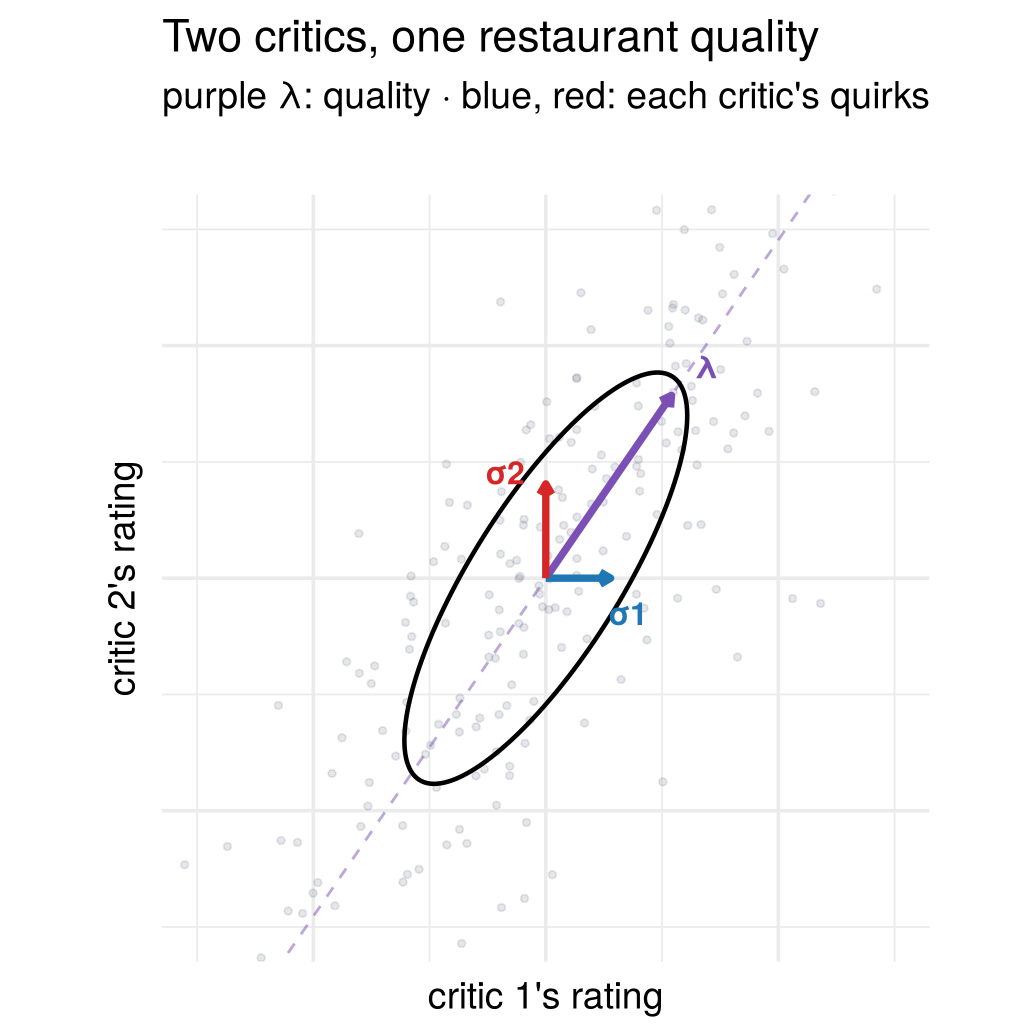
Three shocks now produce two variables, but the two zeros (each critic’s quirks affect only her own rating) take the extra freedom away again:
3 reduced-form parameters + 1 free parameter = 4 factor-model parameters (\(\lambda_1,\lambda_2,\sigma_1,\sigma_2\)). What is left open is how the noise is split between the critics.
The slider moves through all one-factor stories that fit equally well. The ratings never move; the quality attributed to each restaurant (colour) does.
fig_factor_critics <- function() {
fig <- make_factor_figure(notation = "sigma")
L <- fig$x$layout
L$xaxis$title <- list(text = "critic 1's rating x<sub>1</sub>")
L$yaxis$title <- list(text = "critic 2's rating x<sub>2</sub>")
L$xaxis2$title <- list(text = "critic 1's quirks ε<sub>1</sub>")
L$yaxis2$title <- list(text = "critic 2's quirks ε<sub>2</sub>")
L$annotations[[1]]$text <- "<b>Ratings</b> (colour = restaurant quality f)"
L$annotations[[2]]$text <- "<b>Quirks (ε<sub>1</sub>, ε<sub>2</sub>), quality f as colour</b>"
fig$x$layout <- L
fig
}
# draw the figure
fig_factor_critics()Four natural restrictions pick one story each:
fig_factor_choices <- function(nrow = 2, pick = 1:4, critics = FALSE,
panels = c("No noise in X₁", "No noise in X₂", "Equal communalities", "Equal noise")) {
restr_pick <- c("ψ₁ = 0 (X₁ is the factor)", "ψ₂ = 0 (X₂ is the factor)",
"equal communalities h₁ = h₂", "equal noise ψ₁ = ψ₂")[pick]
panel_names <- panels[pick]
fa_models <- lapply(restr_pick, function(nm) fa_from_split(app_Sigma, app_restr[[nm]]))
fa_vectors <- purrr::map2_dfr(fa_models, panel_names, function(m, nm) {
tibble(method = nm, which = c("λ", "σ1", "σ2"),
xend = c(m$lambda[1], sqrt(m$psi[1]), 0),
yend = c(m$lambda[2], 0, sqrt(m$psi[2])))
}) |>
mutate(method = factor(method, levels = panel_names),
label_x = xend + ifelse(which == "λ", 0.3, ifelse(which == "σ1", 0.15, -0.35)),
label_y = yend + ifelse(which == "λ", 0.25, ifelse(which == "σ1", -0.3, 0.1)))
fa_lines <- purrr::map2_dfr(fa_models, panel_names, function(m, nm)
tibble(method = nm, x = c(-4, 4) * m$lambda[1], y = c(-4, 4) * m$lambda[2])) |>
mutate(method = factor(method, levels = panel_names))
fa_pts <- purrr::map_dfr(panel_names, function(nm)
tibble(method = nm, x1 = app_X[, 1], x2 = app_X[, 2])) |>
mutate(method = factor(method, levels = panel_names))
fa_ell <- purrr::map_dfr(panel_names, function(nm) {
e <- ellipse_xy(app_root, 1); tibble(method = nm, x1 = e[1, ], x2 = e[2, ])
}) |> mutate(method = factor(method, levels = panel_names))
ggplot(fa_pts, aes(x1, x2)) +
geom_line(data = fa_lines, aes(x, y), colour = col_f, linetype = 2, alpha = 0.5) +
geom_point(alpha = 0.18, colour = "#6f7a8c", size = 1) +
geom_path(data = fa_ell, linewidth = 0.8) +
geom_segment(data = fa_vectors |> dplyr::filter(xend^2 + yend^2 > 1e-6),
aes(x = 0, y = 0, xend = xend, yend = yend, colour = which),
arrow = grid::arrow(length = grid::unit(0.16, "cm")), linewidth = 1.3) +
geom_text(data = fa_vectors |> dplyr::filter(xend^2 + yend^2 > 0.01),
aes(label_x, label_y, label = which, colour = which), size = 4.2, fontface = "bold") +
scale_colour_manual(values = c("λ" = col_f, "σ1" = col_a1, "σ2" = col_a2), guide = "none") +
facet_wrap(~ method, nrow = nrow) +
coord_equal(xlim = c(-3, 3), ylim = c(-3, 3)) +
(if (critics) labs(x = "critic 1's rating", y = "critic 2's rating")
else labs(x = expression(x[1]~"(flight time)"), y = expression(x[2]~"(fuel)"))) +
(if (critics) theme(axis.text = element_blank()) else NULL)
}
# draw the figure
fig_factor_choices(critics = TRUE,
panels = c("Critic 1 never errs", "Critic 2 never errs", "Equally reliable", "Equal noise"))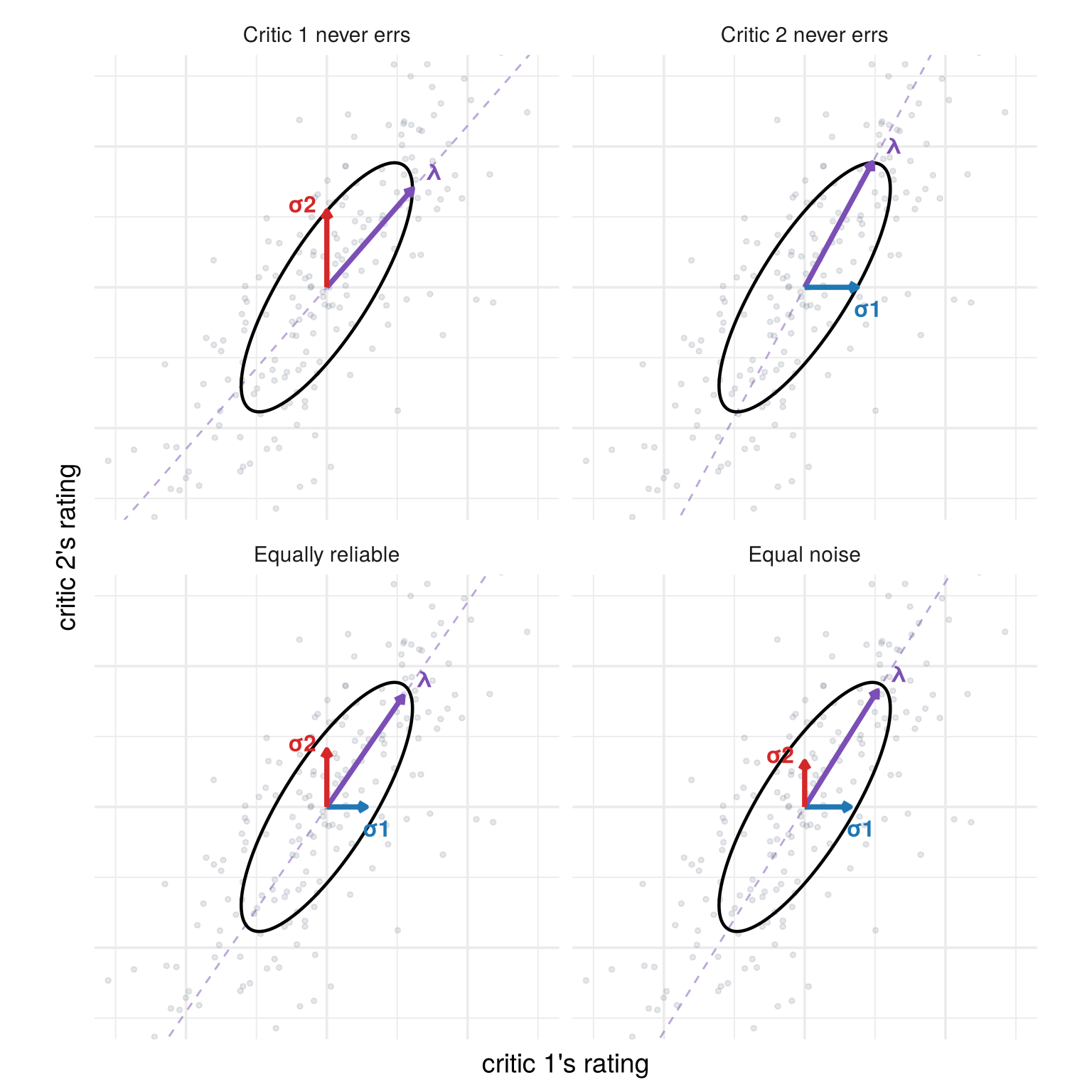
- Critic 1 never errs (\(\sigma_1=0\)): her rating is the quality, and critic 2’s rating is a regression on hers. This is exactly the Cholesky choice.
- Critic 2 never errs: the same with critic 2 first.
- Equally reliable (equal communalities): quality explains the same share of each critic’s rating variance. (The communality of \(X_i\), \(\lambda_i^2/\operatorname{Var}(X_i)\), is the share of its variance due to the common factor.)
- Equal noise (\(\sigma_1=\sigma_2\)): both critics’ quirks are equally large.
A factor model is built to explain the covariance between variables: only the common factor creates co-movement, and the unique shocks soak up what is left. With many critics (or survey questions) and few factors, this becomes a strong and testable restriction.
1.7.2 A discrete latent variable: clustering
In a factor model the center \(\lambda f\) slides continuously along a line. In clustering the latent variable is discrete: each observation belongs to one of a few groups, and the center jumps among a few locations, which need not lie on a line.
fig_factor_to_cluster <- function() {
set.seed(11)
lam_b <- c(1.2, 0.8); psi_b <- 0.22
circle_at <- function(mu, r = sqrt(psi_b) * sqrt(qchisq(0.8, 2)))
tibble(x1 = mu[1] + r * cos(seq(0, 2 * pi, length.out = 120)),
x2 = mu[2] + r * sin(seq(0, 2 * pi, length.out = 120)))
f_draw <- rnorm(240)
cont_pts <- tibble(x1 = lam_b[1] * f_draw + rnorm(240, sd = sqrt(psi_b)),
x2 = lam_b[2] * f_draw + rnorm(240, sd = sqrt(psi_b)), f = f_draw)
cont_circ <- purrr::map_dfr(c(-1.5, -0.75, 0, 0.75, 1.5), function(f)
circle_at(lam_b * f) |> mutate(g = f))
on_centers <- tibble(g = c("1", "2", "3"), x1 = lam_b[1] * c(-1.5, 0, 1.5), x2 = lam_b[2] * c(-1.5, 0, 1.5))
off_centers <- tibble(g = c("1", "2", "3"), x1 = c(-1.8, 1.5, 1.3), x2 = c(0.3, 1.5, -1.6))
draw_clusters <- function(centers, n = 80) purrr::map_dfr(seq_len(nrow(centers)), function(i)
tibble(g = centers$g[i],
x1 = centers$x1[i] + rnorm(n, sd = sqrt(psi_b)),
x2 = centers$x2[i] + rnorm(n, sd = sqrt(psi_b))))
on_pts <- draw_clusters(on_centers)
off_pts <- draw_clusters(off_centers)
circles_for <- function(centers) purrr::map_dfr(seq_len(nrow(centers)), function(i)
circle_at(c(centers$x1[i], centers$x2[i])) |> mutate(g = centers$g[i]))
factor_line <- geom_line(data = tibble(x1 = lam_b[1] * c(-2.4, 2.4), x2 = lam_b[2] * c(-2.4, 2.4)),
aes(x1, x2), colour = col_f, linetype = 2)
pal3 <- c("1" = "#1b9e77", "2" = "#d95f02", "3" = "#7570b3")
lims <- coord_equal(xlim = c(-3.2, 3.2), ylim = c(-2.6, 2.6))
p1 <- ggplot() + factor_line +
geom_point(data = cont_pts, aes(x1, x2, colour = f), size = 1.3, alpha = 0.8) +
geom_path(data = cont_circ, aes(x1, x2, group = g), colour = "grey25", linewidth = 0.6) +
scale_colour_gradient2(low = "#b35806", mid = "#d4d4d4", high = "#542788", guide = "none") +
lims + labs(title = "Continuous factor", subtitle = "Centers λf slide\nalong the line", x = expression(italic(x)[1]), y = expression(italic(x)[2]))
p2 <- ggplot() + factor_line +
geom_point(data = on_pts, aes(x1, x2, colour = g), size = 1.3, alpha = 0.8) +
geom_path(data = circles_for(on_centers), aes(x1, x2, group = g), colour = "grey25", linewidth = 0.8) +
scale_colour_manual(values = pal3, guide = "none") +
lims + labs(title = "Clusters on the line", subtitle = "The center jumps\namong three points", x = expression(italic(x)[1]), y = expression(italic(x)[2]))
p3 <- ggplot() +
geom_point(data = off_pts, aes(x1, x2, colour = g), size = 1.3, alpha = 0.8) +
geom_path(data = circles_for(off_centers), aes(x1, x2, group = g), colour = "grey25", linewidth = 0.8) +
scale_colour_manual(values = pal3, guide = "none") +
lims + labs(title = "Clusters anywhere", subtitle = "No single line\nexplains the cloud", x = expression(italic(x)[1]), y = expression(italic(x)[2]))
p1 + p2 + p3
}
# draw the figure
fig_factor_to_cluster()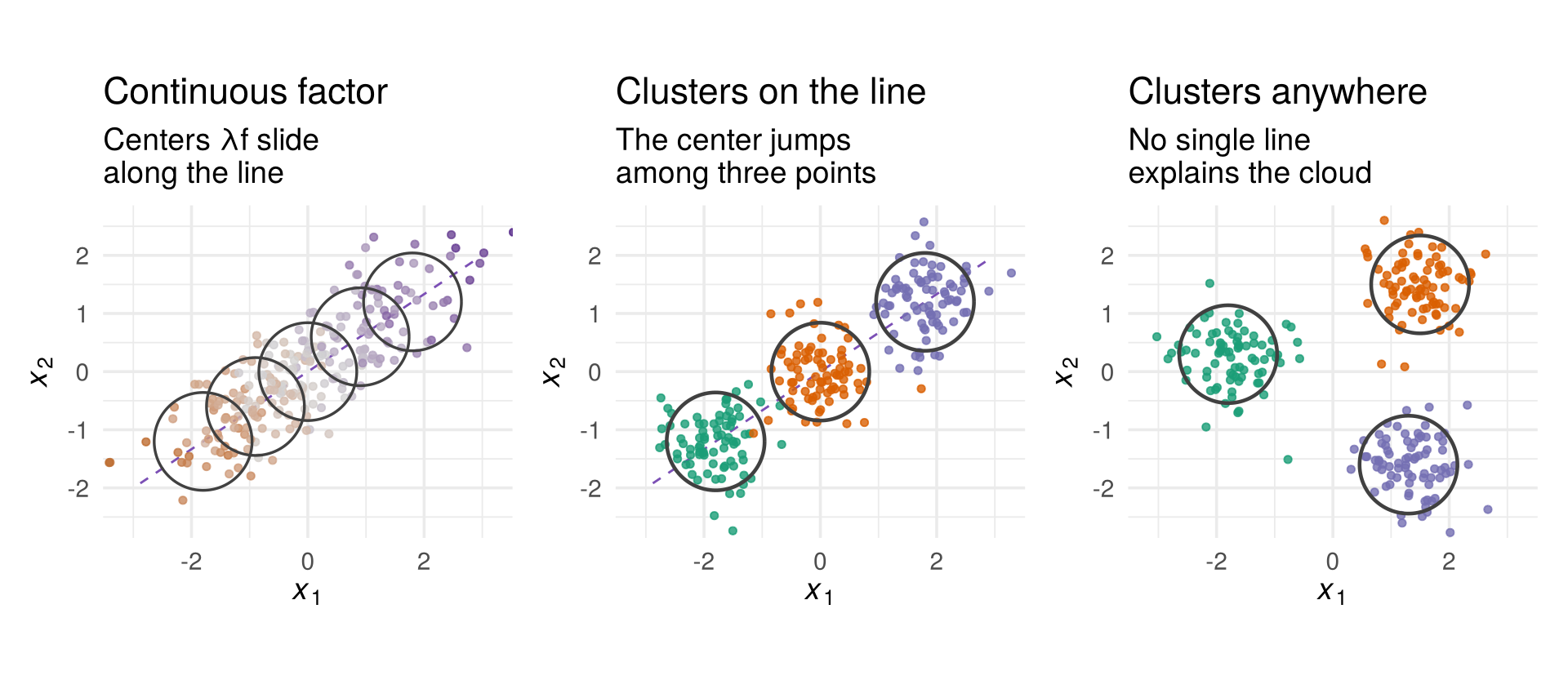
1.7.3 A different distance: multidimensional scaling
Everything so far measured distance in a straight line. Picture a town whose places all sit on one loop road: what matters is the driving distance, not the straight line across the middle.
D_wait <- function(w) {
a <- abs(outer(s_min, s_min, "-"))
D <- pmin(a, T_loop - a + w)
dimnames(D) <- list(places$place, places$place); D
}
fig_mds <- function(height = 660) {
pair <- c("Stadium", "Grocery")
c_frac <- 0.95
site <- tibble(east = approx(road$s, road$east, c_frac * L_road)$y,
north = approx(road$s, road$north, c_frac * L_road)$y)
w_grid <- sort(unique(c(0:36, round(w_star, 1))))
wlab <- function(w) sprintf("%.1f", w)
theta <- 2 * pi * places$frac
prev <- cbind(cos(theta), sin(theta)) * T_loop / (2 * pi)
mds_frames <- purrr::map_dfr(w_grid, function(w) {
Y <- cmdscale(as.dist(D_wait(w)), k = 2)
Y <- procrustes_align(Y, prev); prev <<- Y
places |> dplyr::select(place) |> mutate(d1 = Y[, 1], d2 = Y[, 2], k = wlab(w))
})
road_mds <- mds_frames |> group_by(k) |>
dplyr::group_modify(~ dplyr::bind_rows(.x, .x[1, ])) |> ungroup()
pair_mds <- mds_frames |> dplyr::filter(place %in% pair)
pr <- places |> dplyr::filter(place %in% pair)
p_map <- plot_ly() |>
add_trace(data = road, x = ~east, y = ~north, type = "scatter", mode = "lines", color = I("grey80"),
line = list(color = "grey80", width = 10), hoverinfo = "skip") |>
add_trace(x = pr$east, y = pr$north, type = "scatter", mode = "lines", color = I(col_a2),
line = list(color = col_a2, dash = "dash", width = 1.5), hoverinfo = "skip") |>
add_trace(data = places, x = ~east, y = ~north, type = "scatter", mode = "markers+text",
text = ~place, color = I("#2c3e50"),
textposition = dplyr::case_when(places$east > 3.5 ~ "middle right", places$east < -3.5 ~ "middle left",
places$north > 0 ~ "top center", TRUE ~ "bottom center"),
marker = list(color = "#2c3e50", size = 9), textfont = list(size = 12), hoverinfo = "skip") |>
add_trace(data = site, x = ~east, y = ~north, type = "scatter", mode = "markers+text",
text = "construction", textposition = "bottom right", color = I("#e67e22"),
marker = list(symbol = "x", color = "#e67e22", size = 16, line = list(width = 2)),
textfont = list(color = "#e67e22", size = 12), hoverinfo = "skip")
p_mds <- plot_ly() |>
add_trace(data = road_mds, x = ~d1, y = ~d2, frame = ~k, type = "scatter", mode = "lines",
color = I("grey80"), line = list(color = "grey80", width = 6), hoverinfo = "skip") |>
add_trace(data = mds_frames, x = ~d1, y = ~d2, frame = ~k, text = ~place, type = "scatter",
mode = "markers+text", textposition = "middle right", color = I("#2c3e50"),
marker = list(color = "#2c3e50", size = 9), textfont = list(size = 12),
hovertemplate = "%{text}<extra></extra>") |>
add_trace(data = pair_mds, x = ~d1, y = ~d2, frame = ~k, type = "scatter", mode = "lines",
color = I(col_a2), line = list(color = col_a2, dash = "dash", width = 1.5), hoverinfo = "skip")
p <- subplot(p_map, p_mds, widths = c(0.42, 0.58), margin = 0.05) |>
layout(showlegend = FALSE, margin = list(t = 90),
xaxis = list(title = "west - east (km)", range = c(-7, 8.5), zeroline = FALSE),
yaxis = list(title = "south - north (km)", range = c(-5, 5), scaleanchor = "x", zeroline = FALSE),
xaxis2 = list(title = "MDS dimension 1 (minutes)", range = c(-22, 22), zeroline = FALSE),
yaxis2 = list(title = "MDS dimension 2", range = c(-20, 20), scaleanchor = "x2", zeroline = FALSE),
annotations = list(
list(x = 0, xanchor = "left", y = 1.09, xref = "paper", yref = "paper", showarrow = FALSE,
align = "left", font = list(size = 15),
text = sprintf("On the map<br><span style='font-size:12px'>Stadium to Grocery: %.1f km apart, %.1f km by road</span>",
D_straight["Stadium", "Grocery"], D_drive["Stadium", "Grocery"])),
list(x = 1, xanchor = "right", y = 1.09, xref = "paper", yref = "paper", showarrow = FALSE,
align = "right", font = list(size = 15),
text = "Rebuilt from travel times (MDS)<br><span style='font-size:12px'>grey line: the road, in driving order</span>"))) |>
animation_opts(frame = 150, transition = 0, redraw = TRUE) |>
animation_slider(currentvalue = list(prefix = "waiting time at the construction site: ", suffix = " minutes"))
fig <- finalize_animation(p, list(), start_frame = wlab(0), prefix = "waiting time at the construction site: ",
suffix = " minutes")
fig$x$layout$updatemenus <- head(fig$x$layout$updatemenus, -1)
fig$height <- height
fig
}
# draw the figure
fig_mds()Multidimensional scaling (MDS) takes the table of travel times and finds coordinates whose straight-line distances reproduce it. With no waiting it finds a ring, in driving order. A construction site between the Stadium and the Church adds waiting time to trips that pass it; drag the slider and the ring stretches open. Once the wait passes 27.9 minutes nobody drives through the site, and MDS returns a line: one dimension is enough.
D_wait <- function(w) {
a <- abs(outer(s_min, s_min, "-"))
D <- pmin(a, T_loop - a + w)
dimnames(D) <- list(places$place, places$place); D
}
fig_mds_static <- function() {
L <- 1.25 * max(abs(cmdscale(as.dist(D_wait(0)), k = 2)), abs(cmdscale(as.dist(D_wait(ceiling(w_star) + 2)), k = 2)))
one <- function(w, ttl) {
Y <- cmdscale(as.dist(D_wait(w)), k = 2)
d <- places |> dplyr::select(place) |> mutate(d1 = Y[, 1], d2 = Y[, 2])
ggplot(d, aes(d1, d2)) +
geom_path(data = dplyr::bind_rows(d, d[1, ]), colour = "grey80", linewidth = 2.5) +
geom_point(colour = "#2c3e50", size = 2.6) +
(if (w == 0) geom_text(aes(label = place), size = 3.6, vjust = -0.9)
else geom_text(aes(label = place), size = 3.6, angle = 60, hjust = 0, nudge_y = 1.2)) +
coord_equal(xlim = c(-L, L), ylim = c(-L, L)) + labs(title = ttl, x = "MDS 1 (minutes)", y = "MDS 2")
}
one(0, "No waiting: a ring") + one(ceiling(w_star) + 2, sprintf("Wait > %.0f min: a line", w_star))
}
# draw the figure
fig_mds_static()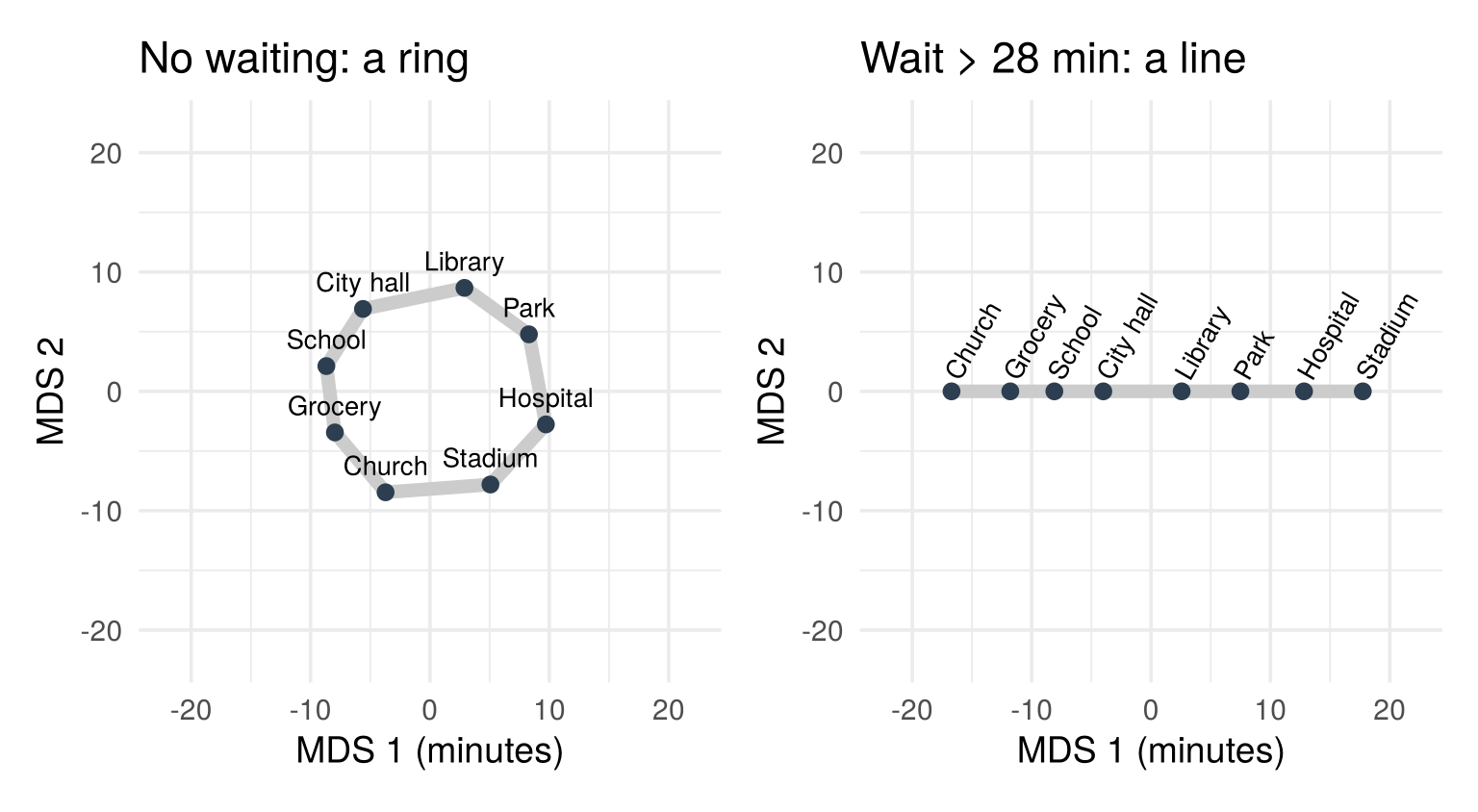
MDS first rebuilds coordinates from the distances we care about; then the same ideas apply to those coordinates. The rebuilt map is only determined up to a rotation, just like \(A\).
Check your understanding
- In the food-critics model, the restaurant’s quality is
- a unique shock
- the common factor
- a cluster
- a distance
- “Critic 1 never errs” gives the same \(A\) as
- PCA
- the symmetric root
- Cholesky with critic 1 first
- a cluster model
- What distinguishes clustering from a factor model?
- The latent variable is discrete
- It uses more variables
- It requires distances
- It has no unique shocks
- MDS is needed when
- the distance we care about is not the straight-line distance
- there are more variables than observations
- the shocks are correlated
- the sample is small
Answers
1 b. 2 c. 3 a. 4 a.1.8 The road ahead
The rest of the course follows the three layers of Section 1.5. Chapter 2 looks at the sample: the data matrix, its plots and its summaries. Chapter 3 moves to the reduced form: the distribution of the observed random vector, its moments, and how sample summaries estimate them. The remaining chapters are structural models: each maps the reduced form to structural parameters, with its own identifying assumptions.
fig_roadmap <- function() {
boxes <- tibble(
x = c(0.9, 3.2, 6.2, 6.2, 6.2, 6.2, 6.2),
y = c(0, 0, 2.4, 1.2, 0, -1.2, -2.4),
w = c(1.5, 1.9, 2.6, 2.6, 2.6, 2.6, 2.6),
title = c("Sample", "Reduced form", "PCA", "MDS", "Factor analysis", "Cluster analysis", "CFA and SEM"),
sub = c("data matrix 𝐗", "𝑋: μ, Σ", "shocks ordered by variance", "coordinates from distances",
"few common factors + unique shocks", "discrete latent groups", "restrictions from theory"),
fill = c("#fdebd5", "#d9f2ec", rep("#f5dfeb", 5)))
ggplot(boxes) +
geom_rect(aes(xmin = x - w / 2, xmax = x + w / 2, ymin = y - 0.45, ymax = y + 0.45, fill = I(fill)),
colour = "grey40") +
geom_text(aes(x, y + 0.17, label = title), fontface = "bold", size = 4.2) +
geom_text(aes(x, y - 0.12, label = sub), size = 3.4) +
annotate("segment", x = 1.7, xend = 2.2, y = 0, yend = 0, colour = col_e, linewidth = 1.1,
arrow = arrow(length = unit(0.22, "cm"), type = "closed")) +
annotate("text", x = 1.95, y = 0.25, label = "infer", colour = col_e, fontface = "bold", size = 4) +
annotate("segment", x = 4.2, xend = 4.85, y = 0, yend = c(2.4, 1.2, 0, -1.2, -2.4), colour = col_h, linewidth = 0.9,
arrow = arrow(length = unit(0.2, "cm"), type = "closed")) +
annotate("text", x = 3.2, y = 1.25, label = "identify:\nstructural models", colour = col_h,
fontface = "bold", size = 4, lineheight = 0.9) +
coord_cartesian(xlim = c(0, 7.7), ylim = c(-3, 3.4), expand = FALSE) +
theme_void()
}
# draw the figure
fig_roadmap()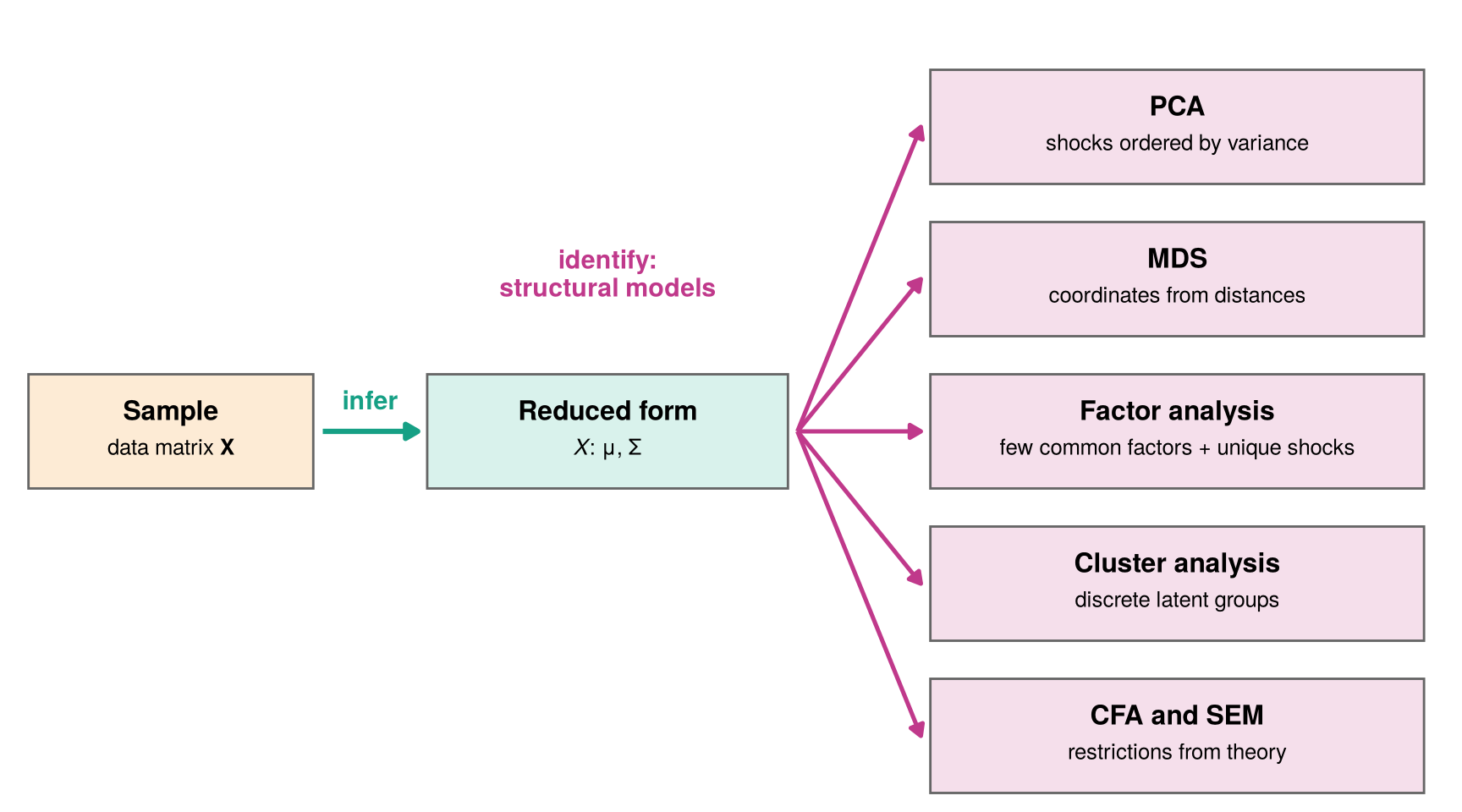
- Principal components analysis (Chapter 4): the longest-first-column choice of Section 1.4.3.
- Multidimensional scaling (Chapter 5): coordinates rebuilt from distances, as in Section 1.7.3.
- Exploratory factor analysis (Chapter 6): common factors and unique shocks, as in Section 1.7.1.
- Cluster analysis (Chapter 7): a discrete latent variable, as in Section 1.7.2.
- Confirmatory factor analysis and structural equation models (Chapter 8): restrictions from theory.
1.9 Summary
- Regressing one variable on another assumes it is chosen from outside. When both are outcomes of the same hidden forces, ask instead which forces move them.
- Independent shocks form a round cloud; a system \(A\) combines them into a tilted cloud. Undoing \(A\) (whitening) recovers the shocks.
- The data reveal only the reduced form \(\Sigma\). Every rotation of \(A\) gives the same \(\Sigma=AA'\), so one extra restriction picks a structural form: symmetry, an ordering (regression), the longest first column, or a known coefficient.
- Infer (sample → reduced form) + identify (reduced form → structural form) = estimate.
- A structural model explains the data and can compress them.
- \(X=A\varepsilon\) is one structural model. Factors and clusters change the latent structure. MDS first rebuilds coordinates from the distances we care about, then the same ideas apply.
Which latent coordinates make the multivariate data easier to understand?
1.9.1 Further reading
- 3Blue1Brown, Essence of Linear Algebra, chapters 1 to 3 (vectors, linear combinations, linear transformations and matrices).
- Everitt and Hothorn (2011), An Introduction to Applied Multivariate Analysis with R, Chapter 1.