2 Looking at Multivariate Data
R code for this chapter: looking_at_data_figures.R (data and figures) and _common.R (shared helpers). Save both in one folder and run source("looking_at_data_figures.R"); every figure is then one function call, as shown under the Code buttons.
Slides for this chapter: looking_at_data_slides.html (opens in a new tab; use the arrow keys to move between slides).
In Chapter 1, data analysis moved between three layers (Section 1.5): the sample we observe, the reduced form (the distribution of the random vector that produced it) and the structural form (the hidden forces behind it). This chapter is about the first layer, the sample: how to write it down, which kinds of variables it contains, how to look at it, and how to summarise it. Chapter 3 moves to the reduced form.
We follow one question from start to finish: which of the 50 US states is the most unusual?
2.1 The data matrix
Multivariate data come as a table: \(n\) observations (people, firms, states, days) measured on \(p\) variables. We store them in an \(n\times p\) data matrix
\[ \mathbf X= \begin{pmatrix} x_{11} & x_{12} & \cdots & x_{1p}\\ x_{21} & x_{22} & \cdots & x_{2p}\\ \vdots & \vdots & \ddots & \vdots\\ x_{n1} & x_{n2} & \cdots & x_{np} \end{pmatrix}. \]
The entry \(x_{tj}\) is the value of variable \(j\) for observation \(t\): the first index is the row (observation), the second the column (variable). Row \(t\), everything we know about one observation, is written as the vector \(x^{(t)}\) (the superscript in parentheses is a label for the row, not a power):
\[ x^{(t)}=\begin{pmatrix}x_{t1}\\ x_{t2}\\ \vdots\\ x_{tp}\end{pmatrix}=(x_{t1},x_{t2},\dots,x_{tp})' . \]
Why not simply \(x_t\)? Because a plain subscript is reserved for the variables: for a vector \(x=(x_1,\dots,x_p)'\), \(x_j\) is its \(j\)-th element, the value of variable \(j\). So \(x_1\) is “the first variable”, and \(x^{(1)}\) is “the first observation”. The two meet in the entry \(x^{(t)}_j=x_{tj}\).
Vectors in this course are columns. The prime \('\) means transpose: it turns a column into a row (and a row into a column), so \((x_{t1},\dots,x_{tp})'\) is just a compact way to write the column above on one line.
Our running example ships with R: state.x77, indicators for the \(n=50\) US states in the 1970s. We use six
variables that describe living conditions: income per capita, illiteracy (%), life expectancy (years),
murders per 100,000 people, the share of adults with a high-school diploma (%), and the number of days with
frost. Here are some of its rows:
| Income $ per capita | Illiteracy % | Life exp. years | Murder per 100k | HS grad % | Frost days | |
|---|---|---|---|---|---|---|
| 1 Alabama | 3,624 | 2.1 | 69.0 | 15.1 | 41.3 | 20 |
| 2 Alaska | 6,315 | 1.5 | 69.3 | 11.3 | 66.7 | 152 |
| 3 Arizona | 4,530 | 1.8 | 70.5 | 7.8 | 58.1 | 15 |
| 4 Arkansas | 3,378 | 1.9 | 70.7 | 10.1 | 39.9 | 65 |
| 5 California | 5,114 | 1.1 | 71.7 | 10.3 | 62.6 | 20 |
| ⋮ | ⋮ | ⋮ | ⋮ | ⋮ | ⋮ | ⋮ |
| 43 Texas | 4,188 | 2.2 | 70.9 | 12.2 | 47.4 | 35 |
| ⋮ | ⋮ | ⋮ | ⋮ | ⋮ | ⋮ | ⋮ |
| 50 Wyoming | 4,566 | 0.6 | 70.3 | 6.9 | 62.9 | 173 |
Texas is row 43, so its murder rate is \(x_{43,4}=12.2\). In R, the data matrix is simply a numeric matrix with one row per state and one column per variable:
X <- state.x77[, c("Income", "Illiteracy", "Life Exp", "Murder", "HS Grad", "Frost")]
dim(X)          # n = 50 rows, p = 6 columns
## [1] 50 6## Income Illiteracy Life Exp Murder HS Grad Frost
## Alabama 3624 2.1 69.05 15.1 41.3 20
## Alaska 6315 1.5 69.31 11.3 66.7 152
## Arizona 4530 1.8 70.55 7.8 58.1 15## Income Illiteracy Life Exp Murder HS Grad Frost
## 4188.0 2.2 70.9 12.2 47.4 35.0With 50 rows and six columns, reading the numbers quickly becomes hard. The picture below shows the whole data matrix sideways (states along the bottom). Because the variables have different units (dollars, years, days), each value is first standardised: we subtract the variable’s average and divide by its standard deviation, \(z_{tj}=(x_{tj}-\bar x_j)/s_j\). The colour then shows how many standard deviations a state lies above (purple) or below (orange) the average state on that variable. The blue column is one observation (Texas), the red row one variable (murder).
fig_heat <- function() {
  Z6 <- scale(X6)
  heat_df <- as_tibble(Z6) |>
    mutate(abb = factor(states$abb, levels = states$abb)) |>
    pivot_longer(-abb, names_to = "variable", values_to = "z") |>
    mutate(variable = factor(variable, levels = rev(vars6), labels = rev(labs6)))
  row_t <- which(states$abb == "TX"); col_j <- 7 - which(vars6 == "Murder")
  ggplot(heat_df, aes(abb, variable, fill = z)) +
    geom_tile(colour = "white", linewidth = 0.2) +
    annotate("rect", ymin = 0.5, ymax = 6.5, xmin = row_t - 0.5, xmax = row_t + 0.5,
             fill = NA, colour = col_a1, linewidth = 1.1) +
    annotate("rect", ymin = col_j - 0.5, ymax = col_j + 0.5, xmin = 0.5, xmax = n_st + 0.5,
             fill = NA, colour = col_a2, linewidth = 1.1) +
    scale_fill_gradient2(low = "#b35806", mid = "white", high = "#542788",
                         limits = c(-3, 3), oob = scales::squish, name = "standardised\nvalue") +
    labs(x = NULL, y = NULL) +
    theme(axis.text.x = element_text(size = 8, angle = 90, vjust = 0.5), panel.grid = element_blank())
}

# draw the figure
fig_heat()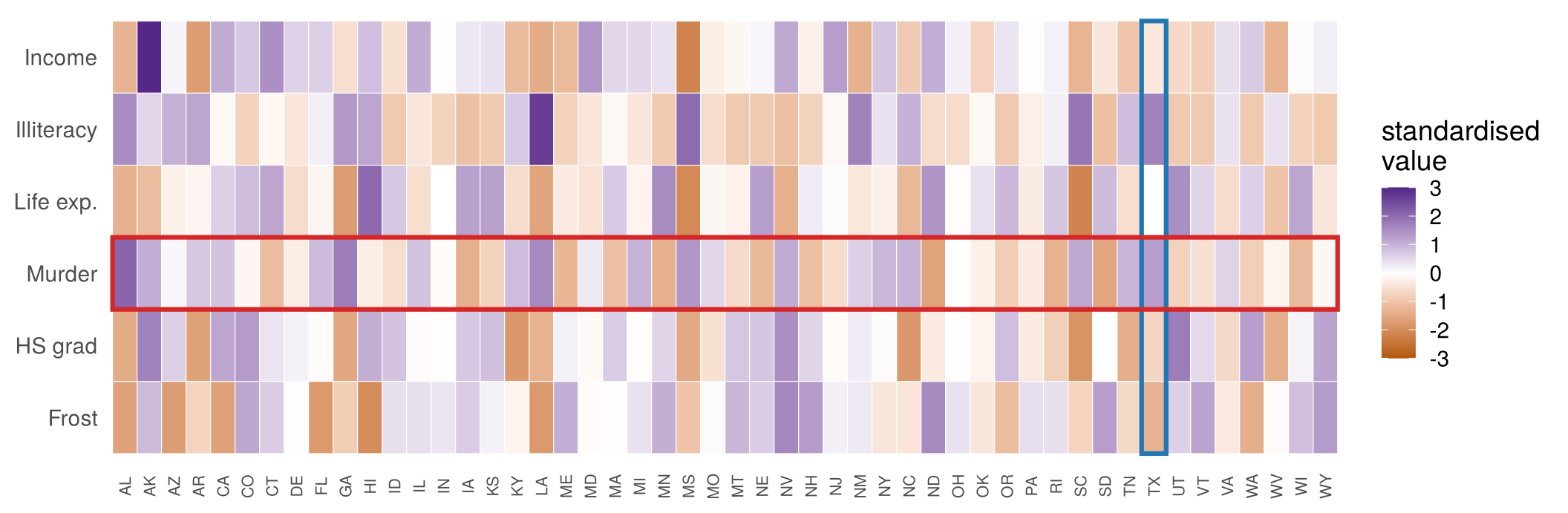
Single extreme values are easy to spot (Alaska’s income and frost, Louisiana’s illiteracy). States whose combination of values is unusual are much harder to see. We come back to this at the end.
2.1.1 Observations are points
The key geometric idea of the course: an observation with \(p\) variables is a point in \(p\)-dimensional space, and the whole data matrix is a cloud of \(n\) points. With one variable each state is a point on a line, with two a point in the plane (the scatterplot), with three a point in space (the dotted lines in the right panel drop the labelled states onto the floor, which is the scatterplot in the middle). With six we can no longer draw the space, but the algebra does not change: lengths, angles and distances are computed exactly as in two dimensions.
fig_dims_3d_static <- function(azimuth = -35, elevation = 22) {
  hl <- c("TX", "NV", "IA", "AL", "VT")
  rng <- list(x = c(0.5, 3), y = c(1, 16), z = c(67.5, 74))          # illiteracy, murder, life expectancy
  unit <- function(v, r) (v - r[1]) / diff(r)
  a <- azimuth * pi / 180; e <- elevation * pi / 180
  proj <- function(x, y, z) {                                         # x, y, z in [0, 1]
    x <- x - 0.5; y <- y - 0.5; z <- z - 0.5
    u <- x * cos(a) - y * sin(a)                                      # turn around the vertical axis
    d <- x * sin(a) + y * cos(a)
    tibble(px = u, py = z * cos(e) + d * sin(e))                      # tilt and drop depth
  }
  P <- with(states, proj(unit(Illiteracy, rng$x), unit(Murder, rng$y), unit(LifeExp, rng$z))) |>
    mutate(abb = states$abb, h = abb %in% hl)
  Fl <- with(states, proj(unit(Illiteracy, rng$x), unit(Murder, rng$y), 0)) |> mutate(abb = states$abb)
  # floor and the two back walls (x = 0 and y = 1), like the corner of a room
  edges <- list(c(0,0,0, 1,0,0), c(1,0,0, 1,1,0), c(1,1,0, 0,1,0), c(0,1,0, 0,0,0),     # floor
                c(0,0,0, 0,0,1), c(0,1,0, 0,1,1), c(0,0,1, 0,1,1),                       # wall x = 0
                c(1,1,0, 1,1,1), c(0,1,1, 1,1,1))                                        # wall y = 1
  grid_f <- c(lapply(c(0.25, 0.5, 0.75), function(g) c(g,0,0, g,1,0)),
              lapply(c(0.25, 0.5, 0.75), function(g) c(0,g,0, 1,g,0)))
  seg <- function(L) purrr::map_dfr(L, function(v) {
    a0 <- proj(v[1], v[2], v[3]); a1 <- proj(v[4], v[5], v[6])
    tibble(x = a0$px, y = a0$py, xend = a1$px, yend = a1$py) })
  E <- seg(edges); G <- seg(grid_f)
  ax <- dplyr::bind_rows(proj(0.5, -0.2, 0) |> mutate(lab = "illiteracy"),
                         proj(1.22, 0.5, 0) |> mutate(lab = "murder"),
                         proj(-0.08, 1, 1.12) |> mutate(lab = "life exp."))
  hlP <- P |> dplyr::filter(h); hlF <- Fl |> dplyr::filter(abb %in% hl)
  ggplot() +
    geom_segment(data = G, aes(x, y, xend = xend, yend = yend), colour = "grey90") +
    geom_segment(data = E, aes(x, y, xend = xend, yend = yend), colour = "grey65") +
    geom_segment(data = tibble(x = hlP$px, y = hlP$py, xend = hlF$px, yend = hlF$py),
                 aes(x, y, xend = xend, yend = yend), colour = "grey45", linetype = 3) +
    geom_point(data = hlF, aes(px, py), colour = "grey60", size = 1.2) +
    geom_point(data = dplyr::filter(P, !h), aes(px, py), colour = "#6f7a8c", alpha = 0.6, size = 2.2) +
    geom_point(data = hlP, aes(px, py), colour = "black", size = 2.4) +
    geom_text_repel(data = hlP, aes(px, py, label = abb), size = 3.6, seed = 3, min.segment.length = 0.2,
                    box.padding = 0.35) +
    geom_text(data = ax, aes(px, py, label = lab), size = 3.6, colour = "grey30") +
    coord_equal(clip = "off") +
    labs(title = "p = 3: a point in space", subtitle = "Dotted: drop to the floor (the plane)", x = NULL, y = NULL) +
    theme(axis.text = element_blank(), panel.grid = element_blank())
}

fig_dims <- function() {
  hl <- c("TX", "NV", "IA", "AL", "VT")
  tx <- states |> dplyr::filter(abb %in% hl)
  p_1d <- ggplot(states, aes(Murder, 0)) +
    geom_hline(yintercept = 0, colour = "grey70") +
    geom_point(colour = "#6f7a8c", alpha = 0.6, size = 2.2) +
    geom_point(data = tx, colour = "black", size = 2.4) +
    geom_text_repel(data = tx, aes(label = abb), nudge_y = 0.3, size = 3.6, seed = 2,
                    direction = "x", min.segment.length = 0) +
    scale_y_continuous(limits = c(-0.5, 0.6), breaks = NULL) +
    labs(title = "p = 1: a line", subtitle = "Each state is a number", x = "murders per 100,000", y = NULL)
  p_2d <- ggplot(states, aes(Illiteracy, Murder)) +
    geom_point(colour = "#6f7a8c", alpha = 0.6, size = 2.2) +
    geom_point(data = tx, colour = "black", size = 2.4) +
    geom_text_repel(data = tx, aes(label = abb), size = 3.6, seed = 2, min.segment.length = 0) +
    labs(title = "p = 2: a plane", subtitle = "Each state is a point", x = "illiteracy (%)", y = "murders per 100,000")
  p_1d + p_2d + fig_dims_3d_static() + plot_layout(widths = c(1, 1, 1.15))
}

# draw the figure
fig_dims()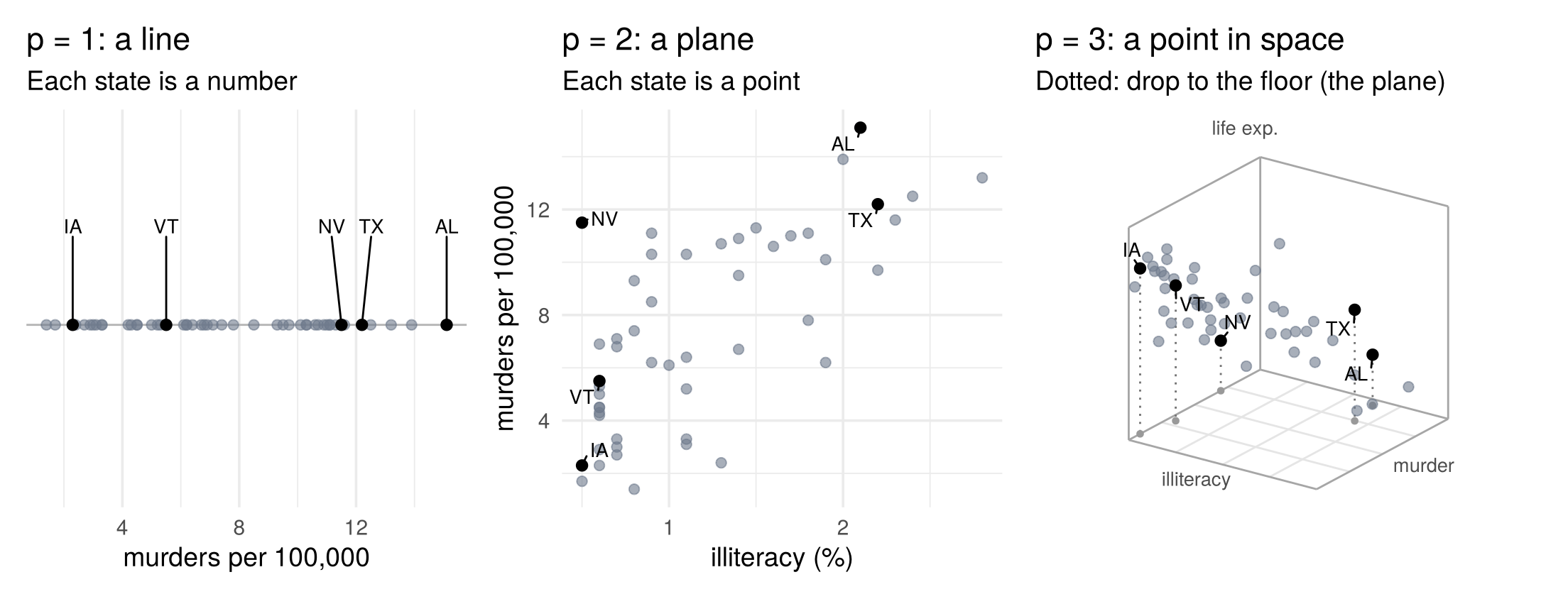
Points have distances. Draw two states in a scatterplot, lay a ruler from one point to the other, and read off the length: that is the Euclidean distance (the ordinary “straight-line” distance, with both axes drawn on the same scale). Here are Texas and California on illiteracy and murder:
fig_euclid <- function() {
  a <- X6["California", c("Illiteracy", "Murder")]; b <- X6["Texas", c("Illiteracy", "Murder")]
  d <- sqrt(sum((a - b)^2))
  two <- tibble(state = c("California", "Texas"), x = c(a[1], b[1]), y = c(a[2], b[2]))
  ggplot() +
    annotate("segment", x = a[1], xend = b[1], y = a[2], yend = a[2], linetype = 2, colour = "grey40") +
    annotate("segment", x = b[1], xend = b[1], y = a[2], yend = b[2], linetype = 2, colour = "grey40") +
    annotate("segment", x = a[1], xend = b[1], y = a[2], yend = b[2], colour = col_a2, linewidth = 1.4) +
    annotate("text", x = (a[1] + b[1]) / 2, y = a[2] - 0.18, label = sprintf("%.1f (illiteracy)", b[1] - a[1]),
             colour = "grey30", size = 4.5) +
    annotate("text", x = b[1] + 0.08, y = (a[2] + b[2]) / 2, label = sprintf("%.1f (murder)", b[2] - a[2]),
             colour = "grey30", size = 4.5, hjust = 0) +
    annotate("text", x = (a[1] + b[1]) / 2 - 0.12, y = (a[2] + b[2]) / 2 + 0.2,
             label = sprintf("ruler: %.2f", d), colour = col_a2, size = 4.8, hjust = 1, fontface = "bold") +
    geom_point(data = two, aes(x, y), colour = "black", size = 3.2) +
    geom_text(data = two, aes(x, y, label = state), nudge_y = 0.3, size = 4.5) +
    coord_equal(xlim = c(0.3, 3.3), ylim = c(9.6, 12.8)) +
    labs(x = "illiteracy (%)", y = "murders per 100,000",
         title = "A ruler between two points",
         subtitle = "Zoomed in, both axes on the same scale")
}

# draw the figure
fig_euclid()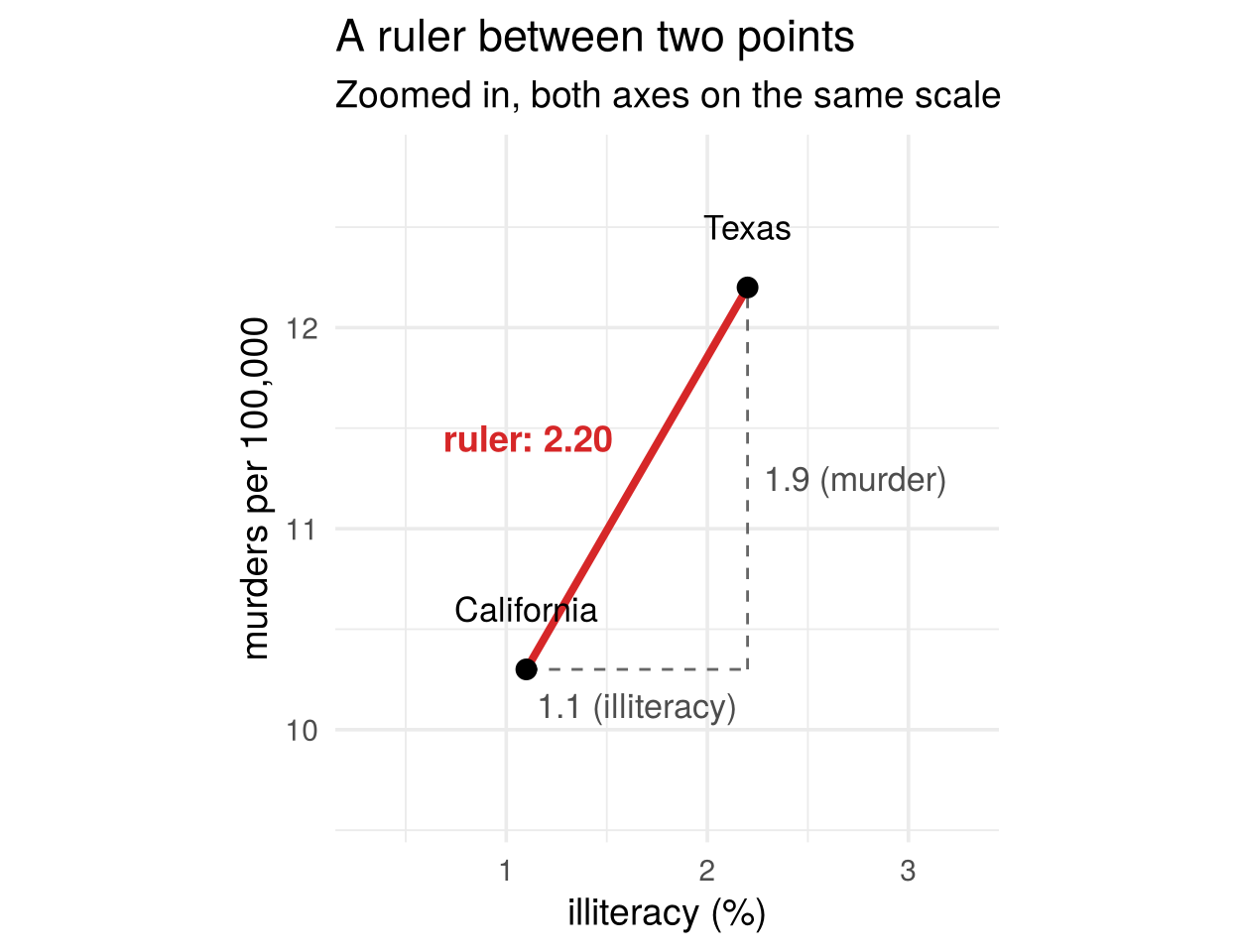
The ruler is the long side of a right triangle. Its two short sides are the differences on each variable: 1.1 percentage points of illiteracy and 1.9 murders per 100,000. By Pythagoras’ theorem,
\[ \sqrt{(2.2-1.1)^2+(12.2-10.3)^2}=2.20 . \]
With three variables the ruler goes through space, and the same rule adds a third squared difference. With \(p\) variables we can no longer hold a ruler, but the formula carries on: square the difference on every variable, add them up, and take the square root. For observations \(s\) and \(t\),
\[ \lVert x^{(s)}-x^{(t)}\rVert=\sqrt{\sum_{j=1}^p (x_{sj}-x_{tj})^2} . \]
The same sum can be written with vectors. The difference of two observations is the column of differences, \(x^{(s)}-x^{(t)}=(x_{s1}-x_{t1},\dots,x_{sp}-x_{tp})'\). For two columns \(a\) and \(b\) of the same length, the product of the row \(a'\) with the column \(b\) multiplies matching entries and adds them up, \(a'b=\sum_{j=1}^p a_jb_j\) (a single number, the inner product). With \(a=b=x^{(s)}-x^{(t)}\) this is exactly the sum of squared differences, so
\[ \lVert x^{(s)}-x^{(t)}\rVert=\sqrt{(x^{(s)}-x^{(t)})'(x^{(s)}-x^{(t)})} . \]
The Euclidean distance depends on the units: murder rates vary over a wider range of numbers than illiteracy rates, so they dominate the distance. Standardising the variables (Section 2.5) or the Mahalanobis distance (Section 2.6.2) deal with this.
X2 <- state.x77[, c("Illiteracy", "Murder")]
dist(X2[c("Texas", "California"), ])   # Euclidean distance between two states
## Texas
## California 2.19545Check your understanding
- In the data matrix \(\mathbf X\), the entry \(x_{tj}\) is
- the value of observation \(j\) on variable \(t\)
- the value of variable \(j\) for observation \(t\)
- the correlation between variables \(t\) and \(j\)
- the distance between observations \(t\) and \(j\)
- With \(p=6\) variables, each state is
- a point in 6-dimensional space
- a point in the plane
- a line with 6 points
- a 6 × 6 matrix
Answers
1 b. 2 a.2.2 Types of variables
Not every column of a data set is a measurement on a number line. The traditional classification has four levels of measurement, also called measurement scales (as in Everitt and Hothorn, 2011, Chapter 1). The scale says which comparisons between two values are meaningful: only “same or different” (nominal), also “larger or smaller” (ordinal), also “by how much” (interval), and also “how many times as much” (ratio). We say a variable is nominal-scaled, ordinal-scaled, interval-scaled or ratio-scaled, or that it is measured on that scale.
The examples use a second data set besides the states, the Palmer penguins (R package palmerpenguins):
333 adult penguins of three species (Adelie, Chinstrap, Gentoo), observed on three islands near
Palmer Station, Antarctica, after dropping penguins with missing values. For each penguin it records the
species, island, sex and year, the body mass, the flipper (wing) length, and two measurements of the bill
(the beak): bill length, from the base of the bill to its tip, and bill depth, the height of the bill
from top to bottom.
| Type | What the values mean | Example |
|---|---|---|
| Nominal | unordered categories (labels) | penguin species, island; US region |
| Ordinal | ordered categories; the gaps are not comparable | diamond cut (Fair < Good < … < Ideal); survey answer (strongly disagree < disagree < neutral < agree < strongly agree) |
| Interval | equal differences mean the same; zero is arbitrary. A step from 40 °F to 50 °F is the same change in temperature as a step from 80 °F to 90 °F. | temperature in °F or °C; calendar year |
| Ratio | interval scale with a true zero, so ratios make sense. Zero means “none at all”, so a value twice as large means twice as much: 4 kg is twice 2 kg, but 80 °F is not “twice as hot” as 40 °F, because 0 °F is not “no temperature”. | income, body mass (the weight shown on a scale, in grams), murder rate |
Two special cases are common in business data. A binary variable is a nominal variable with only two categories (default yes/no). Coded 0/1, its mean is the share of ones, which is why binary variables are often treated as numeric. A count (customer complaints, frost days) is ratio-scaled, since zero means none and 10 complaints are twice as many as 5, but it takes only whole numbers.
fig_types <- function() {
  p_nom <- ggplot(peng, aes(island)) +
    geom_bar(fill = "#6f7a8c") +
    labs(title = "Nominal", subtitle = "Island: labels,\nno order", x = NULL, y = "count")
  cut_med <- levels(ggplot2::diamonds$cut)[median(as.integer(ggplot2::diamonds$cut))]
  p_ord <- ggplot(ggplot2::diamonds, aes(cut, fill = cut == cut_med)) +
    geom_bar() +
    scale_fill_manual(values = c(`TRUE` = col_a1, `FALSE` = "#6f7a8c"), guide = "none") +
    scale_y_continuous(labels = scales::label_comma()) +
    labs(title = "Ordinal", subtitle = paste0("Diamond cut: ordered,\nmedian '", cut_med, "'"), x = NULL, y = NULL) +
    theme(axis.text.x = element_text(angle = 30, hjust = 1))
  p_int <- ggplot(airquality, aes(Temp)) +
    geom_histogram(bins = 20, fill = "#6f7a8c", colour = "white") +
    labs(title = "Interval", subtitle = "Temperature (°F): zero\nis arbitrary", x = "°F (New York, 1973)", y = NULL)
  p_rat <- ggplot(peng, aes(body_mass_g)) +
    geom_histogram(bins = 25, fill = "#6f7a8c", colour = "white") +
    geom_vline(xintercept = mean(peng$body_mass_g), colour = col_a2, linewidth = 1) +
    labs(title = "Ratio", subtitle = "Body mass: true zero,\nmean (red) and ratios", x = "grams", y = NULL)
  p_nom + p_ord + p_int + p_rat + plot_layout(nrow = 1)
}

# draw the figure
fig_types()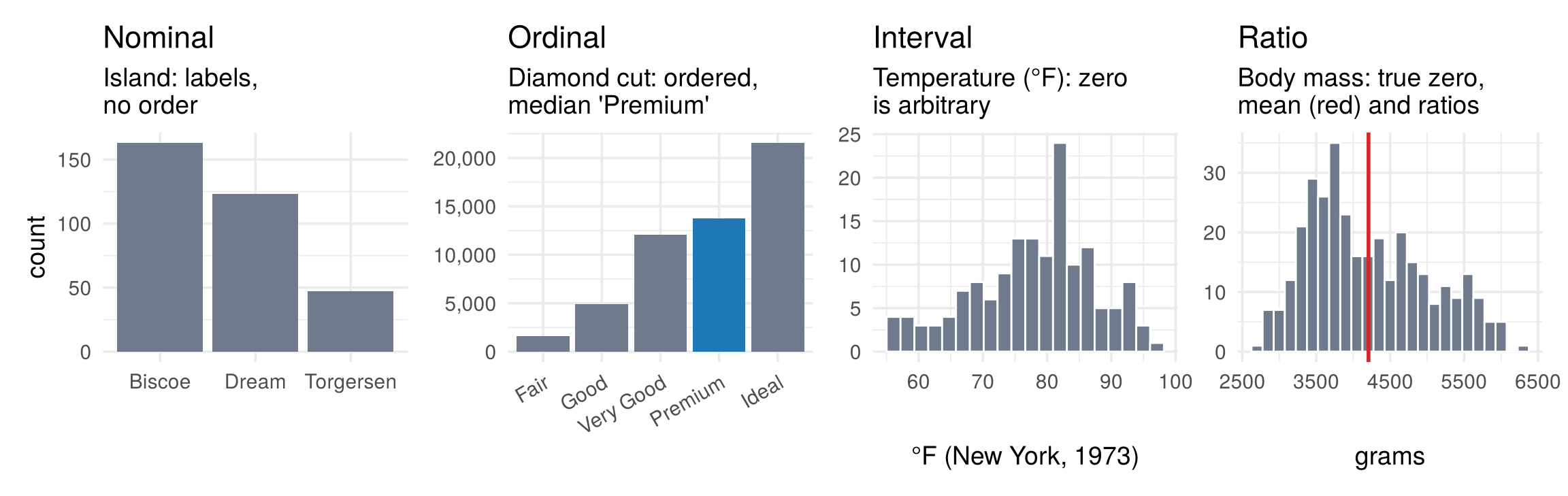
2.2.1 Why the type matters
The type decides what we can compute and how we can plot. Each column below is a summary or a way of showing a variable; each row a type of variable:
fig_type_matrix <- function(base = 13) {
  sym <- c(y = "\u2713", n = "\u2717", `~` = "~")
  ggplot(type_matrix, aes(what, type)) +
    geom_tile(aes(fill = v), colour = "white", linewidth = 1.2) +
    geom_text(aes(label = sym[v], colour = v), size = base / 2.2, fontface = "bold") +
    scale_fill_manual(values = c(y = "#e3f1e6", n = "#f6e3e1", `~` = "#fbf1dc"), guide = "none") +
    scale_colour_manual(values = c(y = "#1b7a3a", n = "#b03a2e", `~` = "#a8730f"), guide = "none") +
    scale_x_discrete(position = "top") +
    facet_grid(~ group, scales = "free_x", space = "free_x") +
    labs(x = NULL, y = NULL, caption = "\u2713 works    ~ with care (few categories or values, binning)    \u2717 meaningless") +
    theme_minimal(base_size = base) +
    theme(axis.text.x.top = element_text(angle = 90, hjust = 0, vjust = 0.5), panel.grid = element_blank(),
          strip.placement = "outside", strip.text = element_text(face = "bold", size = base),
          axis.text.y = element_text(size = base), plot.caption = element_text(hjust = 0, colour = "grey30"))
}

# draw the figure
fig_type_matrix()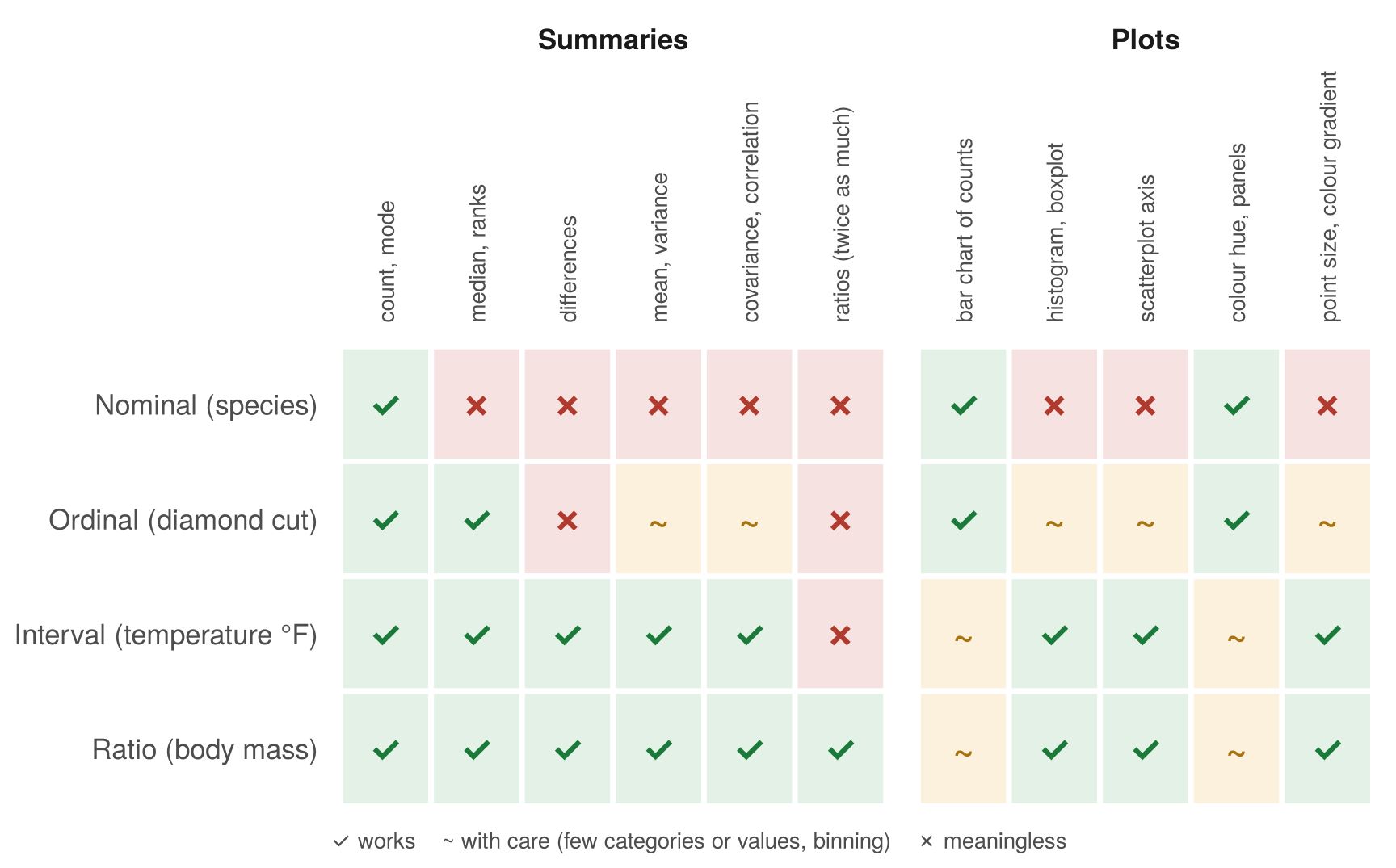
- Summaries. Means, variances, covariances and distances are built from differences and averages of values, so they need numbers on a scale: interval or ratio data. The “average island” of a penguin is meaningless, even if the computer stores the islands as 1, 2, 3. Ordinal variables such as survey scales are often treated as numeric anyway, a pragmatic choice that works when there are enough categories (factor analysis of questionnaires relies on it).
- Plots. A plot uses the same operations. Positions on an axis and point sizes compare distances and amounts, so they need numeric variables. Categories can only be counted, given different colours, or put in separate panels.
2.2.2 Categorical variables in R: factors
A categorical variable can be stored as text, for example the island names "Biscoe", "Dream",
"Torgersen" repeated for every penguin. R has a dedicated type for it, the factor. A factor stores the
list of possible categories once (its levels) and, for each observation, only a whole-number code that points
to a level:
island_text <- as.character(palmerpenguins::penguins$island)   # stored as text
island <- factor(island_text)                                  # converted to a factor
levels(island)             # the categories, stored once
## [1] "Biscoe"    "Dream"     "Torgersen"
head(as.integer(island))   # each penguin only carries a code
## [1] 3 3 3 3 3 3
table(island)              # counts per category
## island
##    Biscoe     Dream Torgersen
##       168       124        52
Converting text to a factor has several advantages:
- Smaller and faster. Whole-number codes take less memory than repeated text, and counting, grouping and sorting work on the codes, which is faster for large data sets.
- A fixed set of categories. Once the levels are set, a misspelled value (
"Bisco") shows up as missing instead of silently becoming a new category, and a category with no observations still appears in counts and plots. - Order. The order of the levels sets the order in tables and plot legends. For an ordinal variable,
ordered = TRUEalso makes comparisons such as<meaningful (see the code below). - Models. Regression and other model functions recognise factors and create the dummy (0/1) variables for the categories automatically.
cut <- factor(c("Good", "Ideal", "Fair"),
              levels = c("Fair", "Good", "Very Good", "Premium", "Ideal"), ordered = TRUE)
cut
## [1] Good  Ideal Fair
## Levels: Fair < Good < Very Good < Premium < Ideal
cut < "Premium"   # ordered factors can be compared
## [1]  TRUE FALSE  TRUE
R records how each column is stored: a factor is nominal (or ordinal, if ordered), a numeric is treated
as interval or ratio. Storage is not meaning, though: year is stored as a number in the penguin data but is
used here only as a label.
##           species            island    bill_length_mm     bill_depth_mm
##          "factor"          "factor"         "numeric"         "numeric"
## flipper_length_mm       body_mass_g               sex              year
##         "integer"         "integer"          "factor"         "integer"
Check your understanding
- Temperature in °F is an interval variable rather than a ratio variable because
- it can be negative
- its zero point is arbitrary, so “twice as hot” is meaningless
- it is measured with error
- it has only a few values
- Which variable should not go into a covariance matrix as it is?
- income in dollars
- murders per 100,000
- penguin species coded 1, 2, 3
- frost days
Answers
1 b. 2 c.2.3 A plot for each type
The type of a variable also decides which plot works. The scatterplot, the workhorse for two numeric variables, breaks down as soon as a variable is categorical:
fig_type_plots <- function() {
  cnt <- peng |> count(island, species)
  bad1 <- ggplot(peng, aes(island, species)) +
    geom_point(colour = "#6f7a8c", size = 3) +
    labs(title = "Scatterplot: two categorical",
         subtitle = sprintf("%d penguins, but only %d dots", nrow(peng), nrow(cnt)), x = "island", y = "species")
  good1 <- ggplot(cnt, aes(island, species)) +
    geom_tile(aes(fill = n), colour = "white") +
    geom_text(aes(label = n), size = 5) +
    scale_fill_gradient(low = "#eef4fa", high = col_a1, guide = "none") +
    labs(title = "Count table (heatmap)", subtitle = "Each combination shows its count", x = "island", y = "species")
  bad2 <- ggplot(peng, aes(species, body_mass_g)) +
    geom_point(colour = "#6f7a8c", size = 2, alpha = 0.6) +
    labs(title = "Scatterplot: categorical vs numeric", subtitle = "Points pile up on three lines",
         x = "species", y = "body mass (g)")
  good2 <- ggplot(peng, aes(species, body_mass_g)) +
    geom_boxplot(width = 0.5, outlier.shape = NA, fill = "grey95") +
    geom_jitter(width = 0.15, colour = "#6f7a8c", alpha = 0.5, size = 1.2) +
    labs(title = "Boxplot with jittered points", subtitle = "Centre, spread and every penguin",
         x = "species", y = "body mass (g)")
  (bad1 + good1) / (bad2 + good2)
}

# draw the figure
fig_type_plots()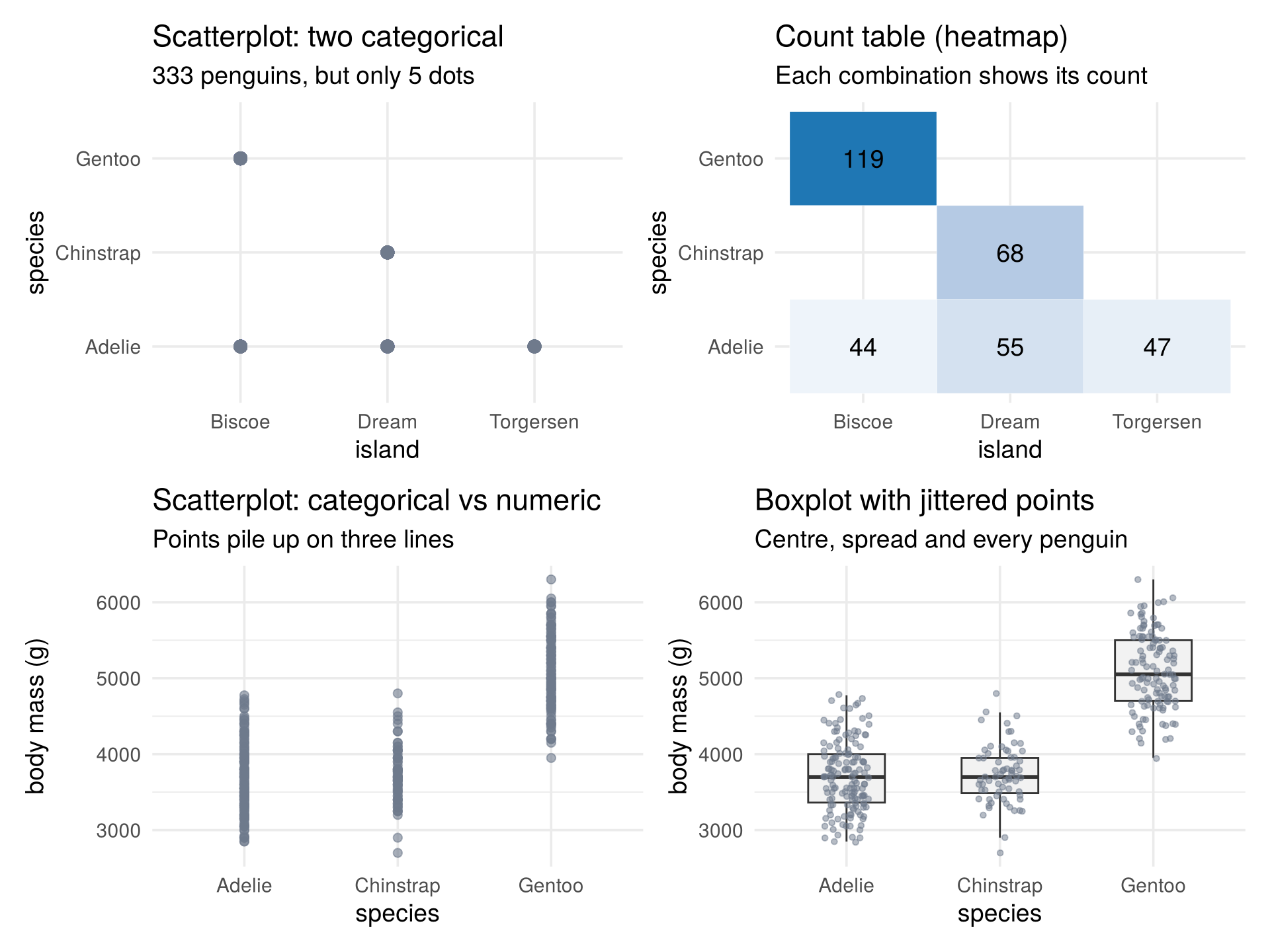
- Two categorical variables (top). A scatterplot of island against species draws 333 penguins as only 5 dots: all penguins with the same combination sit on top of each other, and the plot hides how many there are. A count table (here drawn as a heatmap) shows exactly what matters: how many penguins fall into each combination.
- One categorical, one numeric (bottom). The points pile up on a few vertical lines and overlap. A boxplot shows the centre (median) and spread (box: middle half of the data) for each group, and jittered points (shifted sideways at random) show every penguin without overlap.
- Two numeric variables: the scatterplot is the right tool, one point per observation.
2.3.1 Many numeric variables: the scatterplot matrix
With \(p\) numeric variables there are \(p(p-1)/2\) pairs. The scatterplot matrix shows all of them at once: the panel in row \(j\), column \(k\) plots variable \(j\) against variable \(k\), the diagonal shows each variable on its own, and the upper triangle reports the correlations (introduced below).
fig_pairs <- function(base = 12) {
  ggpairs(states, columns = vars6,
          lower = list(continuous = wrap("points", alpha = 0.6, size = 1.1, colour = "#6f7a8c")),
          diag = list(continuous = wrap("densityDiag", colour = "#2c3e50")),
          upper = list(continuous = wrap("cor", size = 4, colour = "black", stars = FALSE)),
          columnLabels = labs6) +
    theme_minimal(base_size = base) +
    theme(panel.border = element_rect(fill = NA, colour = "grey85"), axis.text = element_text(size = 7),
          panel.grid.minor = element_blank())
}

# draw the figure
fig_pairs()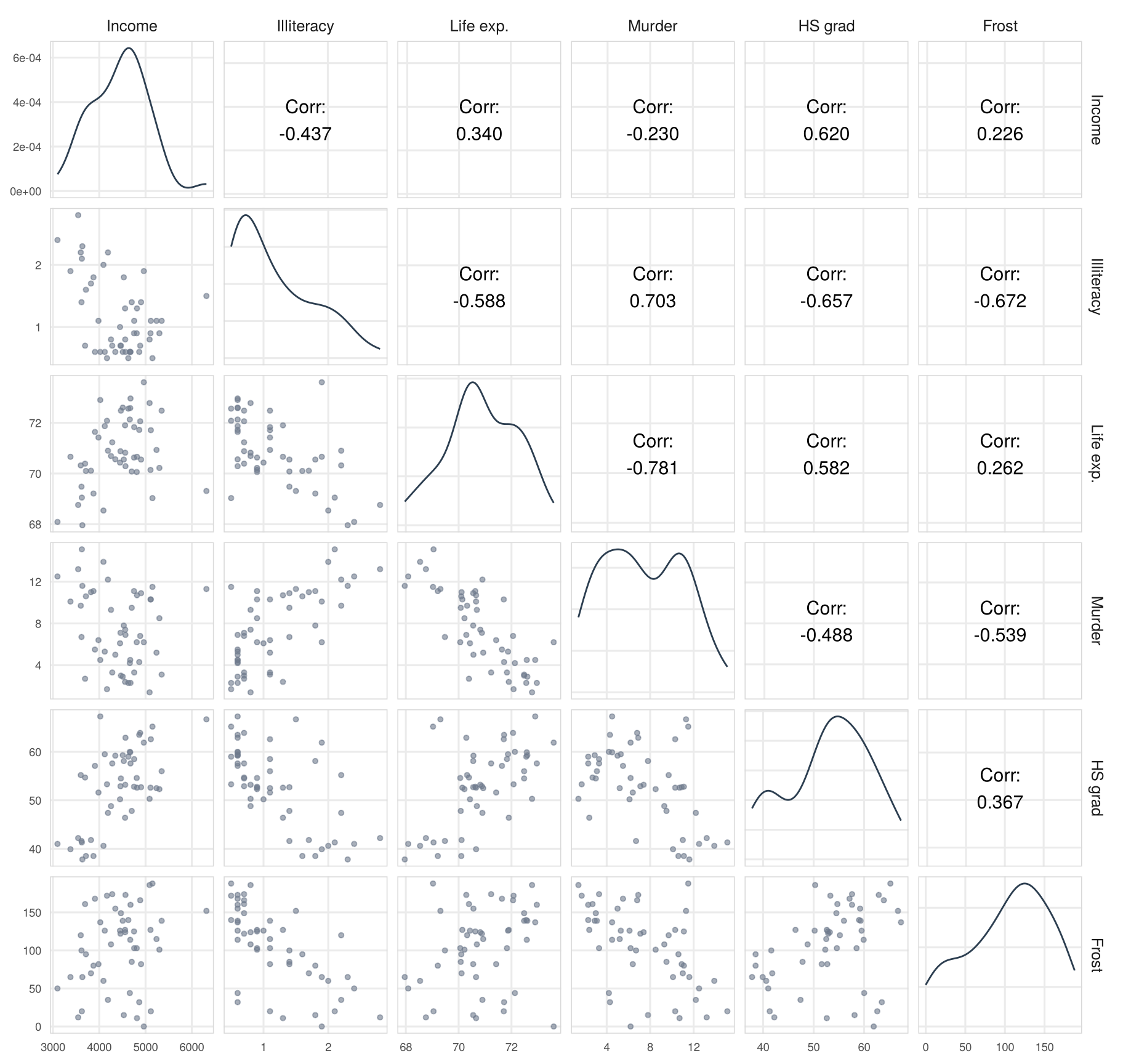
Illiteracy, murder, life expectancy and high-school graduation all move together, in the expected directions; frost goes with low illiteracy (northern states). With so many strong correlations, a question arises that the scatterplots alone cannot answer: are there really six separate sources of variation, or do a few common ones drive several variables at once? Principal components (Chapter 4) and factor analysis (Chapter 6) are built to answer it.
Check your understanding
- Why is a scatterplot of two categorical variables hard to read?
- The axes have no units
- All observations with the same combination are drawn on top of each other
- Categorical variables cannot be plotted
- The points are too large
- Which plot suits one categorical and one numeric variable?
- a boxplot per group, possibly with jittered points
- a count table
- a 3D scatterplot
- a heatmap of the correlation matrix
- How many panels below the diagonal does a scatterplot matrix of 6 variables have?
- 6
- 12
- 15
- 36
Answers
1 b. 2 a. 3 c.2.4 A third variable, in two dimensions
A scatterplot matrix shows variables two at a time. To see three at once, the obvious idea is a 3D plot.
2.4.1 Why not just plot in 3D?
Here are the penguins’ bill length, bill depth and flipper length in 3D, drawn from three angles:
static_3d <- function(x, y, z, colour = NULL, azimuth = -35, elevation = 22,
                      labs3 = c("x", "y", "z"), title = NULL, subtitle = NULL) {
  u <- function(v) (v - min(v)) / diff(range(v))
  a <- azimuth * pi / 180; e <- elevation * pi / 180
  proj <- function(x, y, z) {
    x <- x - 0.5; y <- y - 0.5; z <- z - 0.5
    tibble(px = x * cos(a) - y * sin(a), py = z * cos(e) + (x * sin(a) + y * cos(a)) * sin(e))
  }
  P <- proj(u(x), u(y), u(z)) |> mutate(col = if (is.null(colour)) "all" else as.character(colour))
  edges <- list(c(0,0,0, 1,0,0), c(1,0,0, 1,1,0), c(1,1,0, 0,1,0), c(0,1,0, 0,0,0),
                c(0,0,0, 0,0,1), c(0,1,0, 0,1,1), c(0,0,1, 0,1,1), c(1,1,0, 1,1,1), c(0,1,1, 1,1,1))
  E <- purrr::map_dfr(edges, function(v) { a0 <- proj(v[1], v[2], v[3]); a1 <- proj(v[4], v[5], v[6])
    tibble(x = a0$px, y = a0$py, xend = a1$px, yend = a1$py) })
  corners <- list(c(0, 0), c(0, 1), c(1, 1))                  # vertical edges of the box
  top <- corners[[which.min(sapply(corners, function(cc) proj(cc[1], cc[2], 1)$px))]]
  ax <- dplyr::bind_rows(proj(0.5, -0.25, 0), proj(1.25, 0.5, 0), proj(top[1], top[2], 1.1)) |>
    mutate(lab = labs3, py = py - c(0.07, 0.07, 0))
  # drop the label of an axis that points (almost) straight at the viewer
  shown <- c(abs(cos(a)), abs(sin(a)), 1) > 0.2
  ax <- ax[shown, ]
  p <- ggplot() +
    geom_segment(data = E, aes(x, y, xend = xend, yend = yend), colour = "grey65") +
    geom_point(data = P, aes(px, py, colour = col), alpha = 0.6, size = 1.6) +
    geom_text(data = ax, aes(px, py, label = lab), size = 3.6, colour = "grey30") +
    coord_equal(clip = "off") +
    labs(title = title, subtitle = subtitle, x = NULL, y = NULL) +
    theme(axis.text = element_blank(), panel.grid = element_blank())
  if (is.null(colour)) p + scale_colour_manual(values = c(all = "#6f7a8c"), guide = "none")
  else p + scale_colour_manual(values = pal_species, name = NULL)
}

fig_3d_views <- function() {
  v <- function(az, el, t, s) static_3d(peng$bill_length_mm, peng$bill_depth_mm, peng$flipper_length_mm,
                                        azimuth = az, elevation = el, title = t, subtitle = s,
                                        labs3 = c("bill length", "bill depth", "flipper length"))
  v(-90, 0, "View 1", "Two groups?") + v(-20, 25, "View 2", "One blob?") + v(40, 60, "View 3", "Three groups?")
}

# draw the figure
fig_3d_views()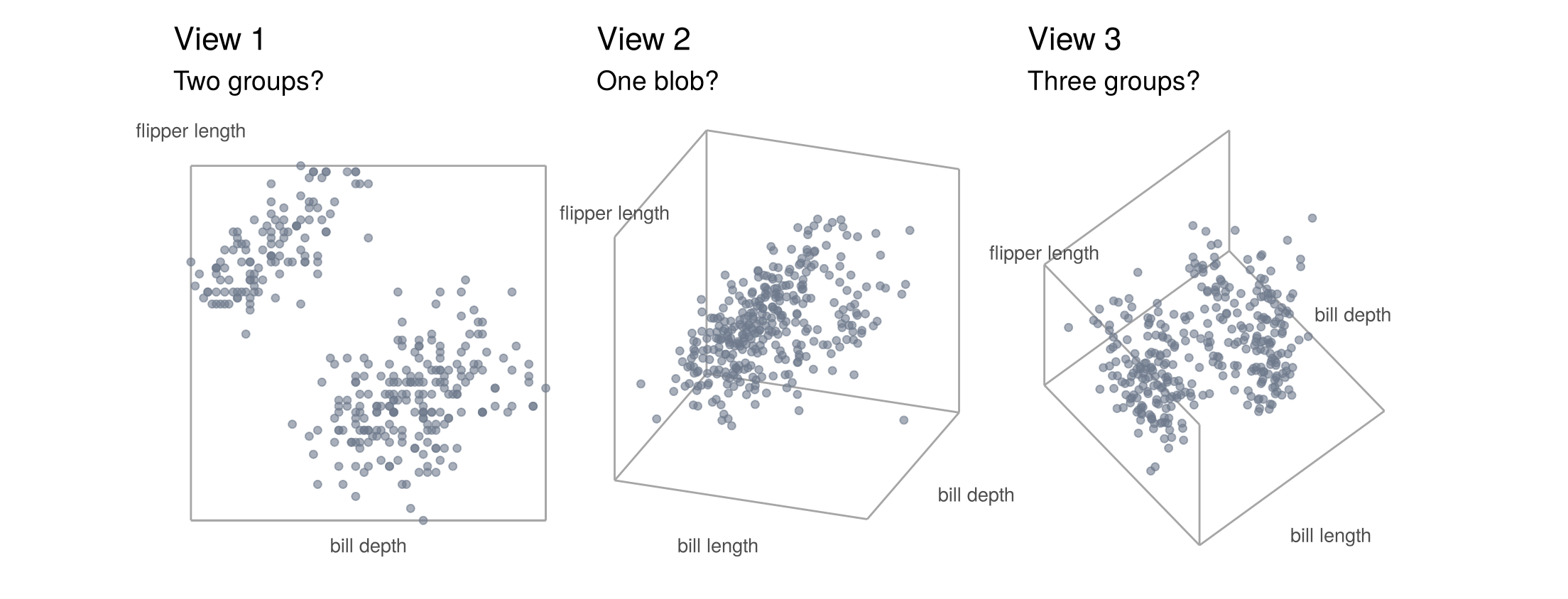
The same 333 penguins tell three different stories: two groups, one blob, three groups. On a page or a screen, a 3D plot is always a flat picture of a 3D cloud. Our eyes have to guess the depth, points hide behind each other, and values cannot be read off the axes. Rotating helps (drag the interactive version below), but it takes many views to understand one cloud, and a printed page shows only one.
fig_3d <- function(height = NULL) {
  p <- plot_ly(peng, x = ~bill_length_mm, y = ~bill_depth_mm, z = ~flipper_length_mm,
               color = ~species, colors = pal_species,
               type = "scatter3d", mode = "markers", marker = list(size = 3, opacity = 0.8),
               text = ~paste(species, island, sex, sep = ", "), hoverinfo = "text") |>
    layout(scene = list(xaxis = list(title = "bill length"), yaxis = list(title = "bill depth"),
                        zaxis = list(title = "flipper length"),
                        camera = list(eye = list(x = 1.6, y = -1.6, z = 0.8))),
           legend = list(x = 0.02, y = 0.95), margin = list(l = 0, r = 0, t = 10, b = 0))
  if (!is.null(height)) p$height <- height
  p
}

# draw the figure
fig_3d()
Humans read two-dimensional pictures well: positions along two axes are what we judge most accurately. So the standard approach is to keep two axes for two of the variables and show the third in another way. Here is the penguin cloud from the 3D views, drawn the 2D way. Bill length and bill depth stay on the axes, and flipper length becomes a colour gradient from dark (short flippers) to bright (long flippers):
fig_3d_in_2d <- function() {
  ggplot(peng, aes(bill_length_mm, bill_depth_mm, colour = flipper_length_mm)) +
    geom_point(size = 2.2, alpha = 0.85) +
    scale_colour_viridis_c(option = "plasma", end = 0.92, name = "flipper\nlength (mm)") +
    labs(x = "bill length (mm)", y = "bill depth (mm)",
         title = "Two axes + a colour gradient", subtitle = "Three groups appear")
}

# draw the figure
fig_3d_in_2d()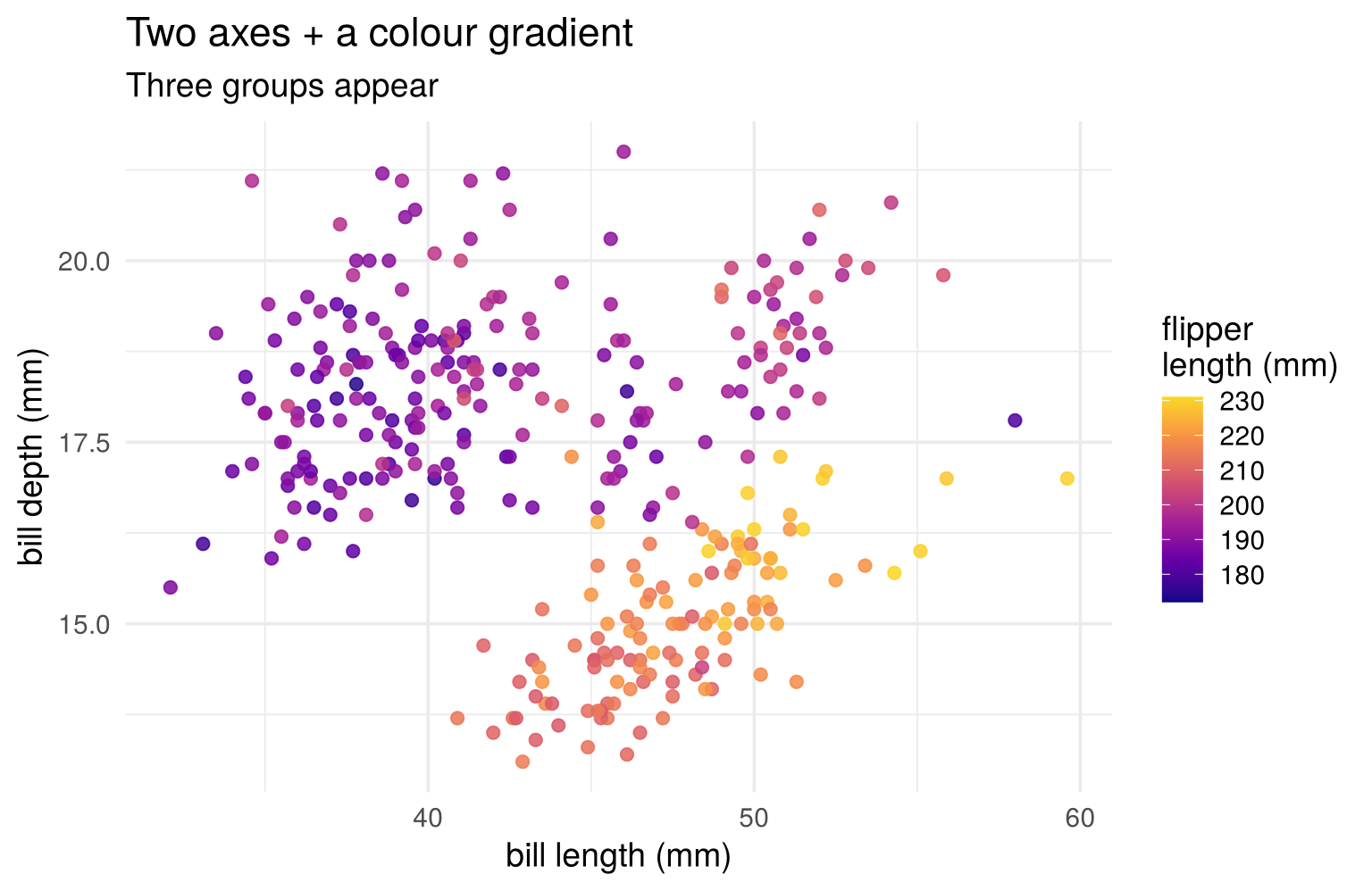
One flat picture, and every value can be read off: there are three groups. Penguins with short bills, penguins with long and deep bills, and penguins with long but shallow bills and long flippers (bright colours). None of the three 3D views showed this clearly.
A colour gradient works here because flipper length is numeric: lighter means more. Which encoding fits best depends on the type of the third variable (the plot columns of Section 2.2.1):
| Plot | Third variable shown as | Use when the third variable is |
|---|---|---|
| grouped scatterplot | colour hue, one per category | categorical (species, region) |
| bubble plot | point size or colour gradient | numeric (flipper length, population, income) |
| conditioning (facet, trellis) plot | separate panels, same axes | categorical, or numeric cut into a few bins |
A categorical third variable therefore leaves a choice: colours in one panel, or one panel per category. The rest of this section looks at each plot in turn.
2.4.2 Categorical third variable: colour
Mapping a categorical variable to colour gives a grouped scatterplot (in ggplot2,
aes(colour = species)). Each category gets its own hue; hues have no order, which suits nominal variables. Colour can change the conclusion completely. Here are the bill measurements, first
without and then with colour:
fig_simpson <- function() {
  p_grey <- ggplot(peng, aes(bill_length_mm, bill_depth_mm)) +
    geom_point(colour = "#6f7a8c", alpha = 0.6, size = 1.8) +
    geom_smooth(method = "lm", formula = y ~ x, se = FALSE, colour = "black", linewidth = 0.8) +
    labs(title = "Ignoring species", subtitle = sprintf("r = %.2f: longer bills are shallower?", r_all),
         x = "bill length (mm)", y = "bill depth (mm)")
  p_col <- ggplot(peng, aes(bill_length_mm, bill_depth_mm, colour = species)) +
    geom_point(alpha = 0.7, size = 1.8) +
    geom_smooth(method = "lm", formula = y ~ x, se = FALSE, linewidth = 0.8) +
    scale_colour_manual(values = pal_species) +
    labs(title = "Colour = species",
         subtitle = sprintf("Within each species r = %.2f to %.2f", min(r_within), max(r_within)),
         x = "bill length (mm)", y = "bill depth (mm)", colour = NULL) +
    theme(legend.position = c(0.84, 0.9), legend.background = element_rect(fill = "white", colour = NA))
  p_grey + p_col
}

# draw the figure
fig_simpson()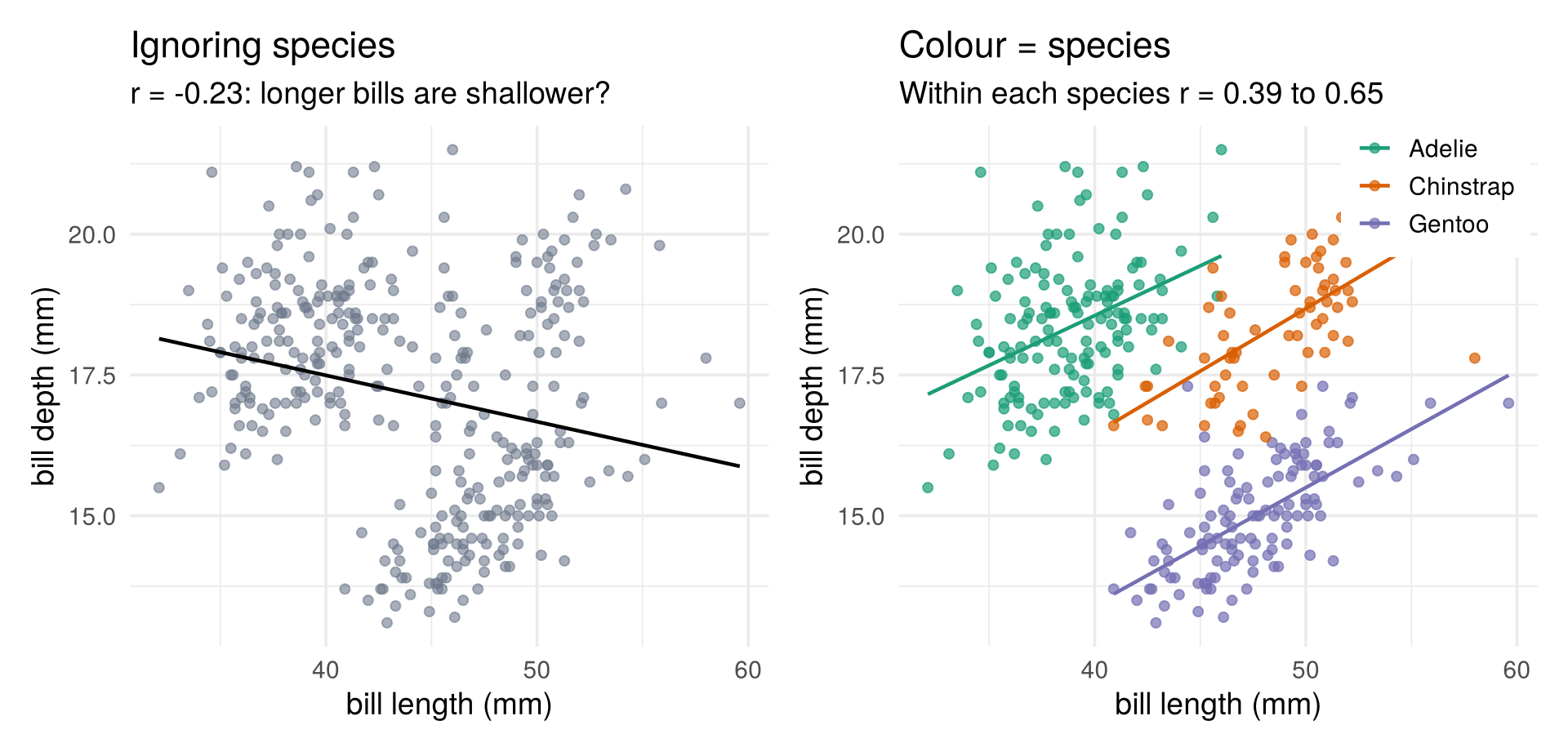
Ignoring species, longer bills seem to be shallower (\(r=-0.23\)). Within every species the relation is positive. The negative overall correlation comes entirely from the differences between species: Gentoo penguins have long but shallow bills. This reversal is Simpson’s paradox, and it is a first example of a hidden group variable, the kind of structure cluster analysis (Chapter 7) looks for.
2.4.3 Numeric third variable: size
Colour hues cannot show how much, so a numeric third variable needs an encoding with an order and a scale.
Mapping it to point size gives a bubble plot (aes(size = Population)); a colour gradient (light to
dark) can add a fourth numeric variable. Here the states are placed by illiteracy and murder, sized by population
and coloured by income:
fig_bubble <- function() {
  big <- states |> slice_max(Population, n = 6)
  ggplot(states, aes(Illiteracy, Murder)) +
    geom_point(aes(size = Population, fill = Income), shape = 21, colour = "grey30", alpha = 0.8) +
    geom_text_repel(data = big, aes(label = state), size = 3.6, seed = 3, box.padding = 0.8,
                    min.segment.length = 0) +
    scale_size_area(max_size = 16, breaks = c(1000, 5000, 20000),
                    labels = scales::label_comma(suffix = "k"), name = "population") +
    scale_fill_gradient2(low = "#b35806", mid = "#f7f7f7", high = "#542788",
                         midpoint = median(states$Income), name = "income ($)") +
    labs(x = "illiteracy (%)", y = "murders per 100,000")
}

# draw the figure
fig_bubble()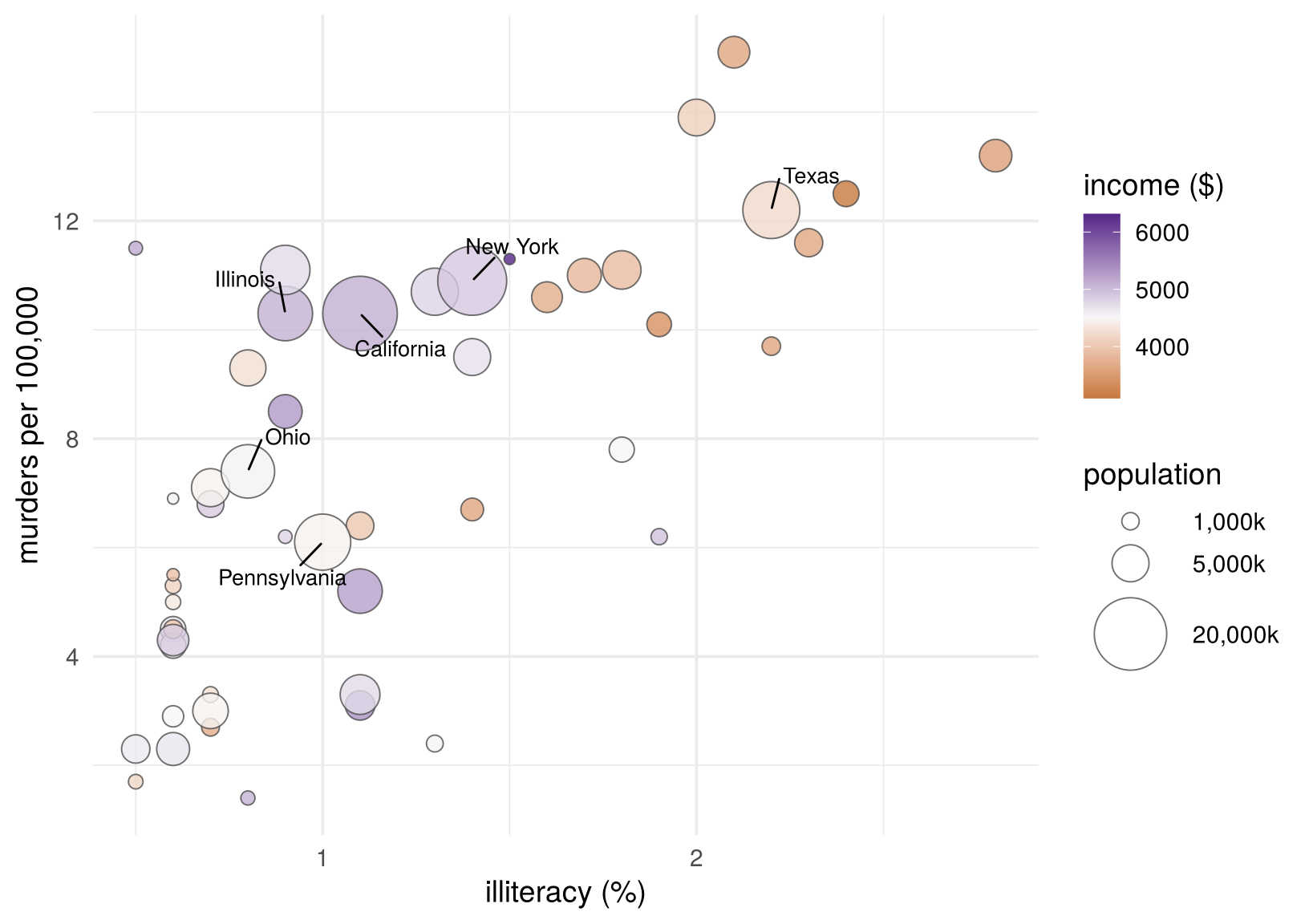
Bubble plots give a rough impression for a modest number of points. They crowd quickly, and sizes are hard to compare precisely (we judge areas, not lengths).
2.4.4 Categorical third variable: panels
Instead of colouring by a categorical variable, we can split the data by it and draw one small scatterplot per
group, all with the same axes. These are conditioning plots. The same idea goes by several names, depending
on the software: facet plots in ggplot2, trellis plots in R’s lattice package (and in Everitt and
Hothorn), and small multiples in general. Here body mass and flipper length are split by species and sex.
Facet plot with one variable: facet_wrap(). One panel per species, side by side:
fig_facet_wrap <- function() {
  ggplot(peng, aes(flipper_length_mm, body_mass_g, colour = species)) +
    geom_point(alpha = 0.7, size = 1.5) +
    geom_smooth(method = "lm", formula = y ~ x, se = FALSE, colour = "black", linewidth = 0.6) +
    facet_wrap(~ species) +
    scale_colour_manual(values = pal_species, guide = "none") +
    labs(x = "flipper length (mm)", y = "body mass (g)") +
    theme(panel.border = element_rect(fill = NA, colour = "grey85"))
}

# draw the figure
fig_facet_wrap()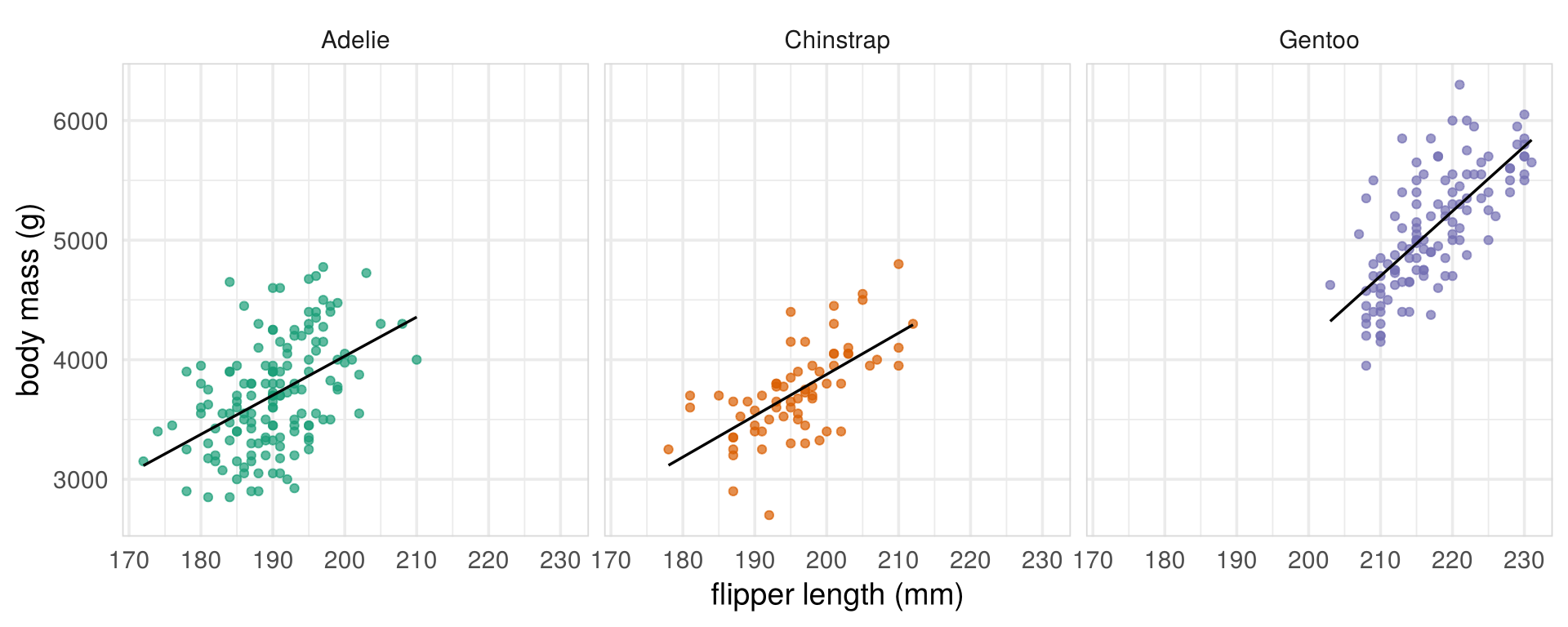
Facet plot with two variables: facet_grid(). Rows for sex, columns for species:
fig_trellis <- function() {
  ggplot(peng, aes(flipper_length_mm, body_mass_g, colour = species)) +
    geom_point(alpha = 0.7, size = 1.5) +
    geom_smooth(method = "lm", formula = y ~ x, se = FALSE, colour = "black", linewidth = 0.6) +
    facet_grid(sex ~ species) +
    scale_colour_manual(values = pal_species, guide = "none") +
    labs(x = "flipper length (mm)", y = "body mass (g)") +
    theme(panel.border = element_rect(fill = NA, colour = "grey85"))
}

# draw the figure
fig_trellis()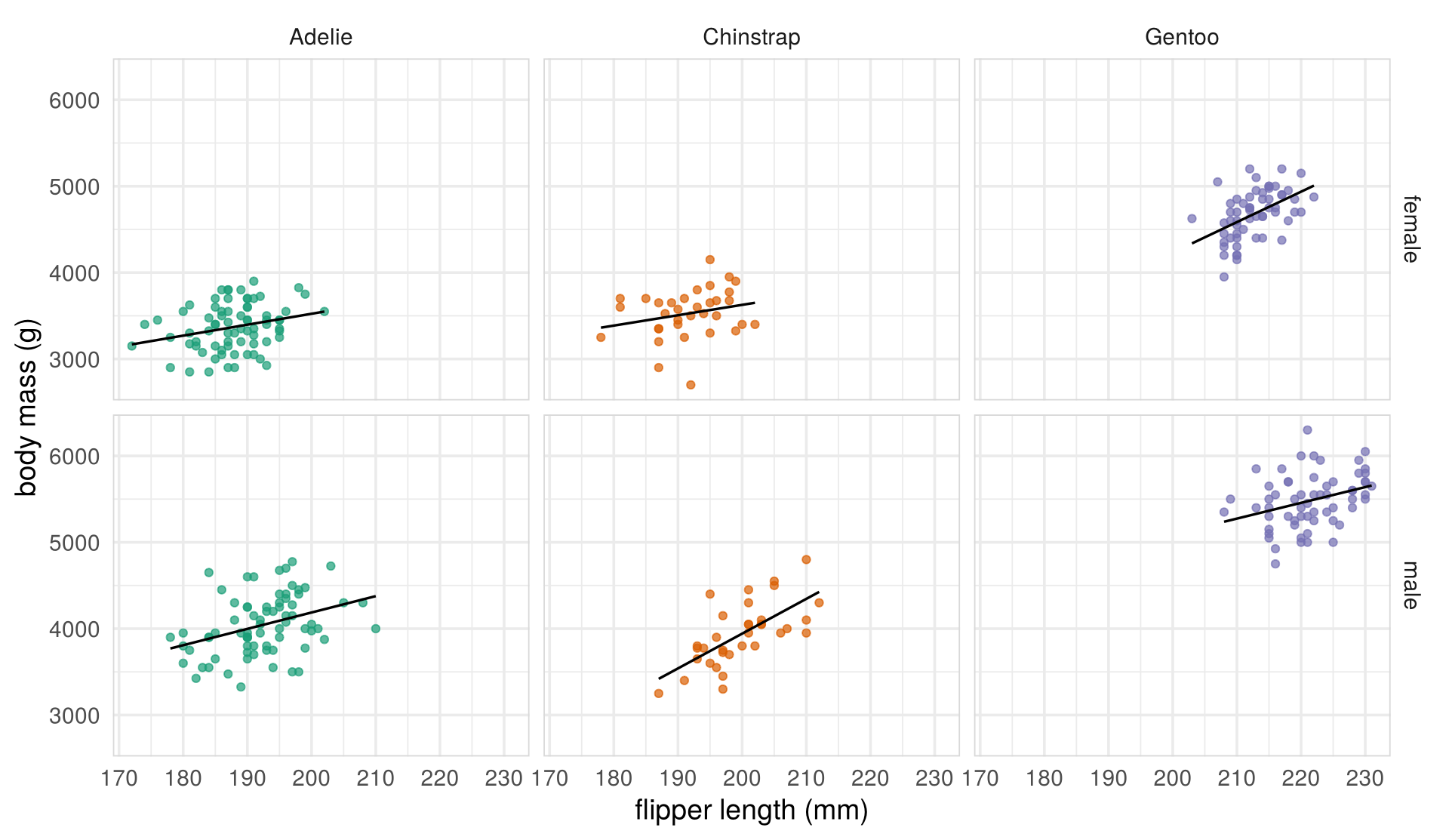
Trellis plot with lattice. The same plot in the older lattice package, where the formula
body_mass_g ~ flipper_length_mm | species * sex reads “body mass against flipper length, given species
and sex”:
fig_lattice <- function() {
  lattice::xyplot(body_mass_g ~ flipper_length_mm | species * sex, data = peng,
                  type = c("p", "r"), col = "#6f7a8c", pch = 16, cex = 0.6,
                  xlab = "flipper length (mm)", ylab = "body mass (g)")
}

# draw the figure
fig_lattice()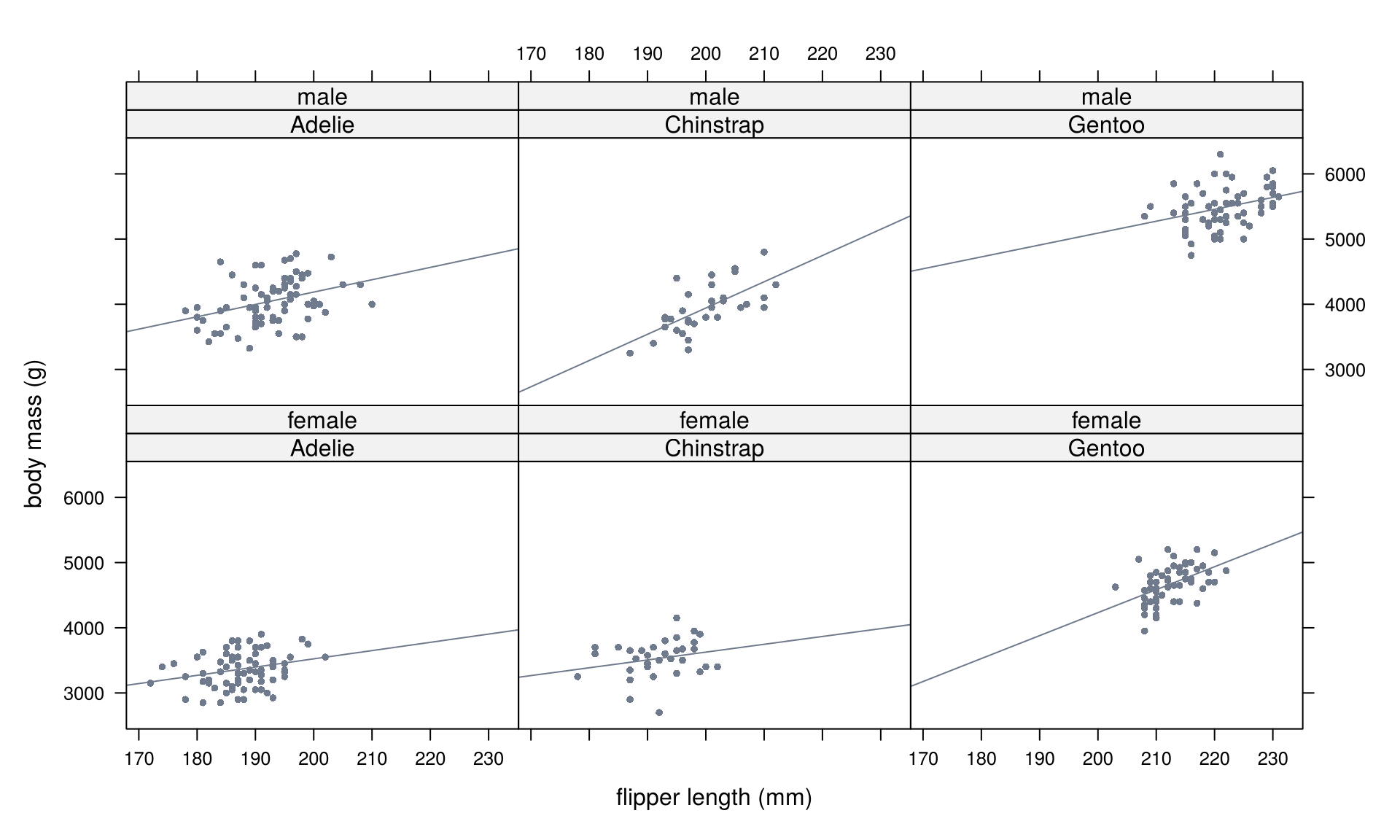
Within each panel, heavier penguins have longer flippers. Comparing panels, Gentoo penguins are larger and males are heavier than females.
Check your understanding
- The main problem with a static 3D scatterplot is that
- it needs three numeric variables
- depth must be guessed and points hide each other, so different views suggest different structures
- R cannot draw 3D plots
- it shows too few points
- Bill length and depth are negatively correlated overall but positively correlated within each species.
This is an example of
- an outlier
- Simpson’s paradox
- a nonlinear relation
- measurement error
- A conditioning (facet, trellis) plot
- colours points by a third variable
- draws one panel per group, with the same axes
- rotates the cloud in 3D
- maps a numeric variable to point size
- To add each state’s population to a scatterplot of illiteracy against murder, the best choice is
- a different colour hue for every state
- point size (a bubble plot)
- one panel per population value
- a static 3D plot
Answers
1 b. 2 b. 3 b. 4 b.2.5 Summaries of the cloud
Plots show the shape of the cloud; a few numbers summarise it. All of them are sample quantities, computed from the data matrix; Chapter 3 introduces the population quantities they estimate.
2.5.1 Mean and standard deviation
The sample mean of variable \(j\) is its average over the \(n\) observations, and the mean vector collects the means of all \(p\) variables. It is the centre of the cloud:
\[ \bar x_j=\frac1n\sum_{t=1}^n x_{tj},\qquad \bar x=\begin{pmatrix}\bar x_1\\ \vdots\\ \bar x_p\end{pmatrix}=\frac1n\sum_{t=1}^n x^{(t)} . \]
The sample variance of variable \(j\) is the (almost) average squared deviation from the mean, and the standard deviation is its square root:
\[ s_j^2=\frac{1}{n-1}\sum_{t=1}^n (x_{tj}-\bar x_j)^2,\qquad s_j=\sqrt{s_j^2}=\sqrt{\frac{1}{n-1}\sum_{t=1}^n (x_{tj}-\bar x_j)^2} . \]
The standard deviation is in the units of the variable (murders per 100,000, dollars) and measures the typical distance of an observation from the mean: each \(|x_{tj}-\bar x_j|\) is the distance of observation \(t\) from the mean on variable \(j\), and \(s_j\) is (almost) the square root of the average squared distance. For murder, \(s=3.69\): a typical state is about 4 murders per 100,000 away from the average of 7.4. Dividing by \(n-1\) instead of \(n\) is a small correction: deviations from the sample mean are slightly smaller than deviations from the unknown population mean.
##     Income Illiteracy   Life Exp     Murder    HS Grad      Frost
## 4435.8000 1.1700 70.8786 7.3780 53.1080 104.4600## Income Illiteracy Life Exp Murder HS Grad Frost
## 614.4699392 0.6095331 1.3423936 3.6915397 8.0769978 51.98084812.5.2 Covariance
The sample covariance of variables \(j\) and \(k\) is (almost) the average product of their deviations from the mean,
\[ s_{jk}=\frac{1}{n-1}\sum_{t=1}^n (x_{tj}-\bar x_j)(x_{tk}-\bar x_k). \]
The sign of each product depends on the quadrant a point falls into relative to the mean. Points above average on both variables, or below on both, contribute positive products (blue); the other two quadrants contribute negative ones (red). Each product is the signed area of the rectangle between the point and the mean.
fig_quadrants <- function() {
  cen <- states |> mutate(ci = Illiteracy - xb2[1], cm = Murder - xb2[2],
                          prod = ci * cm, sign = ifelse(prod >= 0, "positive", "negative"))
  p_rect <- ggplot(cen) +
    geom_rect(aes(xmin = 0, xmax = ci, ymin = 0, ymax = cm, fill = sign), alpha = 0.12) +
    geom_hline(yintercept = 0, colour = "grey40") + geom_vline(xintercept = 0, colour = "grey40") +
    geom_point(aes(ci, cm, colour = sign), size = 2.2) +
    annotate("text", x = c(1.5, -0.9, -0.9, 1.5), y = c(8, 8, -6.5, -6.5), label = c("+", "-", "+", "-"),
             size = 9, colour = c(col_a1, col_a2, col_a1, col_a2)) +
    scale_fill_manual(values = c(positive = col_a1, negative = col_a2), guide = "none") +
    scale_colour_manual(values = c(positive = col_a1, negative = col_a2), guide = "none") +
    labs(title = "Centred data", subtitle = "Rectangle = product, sign by quadrant",
         x = "illiteracy - mean", y = "murder - mean")
  p_prod <- ggplot(cen, aes(reorder(abb, prod), prod, fill = sign)) +
    geom_col() +
    geom_hline(yintercept = s_im, linetype = 2) +
    annotate("label", x = 8, y = s_im + 0.2, label = sprintf("covariance = %.2f", s_im), size = 3.8, hjust = 0) +
    scale_fill_manual(values = c(positive = col_a1, negative = col_a2), guide = "none") +
    coord_flip() +
    labs(title = "The 50 products", subtitle = "Sum / (n - 1) = covariance", x = "states", y = "product") +
    theme(axis.text.y = element_blank(), panel.grid.major.y = element_blank())
  p_rect + p_prod + plot_layout(widths = c(1.2, 1))
}

# draw the figure
fig_quadrants()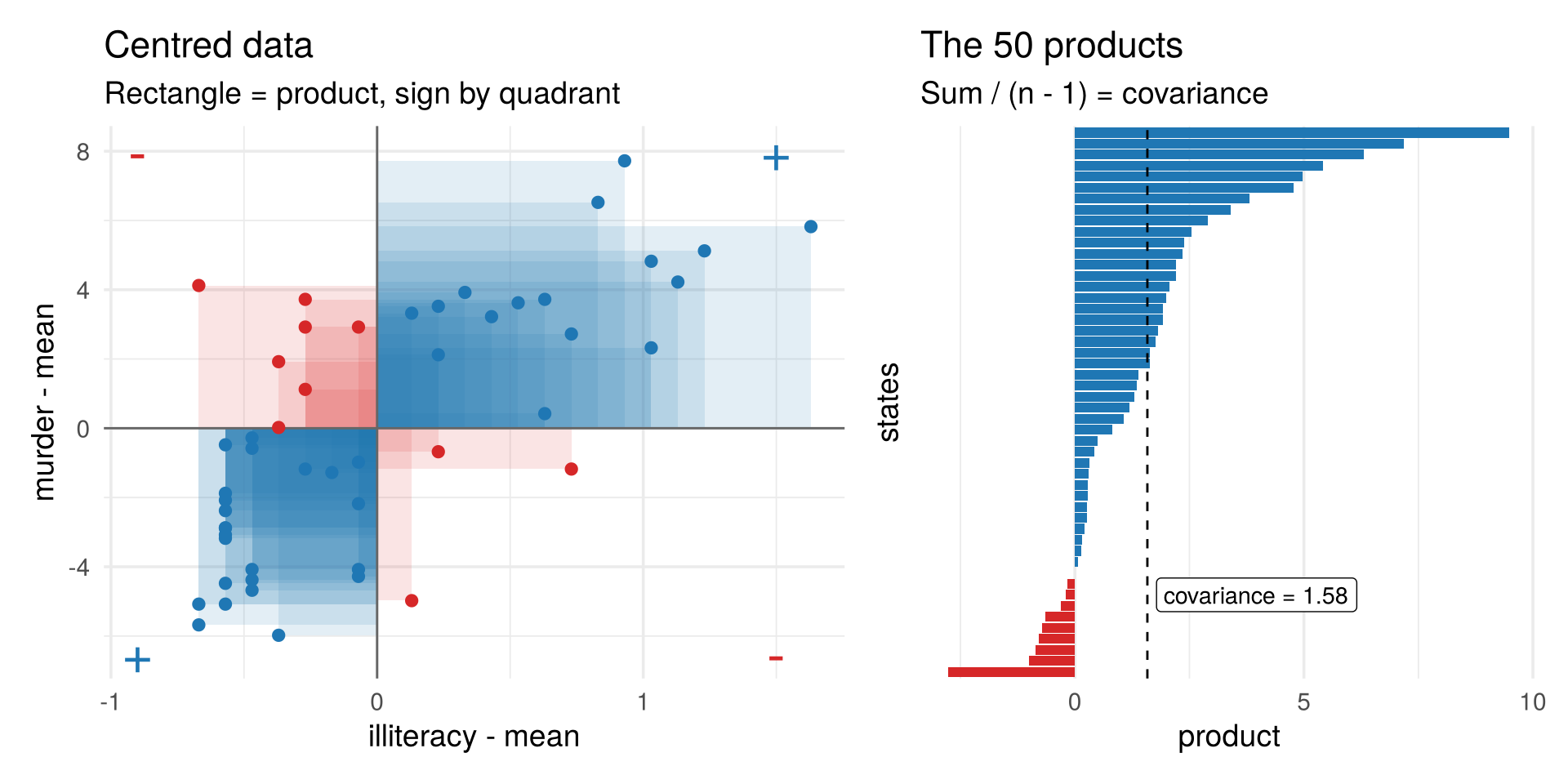
Most states fall in the positive quadrants, so the covariance of illiteracy and murder is positive, \(s=1.58\). The covariance of a variable with itself is its variance, \(s_{jj}=s_j^2\).
2.5.3 The sample covariance matrix
All variances and covariances together form the \(p\times p\) sample covariance matrix, with the variances on the diagonal and the covariances off the diagonal:
\[ S=\begin{pmatrix} s_1^2 & s_{12} & \cdots & s_{1p}\\ s_{21} & s_2^2 & \cdots & s_{2p}\\ \vdots & & \ddots & \vdots\\ s_{p1} & s_{p2} & \cdots & s_p^2\end{pmatrix} =\frac{1}{n-1}\sum_{t=1}^n (x^{(t)}-\bar x)(x^{(t)}-\bar x)' . \]
The right-hand side writes all entries at once. In Section 2.1.1 a row times a column, \(a'b\), gave a single number. The other order, a column times a row, gives a whole matrix: \(ab'\) is the \(p\times p\) matrix with entry \(a_jb_k\) in row \(j\) and column \(k\) (the outer product). For \(a=b=x^{(t)}-\bar x\), the entry in row \(j\), column \(k\) is \((x_{tj}-\bar x_j)(x_{tk}-\bar x_k)\), the product in the covariance formula above. Adding these matrices over all observations and dividing by \(n-1\) gives every \(s_{jk}\) at once.
\(S\) is symmetric (\(s_{jk}=s_{kj}\)). It describes the shape of the cloud, just as \(\bar x\) describes its centre; the one-standard-deviation ellipse below is drawn from \(S\).
##            Illiteracy    Murder
## Illiteracy  0.3715306  1.581776
## Murder 1.5817755 13.627465## Income Illiteracy Life Exp Murder HS Grad Frost
## Income 377573.3 -163.7 280.7 -521.9 3076.8 7227.6
## Illiteracy -163.7 0.4 -0.5 1.6 -3.2 -21.3
## Life Exp 280.7 -0.5 1.8 -3.9 6.3 18.3
## Murder -521.9 1.6 -3.9 13.6 -14.5 -103.4
## HS Grad 3076.8 -3.2 6.3 -14.5 65.2 154.0
## Frost 7227.6 -21.3 18.3 -103.4 154.0 2702.02.5.4 Correlation
A covariance carries the units of both variables (dollars times days, for income and frost), which makes it hard to read. Dividing by the two standard deviations removes the units:
\[ r_{jk}=\frac{s_{jk}}{s_j\,s_k},\qquad -1\le r_{jk}\le 1 . \]
This is the same as the covariance of the standardised values \(z_{tj}=(x_{tj}-\bar x_j)/s_j\) (the values coloured in the heatmap of Section 2.1).
All correlations form the \(p\times p\) sample correlation matrix \(R\), with ones on the diagonal (every variable is perfectly correlated with itself). With \(D=\operatorname{diag}(s_1,\dots,s_p)\), the diagonal matrix of standard deviations, it is the covariance matrix with the units divided out:
\[ R=\begin{pmatrix} 1 & r_{12} & \cdots & r_{1p}\\ r_{21} & 1 & \cdots & r_{2p}\\ \vdots & & \ddots & \vdots\\ r_{p1} & r_{p2} & \cdots & 1\end{pmatrix}=D^{-1}SD^{-1} . \]
Here \(D^{-1}=\operatorname{diag}(1/s_1,\dots,1/s_p)\): multiplying by it from the left divides row \(j\) of \(S\) by \(s_j\), and from the right divides column \(k\) by \(s_k\), so entry \(s_{jk}\) becomes \(s_{jk}/(s_js_k)=r_{jk}\).
##            Income Illiteracy Life Exp Murder HS Grad Frost
## Income       1.00      -0.44     0.34  -0.23    0.62  0.23
## Illiteracy  -0.44       1.00    -0.59   0.70   -0.66 -0.67
## Life Exp     0.34      -0.59     1.00  -0.78    0.58  0.26
## Murder      -0.23       0.70    -0.78   1.00   -0.49 -0.54
## HS Grad      0.62      -0.66     0.58  -0.49    1.00  0.37
## Frost 0.23 -0.67 0.26 -0.54 0.37 1.00## Income Illiteracy Life Exp Murder HS Grad Frost
## Income 1.00 -0.44 0.34 -0.23 0.62 0.23
## Illiteracy -0.44 1.00 -0.59 0.70 -0.66 -0.67
## Life Exp 0.34 -0.59 1.00 -0.78 0.58 0.26
## Murder -0.23 0.70 -0.78 1.00 -0.49 -0.54
## HS Grad 0.62 -0.66 0.58 -0.49 1.00 0.37
## Frost 0.23 -0.67 0.26 -0.54 0.37 1.00fig_cor_heat <- function() {
Rdf <- as_tibble(cor(X6), rownames = "row") |>
pivot_longer(-row, names_to = "col", values_to = "r") |>
mutate(row = factor(row, levels = rev(vars6), labels = rev(labs6)),
col = factor(col, levels = vars6, labels = labs6))
ggplot(Rdf, aes(col, row, fill = r)) +
geom_tile(colour = "white") +
geom_text(aes(label = sprintf("%.2f", r), colour = abs(r) > 0.6), size = 4.3) +
scale_fill_gradient2(low = col_a2, mid = "white", high = col_a1, limits = c(-1, 1)) +
scale_colour_manual(values = c(`TRUE` = "white", `FALSE` = "black"), guide = "none") +
coord_equal() +
labs(x = NULL, y = NULL) +
theme(panel.grid = element_blank(), axis.text.x = element_text(angle = 30, hjust = 1))
}
# draw the figure
fig_cor_heat()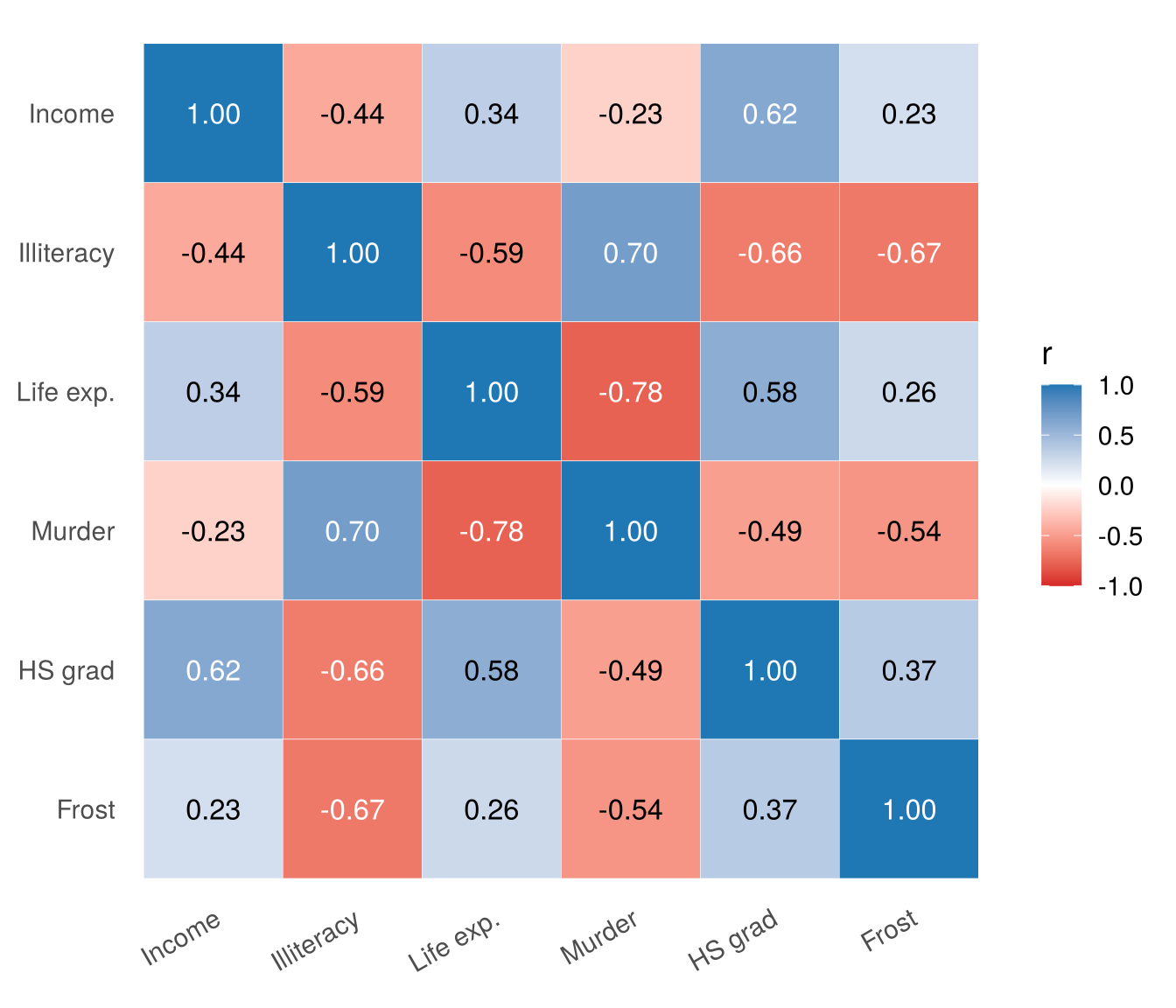
Move the slider to see what different correlations look like for standardised data. Each point is coloured by its product \(z_{t1}z_{t2}\), and \(r\) is (essentially) the average of these products. The black ellipse is the one-standard-deviation ellipse used throughout the course; the thinner it is, the stronger the correlation.
fig_cor_slider <- function() {
  r_grid <- round(seq(-0.95, 0.95, by = 0.05), 2)
  rl <- function(r) sprintf("%.2f", r)
  frames_pts <- map_dfr(r_grid, function(r) {
    M <- app_W %*% t(sym_root(sigma_of(1, 1, r)))
    tibble(id = seq_len(nrow(M)), x = M[, 1], y = M[, 2], prod = M[, 1] * M[, 2], k = rl(r))
  })
  frames_ell <- map_dfr(r_grid, function(r) {
    e <- ellipse_xy(sym_root(sigma_of(1, 1, r)), 1); tibble(x = e[1, ], y = e[2, ], k = rl(r))
  })
  frames_txt <- map_dfr(r_grid, function(r) {
    pr <- frames_pts$prod[frames_pts$k == rl(r)]
    tibble(x = -3.4, y = 3.5, k = rl(r),
           text = sprintf("r = %.2f<br>positive products: %d<br>negative products: %d", r, sum(pr > 0), sum(pr < 0)))
  })
  cs <- list(c(0, "#d62728"), c(0.5, "#dddddd"), c(1, "#1f77b4"))
  p_sl <- plot_ly() |>
    add_trace(x = c(-4, 4), y = c(0, 0), type = "scatter", mode = "lines", line = list(color = "#999", width = 1),
              hoverinfo = "skip", showlegend = FALSE, inherit = FALSE) |>
    add_trace(x = c(0, 0), y = c(-4, 4), type = "scatter", mode = "lines", line = list(color = "#999", width = 1),
              hoverinfo = "skip", showlegend = FALSE, inherit = FALSE) |>
    add_trace(data = frames_pts, x = ~x, y = ~y, frame = ~k, ids = ~id, type = "scatter", mode = "markers",
              marker = list(size = 6, color = ~prod, colorscale = cs, cmin = -1.5, cmax = 1.5, opacity = 0.8,
                            line = list(width = 0.3, color = "#555")),
              hoverinfo = "skip", showlegend = FALSE, inherit = FALSE) |>
    add_trace(data = frames_ell, x = ~x, y = ~y, frame = ~k, type = "scatter", mode = "lines",
              line = list(color = "black", width = 2.5), hoverinfo = "skip", showlegend = FALSE, inherit = FALSE) |>
    add_trace(data = frames_txt, x = ~x, y = ~y, frame = ~k, text = ~text, type = "scatter", mode = "text",
              textposition = "bottom right", textfont = list(size = 13, color = "#2c3e50"),
              hoverinfo = "skip", showlegend = FALSE, inherit = FALSE) |>
    layout(xaxis = list(range = c(-3.6, 3.6), title = "z<sub>1</sub>", zeroline = FALSE),
           yaxis = list(range = c(-3.6, 3.6), title = "z<sub>2</sub>", scaleanchor = "x", zeroline = FALSE),
           margin = list(l = 60, r = 20, t = 50, b = 130), showlegend = FALSE) |>
    animation_opts(frame = 120, transition = 0, redraw = TRUE) |>
    animation_slider(currentvalue = list(prefix = "r = ")) |>
    animation_button(x = 0, xanchor = "left", y = -0.3, yanchor = "top", label = "Play")
  jump <- lapply(c(-0.9, 0, 0.9), function(r) list(
    label = paste("r =", rl(r)), method = "animate",
    args = list(list(rl(r)), list(mode = "immediate", frame = list(duration = 0, redraw = TRUE),
                                  transition = list(duration = 0)))))
  finalize_animation(p_sl, jump, start_frame = "0.50", prefix = "r = ")
}

# draw the figure
fig_cor_slider()
2.5.5 What correlation misses
Correlation measures linear association only, and it can be driven by a single point.
fig_cor_gallery <- function(nrow = 2) {
  make_cloud <- function(r) { M <- app_W %*% t(sym_root(sigma_of(1, 1, r))); tibble(x = M[, 1], y = M[, 2]) }
  w1 <- app_W[, 1]
  clouds <- list(
    "strong negative" = make_cloud(-0.9), "none" = make_cloud(0),
    "moderate positive" = make_cloud(0.5), "strong positive" = make_cloud(0.9),
    "a curve" = tibble(x = w1, y = w1^2 - 1 + 0.2 * app_W[, 2]),
    "one outlier" = tibble(x = c(app_W[1:199, 1] * 0.3, 4), y = c(app_W[1:199, 2] * 0.3, 4)))
  gal <- imap_dfr(clouds, ~ mutate(.x, panel = .y))
  lab_r <- imap_dfr(clouds, ~ tibble(panel = .y, r = cor(.x$x, .x$y)))
  gal <- gal |> left_join(lab_r, by = "panel") |>
    mutate(panel = sprintf("%s: r = %.2f", panel, r), panel = factor(panel, levels = unique(panel)))
  ells <- gal |> group_by(panel) |>
    group_modify(~ { e <- ellipse_xy(sym_root(cov(cbind(.x$x, .x$y))), 1)
                     tibble(x = e[1, ] + mean(.x$x), y = e[2, ] + mean(.x$y)) })
  ggplot(gal, aes(x, y)) +
    geom_point(colour = "#6f7a8c", alpha = 0.45, size = 0.9) +
    geom_path(data = ells, colour = "black", linewidth = 0.8) +
    geom_point(data = dplyr::filter(gal, x == 4 & y == 4), colour = col_a2, size = 2.4) +
    facet_wrap(~ panel, nrow = nrow) +
    coord_equal(xlim = c(-3.5, 4.3), ylim = c(-3.5, 4.3)) +
    labs(x = NULL, y = NULL) +
    theme(axis.text = element_blank(), panel.border = element_rect(fill = NA, colour = "grey85"),
          strip.text = element_text(size = 9))
}

# draw the figure
fig_cor_gallery(nrow = 2)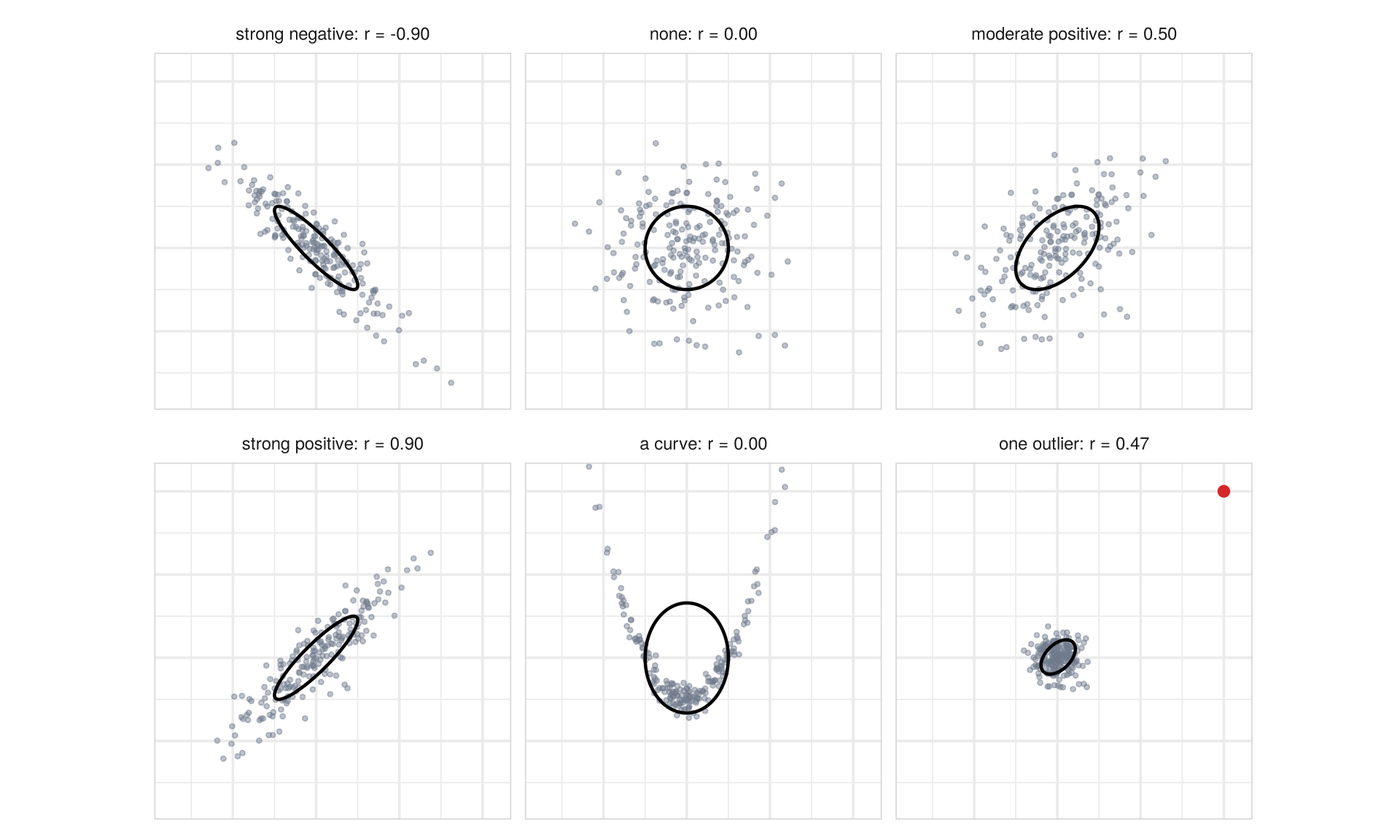
The curve in the bottom row is a strong relationship with \(r\approx 0\); the cloud next to it has no relationship at all except for one extreme point, which on its own creates a sizeable correlation. Always look at the scatterplot before trusting a correlation.
Check your understanding
- A state that is above average on both illiteracy and murder contributes to their covariance
- a positive product
- a negative product
- nothing
- it depends on the units
- Why do we usually report correlations rather than covariances?
- Correlations are always positive
- Correlations do not depend on the units of the variables
- Covariances cannot be computed for more than two variables
- Correlations detect nonlinear relations
- Two variables have \(r\approx 0\). We can conclude that
- they are unrelated
- there is no linear relation, but there may be another kind
- one of them is constant
- there are outliers
Answers
1 a. 2 b. 3 b.2.6 Unusual combinations
Back to the question we started with: which state is the most unusual?
2.6.1 Hawaii: ordinary on each variable
The usual check for one variable is a boxplot. The box holds the middle half of the states; the whiskers reach out to at most 1.5 box lengths beyond it, and only states beyond the whiskers are drawn as separate points, the possible outliers. But a state can be ordinary on every variable and still unusual as a combination. Take two measures of education, illiteracy and the share of adults with a high-school diploma:
fig_unusual <- function() {
  st2 <- states |> mutate(dm = dmU, hi = state == "Hawaii")
  z_long <- as_tibble(scale(X6[, vU])) |> mutate(state = states$state) |>
    pivot_longer(-state, names_to = "variable", values_to = "z") |>
    mutate(variable = factor(variable, levels = vU, labels = c("Illiteracy", "HS grad")))
  p_box <- ggplot(z_long, aes(variable, z)) +
    geom_boxplot(width = 0.45, outlier.shape = 1, fill = "grey95") +
    geom_point(data = dplyr::filter(z_long, state == "Hawaii"), colour = col_a2, size = 3.5) +
    annotate("text", x = 1.5, y = 1.55, label = "Hawaii", colour = col_a2, size = 4.5) +
    coord_cartesian(ylim = c(-2.5, 3)) +
    labs(title = "One at a time", subtitle = "Hawaii: not an outlier", x = NULL, y = "standardised value")
  ell_r <- map_dfr(1:3, function(r) { e <- ellipse_xy(sym_root(SU), r)
    tibble(x = e[1, ] + xbU[1], y = e[2, ] + xbU[2], r = factor(r)) })
  top <- dplyr::slice_max(st2, dm, n = 4)
  p_sc <- ggplot(st2, aes(Illiteracy, HSGrad)) +
    geom_path(data = ell_r, aes(x, y, group = r, linetype = r, colour = r), linewidth = 0.8) +
    geom_point(aes(colour = hi), size = 2.4, alpha = 0.8) +
    geom_label_repel(data = top, aes(label = sprintf("%s (%.2f)", state, dm)), size = 3.7, seed = 1,
                     fill = alpha("white", 0.85), label.size = 0, label.padding = 0.12,
                     min.segment.length = 0, box.padding = 0.6) +
    scale_colour_manual(values = c(`FALSE` = "#6f7a8c", `TRUE` = col_a2, "1" = "black", "2" = "grey45", "3" = "grey65"),
                        guide = "none") +
    scale_linetype_manual(values = c("1" = 1, "2" = 2, "3" = 3), guide = "none") +
    labs(title = "Together", subtitle = "Ellipses: Mahalanobis distance 1, 2, 3",
         x = "illiteracy (%)", y = "high-school graduates (%)")
  p_box + p_sc + plot_layout(widths = c(0.7, 1.3))
}

# draw the figure
fig_unusual()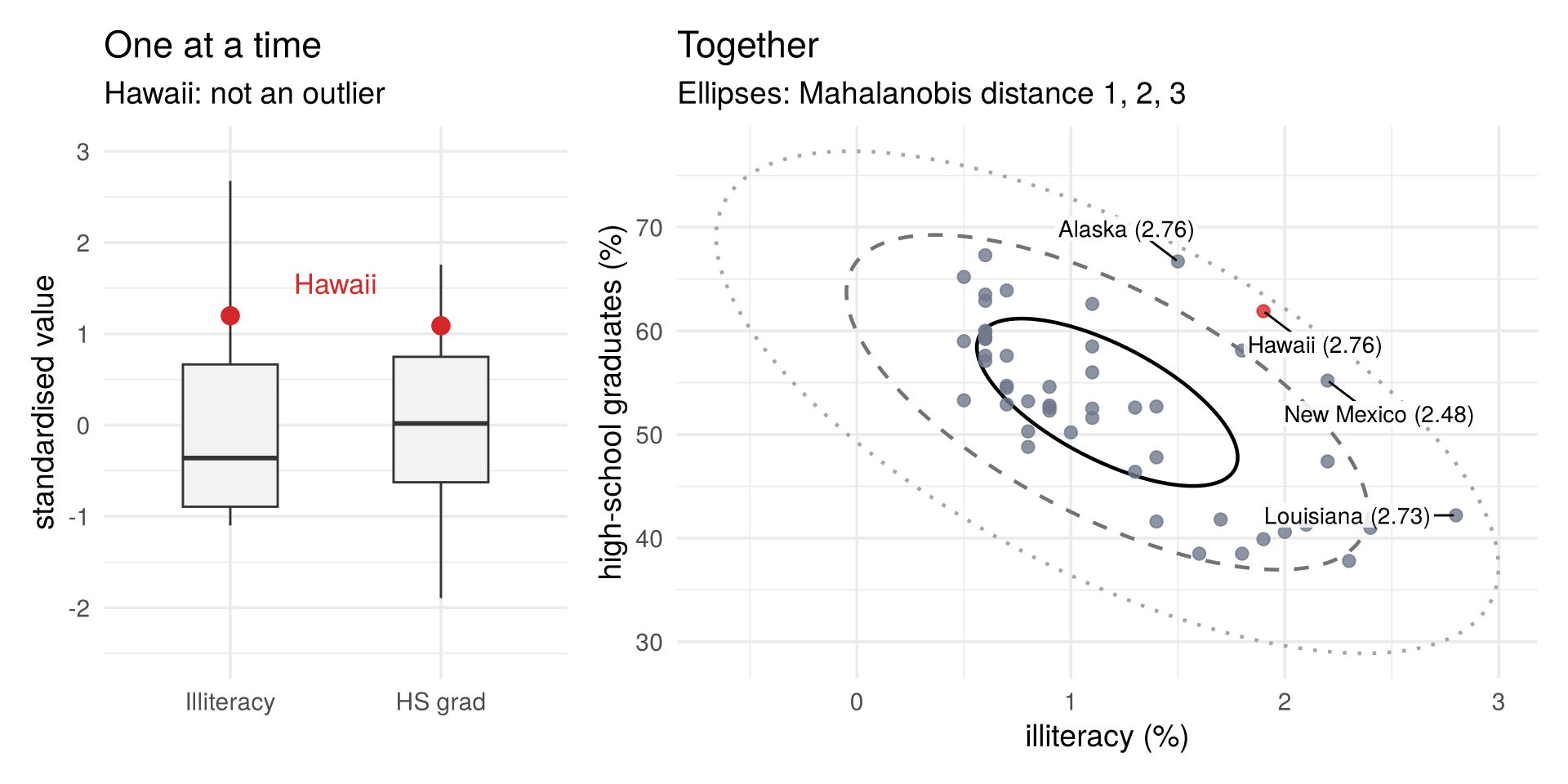
Hawaii’s standardised values are \(z=1.20\) for illiteracy and \(z=1.09\) for high-school graduation: about one standard deviation above average on each. That is outside the middle half of the states, but well within the whiskers, so neither boxplot flags it, and many states are as far from average (9 on illiteracy, 18 on graduation). But the two variables are strongly correlated (\(r=-0.66\)): states with high illiteracy usually have few high-school graduates. Hawaii has high illiteracy and many graduates, and in the scatterplot it sits off the tilted cloud.
2.6.2 The Mahalanobis distance
The Euclidean distance from the centre, \(\lVert x^{(t)}-\bar x\rVert\) (Section 2.1.1), treats every direction alike. But the cloud is an ellipse: a step along its long axis is normal, the same step across its short axis is far out. The Mahalanobis distance measures distance from the centre in units of the cloud’s own shape, described by the sample covariance matrix \(S\) (Section 2.5):
\[ d_t=\sqrt{(x^{(t)}-\bar x)'\,S^{-1}\,(x^{(t)}-\bar x)} . \]
Compare it with the Euclidean distance from the centre, \(\sqrt{(x^{(t)}-\bar x)'(x^{(t)}-\bar x)}\): the only change is
the inverse \(S^{-1}\) of the covariance matrix in the middle (the matrix with \(S^{-1}S=I\), the identity
matrix; R computes it with solve(S)). It shrinks differences in directions where the cloud is wide and
stretches them where it is narrow. With uncorrelated, standardised variables, \(S=I\) and \(d_t\) is just the
Euclidean distance.
Points with equal \(d_t\) lie on one ellipse; the one-standard-deviation ellipse is exactly \(d_t=1\), and the ellipses in the figure above are \(d_t=1,2,3\). A state on a further-out ellipse has a larger distance. Computed from the two variables of the scatterplot, the ranking matches what the figure shows: Hawaii, Alaska and Louisiana are the farthest out, all close to \(d=2.75\), followed by New Mexico.
X2 <- state.x77[, c("Illiteracy", "HS Grad")]
d2 <- sqrt(mahalanobis(X2, center = colMeans(X2), cov = cov(X2)))
round(sort(d2, decreasing = TRUE)[1:5], 2)
## Hawaii Alaska Louisiana New Mexico South Carolina
## 2.76 2.76 2.73 2.48 2.06fig_maha_rank <- function(k = 12, dist = sqrt(d2_st), xlab = "Mahalanobis distance (six variables)") {
d <- tibble(state = names(dist), d = dist) |> slice_max(d, n = k) |>
mutate(state = reorder(state, d))
ggplot(d, aes(d, state)) +
geom_col(fill = col_a1, width = 0.7) +
geom_text(aes(label = sprintf("%.2f", d)), hjust = -0.15, size = 3.8) +
scale_x_continuous(expand = expansion(mult = c(0, 0.12))) +
labs(x = xlab, y = NULL)
}
# draw the figure
fig_maha_rank(8, dist = dmU, xlab = "Mahalanobis distance (illiteracy and high-school graduates)")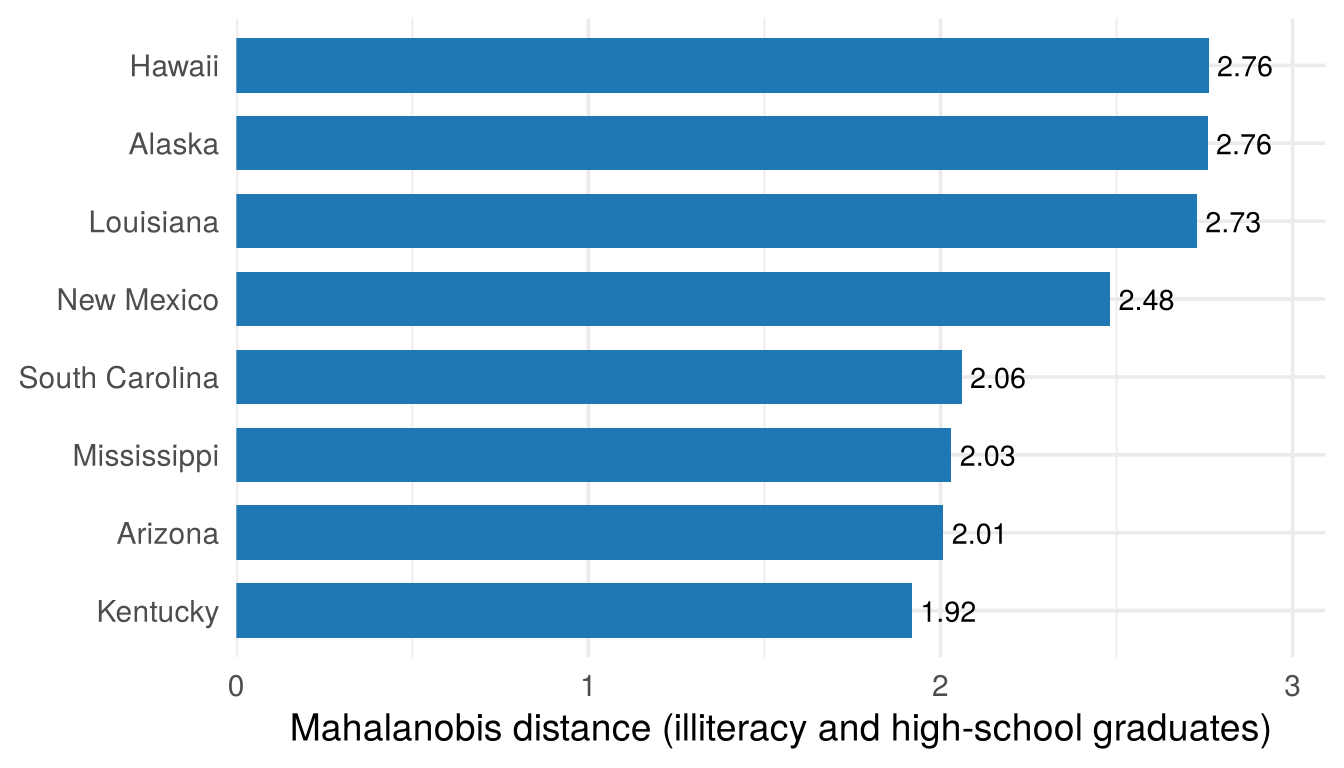
The three states are far out for different reasons. Louisiana has the highest illiteracy and few graduates: it lies beyond the end of the cloud, extreme on one variable but in line with the pattern. Hawaii and Alaska lie across the cloud: both have more graduates than their illiteracy would suggest. Hawaii reaches the same distance as Louisiana with values only about one standard deviation from average. By the Euclidean distance from the centre of the standardised values it would rank only 15th of the 50 states.
With all six variables we can no longer draw the cloud, but the distance works the same way:
d <- sqrt(mahalanobis(X, center = colMeans(X), cov = cov(X)))
round(sort(d, decreasing = TRUE)[1:5], 1)
## Alaska Hawaii New Mexico Nevada Washington
## 4.7 4.0 3.8 3.7 3.4fig_maha_rank <- function(k = 12, dist = sqrt(d2_st), xlab = "Mahalanobis distance (six variables)") {
d <- tibble(state = names(dist), d = dist) |> slice_max(d, n = k) |>
mutate(state = reorder(state, d))
ggplot(d, aes(d, state)) +
geom_col(fill = col_a1, width = 0.7) +
geom_text(aes(label = sprintf("%.2f", d)), hjust = -0.15, size = 3.8) +
scale_x_continuous(expand = expansion(mult = c(0, 0.12))) +
labs(x = xlab, y = NULL)
}
# draw the figure
fig_maha_rank()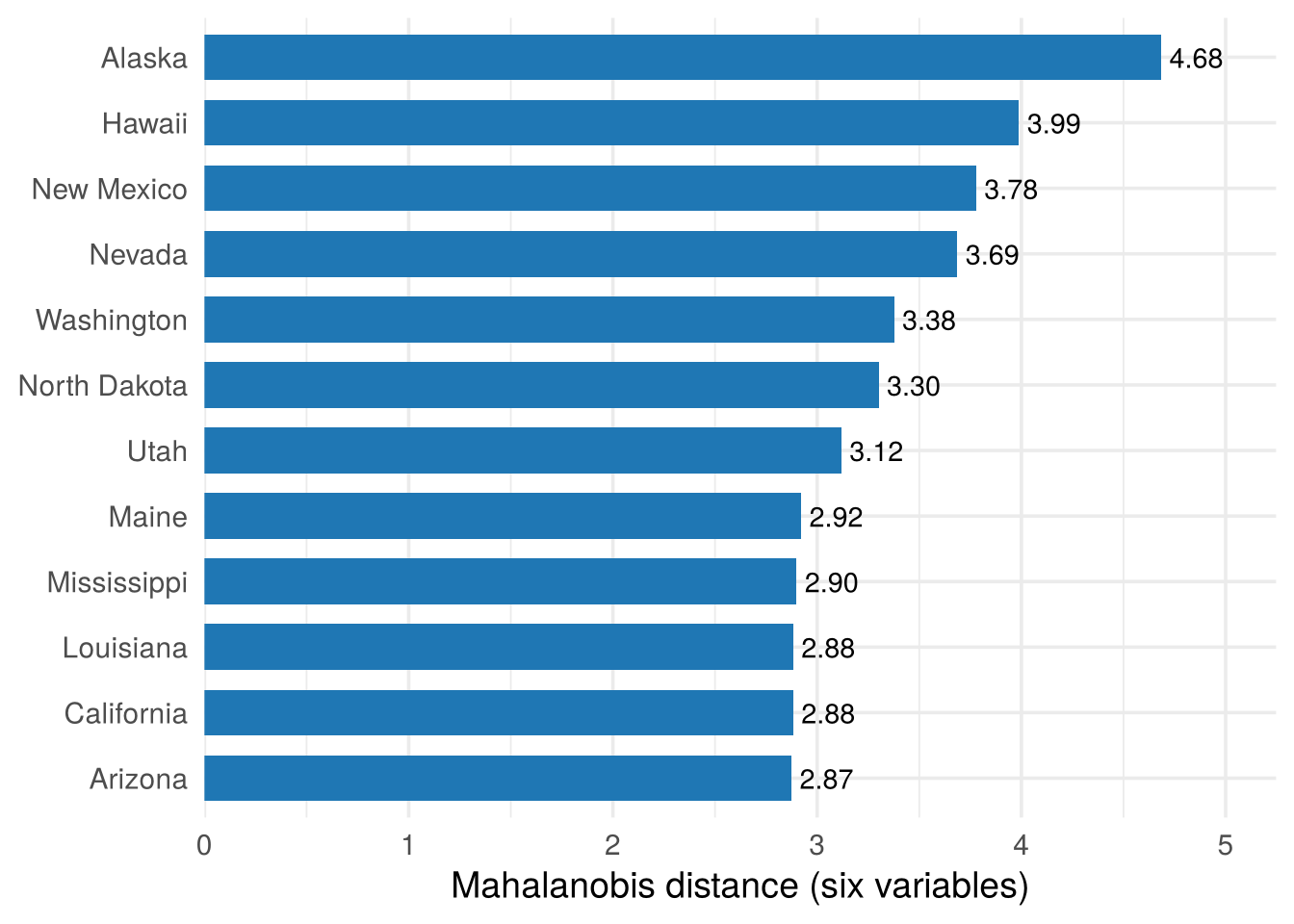
Alaska is the most unusual state, followed by Hawaii, New Mexico and Nevada. Alaska has the highest income and almost the most high-school graduates, yet a high murder rate, while among the other states income and education go with low murder rates. Hawaii has the highest life expectancy but also high illiteracy, again against the pattern of the other states. What makes them unusual is the combination of values.
Is a distance of 4.7 actually surprising, or would some state always be that far out by chance? Answering this needs a model of where the data come from: the distribution of the random vector behind the sample, the topic of Chapter 3.
Check your understanding
- Hawaii is unremarkable on illiteracy and on high-school graduation separately but unusual overall because
- its values are extreme
- its combination of values runs against the correlation of the other states
- it has missing data
- it is an island
- The Mahalanobis distance differs from the ordinary distance from the centre because it
- ignores the correlation between variables
- measures distance relative to the shape of the cloud
- only works with two variables
- uses absolute values instead of squares
Answers
1 b. 2 b.2.7 Summary
- A data set is an \(n\times p\) data matrix \(\mathbf X\): a cloud of \(n\) points in \(p\)-dimensional space. It is the sample, the layer of the analysis we observe.
- Variables are nominal, ordinal, interval or ratio. Means, covariances and distances need numbers on a scale; categorical variables are counted, or used to colour and split plots.
- The type decides the plot: count tables for two categorical variables, boxplots for a categorical and a numeric one, scatterplots and scatterplot matrices for numeric ones.
- 3D plots are hard to read. A third variable is better shown in 2D, in a way that fits its type: a categorical one as colour (grouped scatterplot) or panels (conditioning, facet or trellis plots), a numeric one as size or a colour gradient (bubble plot). A hidden group can reverse a correlation (Simpson’s paradox).
- The covariance is an average product of deviations; the correlation removes the units. Both measure only straight-line association and can be driven by single points.
- The Mahalanobis distance measures distance relative to the shape of the cloud and finds unusual combinations: here Alaska and Hawaii. Whether they are surprising needs a model: Chapter 3.
Look at the shape of the cloud before summarising it.